I'm creating a custom report for a client on products purchased in their Drupal Commerce store. To do this, I've created a view of commerce line items where the order has status 'completed'. For each line item I also need to pull in the shipping and billing customer profile information and so have added in a relationship on those.
That all works fine, until they wanted to separate the billing and shipping address fields so there is one column per component (first name, last name, thoroughfare, etc). In order to achieve this, I added the billing address to the view multiple times and then enabled the 'rewrite the output of this field' check box and put tokens like [commerce_customer_address-first_name] in the input box, and repeated that for each component of the address.
I noted that the rewriting of the field output always fails for the first addressfield added to the view. For example, if I add the same addressfield views field to the view 3 times and rewrite the field output to contain [commerce_customer_address-first_name], [commerce_customer_address_1-first_name] and [commerce_customer_address_2-first_name], the token in the first views addressfield field is always replaced with an empty string but the other two work. i.e. in the above situation, I got a blank column for [commerce_customer_address-first_name] but "John", "Joe", etc as appropriate in the other two columns - even though it's the exact same addressfield data that they're referencing.
To get around this I'm now adding an addressfield to the view and marking it as excluded from display, and then continue to add the rest and rewrite them - but the first one added always has to be hidden as it's blank.


Comments
Comment #1
rszrama commentedI'm actually unable to reproduce this issue. It's been about 6 months, so maybe it's since resolved itself upstream? I went to the default Customer Profiles View in Commerce and rewrote the username field to use the [commerce_customer_address] replacement token and it worked fine. Added another instance of the Address Field to the View and used [commerce_customer_address-1] just fine.
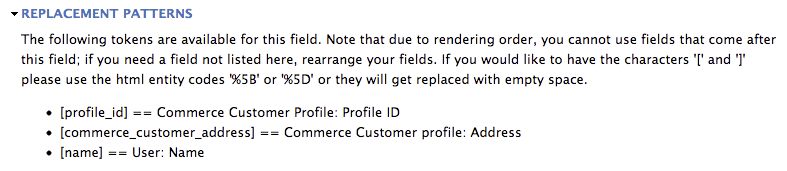
However, I see you've mentioned these -first_name tokens - I'm not sure where they're coming from. Perhaps that's from the Addressfield Tokens module? When I look in the list of replacement tokens for my rewrite options, I don't see any hyphenated options (see attached image).
I'm going to guess this is a problem with a patch or other module on your site, but I will add that I intend to add full Token support to this module and will do what I can to test them within Views when they're added. #1188778: Add token support for the various elements of an address field
Comment #2
a.milkovskyI'm having the same issue.
If you want to add both first and last names into views as separated fields you have to add 2 addressfields.
And other issue: if you want to enable sorting of firstname or lastname it won't work
See video: http://screencast.com/t/9ZWtXW89
Comment #3
jhodgdonI can confirm #2, and the workaround from the original issue proposal:
In the most recent release of Address Field, if you want to use the Rewrite functionality in Views for instance to output just the city/state components of the address, it does not work on the first address field you add to the Fields list. But if you set that one to "exclude from display" and add a second field, the rewrite works fine on the second field. On the first field you can display the full address, but if you use a rewrite like
[field_course_location_address-locality], [field_course_location_address-administrative_area]
the output is just ", ". Whereas on the 2nd field if you use
[field_course_location_address_1-locality], [field_course_location_address_1-administrative_area]
the output is something like "Seattle, WA" which is what we want to happen.
Comment #4
candelas commentedsame here :)
Comment #5
rszrama commentedNow that #991834: Address component Views support has been committed, is this issue resolved by using the distinct address field component Views fields?
Comment #6
jhodgdonAre you saying that we would need to add each distinct address portion to Views? It's a lot easier (if it worked) just to add the address field once and format it with a rewrite, rather than having to add about, let's see:
name of the location
address1
address2
city
state
zip
country
So you'd need to add 7 fields, set each one to "exclude from display" except the last one (or add an 8th field that is global text), and then do a rewrite on the last one or the global field to include all the pieces.
When semantically, really what you are trying to do is to "output the address with a custom format", which is to say, rewrite or reformat the output of the address field. So adding the address field once and doing a rewrite there, if it worked, would make more sense.
So I would say using the separate component fields would be a feasible work-around, but it's a lot more work in the UI to do it, so it would be nice if this worked.
The current work-around where you add the address field once and hide it, then actually use the 2nd one, also has been working for me.
Comment #7
rszrama commented@jhodgdon I'm not sure if you're testing in the context of Drupal Commerce or not, but if you were to install Commerce Kickstart 1.x (not 2.x) and import this View, you should see it working as you describe without the need for an additional hidden address field in the View:
The output looks like this:
I reproduced this without Drupal Commerce using just an address field on the user account and creating a similar View with rewriting. At this point, I assume this is either resolved in dev (perhaps unintentionally through the addition of better Views support?), in Views, or else is owing to some conflict on the sites reporting the issue.
The addition of better Views support solves the reason behind the original post (the desire to have separate address components in their own columns) and supports sorting per #2, even if we aren't sure that it directly fixed the presenting issue.
I'm happy to reconsider this if you experience the same behavior in -dev or can provide me with a Views export and give me entity / field configuration steps to make it work. Sorry this is so frustrating, but maybe it's just all gone and fixed itself. *fingers crossed*