Closed (fixed)
Project:
Drupal core
Version:
6.x-dev
Component:
javascript
Priority:
Critical
Category:
Bug report
Assigned:
Reporter:
Created:
8 Oct 2007 at 17:27 UTC
Updated:
24 Oct 2007 at 11:21 UTC
Jump to comment: Most recent file


While going through potential targets for AHAH, more things have become clearly needed. This patch addresses the following concerns:
- An easy way to switch between the progress 'bar' and 'throbber' style of progress.
- Correcting a typo which kept the 'progress-disabled' class on elements even after the AHAH request was complete.
- Correcting logic for Safari exception on applying jQuery effects to table rows.
- Applying 'hide' logic after the new content is added to the page, which is another fix for Safari.
This patch should have no visible changes to the blocks page or upload module, but adds a significant amount of needed cleanup to the AHAH framework.
| Comment | File | Size | Author |
|---|---|---|---|
| #3 | progress-options.png | 9.38 KB | quicksketch |
| #2 | drupal_ahah_progress_0.patch | 9.84 KB | quicksketch |
| drupal_ahah_progress.patch | 8.67 KB | quicksketch |

Comments
Comment #1
webernet commentedWhy is the progress bar limited to a width of 5em? (.progress .bar width was first added to system.css in http://drupal.org/node/157752 )
It makes the progress bar in update.php much too short as well as those of book.module and upload.module.
Comment #2
quicksketchThis patch adds the correct support for updating the progress bar indicator. I'll follow up with code examples.
@webernet You're correct, I don't think a width is wanted on all progress bars at all, and 5em is too narrow anyway for places that do use ahah.js (such as upload module). I've changed the width to 16em and only on .ahah-progress-bar class, which should allow space for a short message and percentage (if needed). The width is needed at some point though, because it keeps the appearance correct when floating it left.
Comment #3
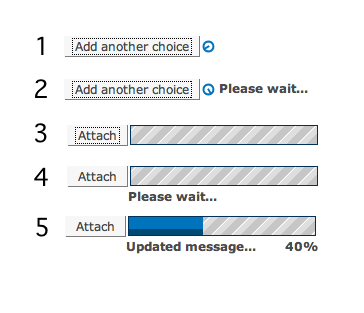
quicksketchThe progress bar indicator is the main component of this patch. Since modules utilizing AHAH will need different approaches, we need to accommodate for all scenarios. Sample displays attached. Here are some code examples of how you would customize the progress bar used with AHAH to your liking:
Example 1. Throbber (default).
Example 2. Throbber with message.
Example 3. Progress bar.
Example 4. Progress bar with message.
Example 5. Progress bar with message and progress indicator.
Example 6. No progress indicator at all.
Comment #4
quicksketchwebernet and I had a discussion in #drupal about the class names used, reporting inconsistency between the
progressclass and theahah-progressandahah-progress-throbberclass. Here are the classes used an my reasons for using them:The throbber version:
The progress bar version:
So basically the classing here let's us easily select the following items:
- All progress elements added by ahah.js (
.ahah-progress)- Specifically ahah progress bars (
.ahah-progress-bar)- Specifically ahah progress throbbers (
.ahah-progress-throbber)The class
.progressis not used in the throbber version of the code because it's probably best if that class is reserved for use exclusively by progress.js. So after reviewing my code a second time, I don't think that the class names or CSS should be changed. Not to say it's perfect. Suggestions are very welcome!Comment #5
Stefan Nagtegaal commentedThis works good and looks very solid!
This is ready to go in..
Comment #6
gábor hojtsyLooks better indeed, committed to allow the usability improvements blocked by this patch to progress (pun intended :).
Comment #7
(not verified) commented