Closed (won't fix)
Project:
Drupal.org security advisory coverage applications
Component:
module
Priority:
Normal
Category:
Task
Assigned:
Unassigned
Reporter:
Created:
21 Oct 2012 at 14:28 UTC
Updated:
19 Aug 2013 at 07:52 UTC


The aim of Simple Twitter is to make it really easy to display Twitter data (specifically user tweets) on a Drupal site. The module is written with a view to end-users needing zero code writing abilities.
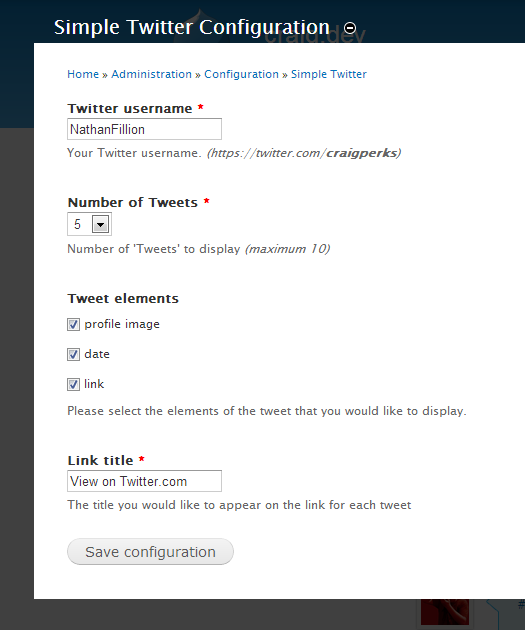
Twitter Pull is a module that performs a similar task to Simple Twitter (in this it allows the user to display tweets on the front-end). The issue with the Twitter Pull method is that it requires the end-user to drop PHP code into the page and configure the tpl.php file if they want to change the display. With Simple Twitter you access the config page (at admin/config/simple_twitter/config), select the items you want to display in each tweet, the number of tweets you want to display and the username of the Twitter account you want to load and you're done. Simple Twitter then creates a block which can be dropped anywhere on the site.
git clone --recursive --branch master http://git.drupal.org:sandbox/craigweb/1818578.git simple_twitter
cd simple_twitterhttp://drupal.org/sandbox/craigweb/1818578
The module is written for Drupal 7
| Comment | File | Size | Author |
|---|---|---|---|
| Simple Twitter - Config Page | 25.2 KB | craigperks | |
| Simple Twitter - Front End Display | 60.78 KB | craigperks |


Comments
Comment #1
klausiThis sounds like a feature that could go directly into twitter_pull or similar modules. Module duplication and fragmentation is a huge problem on drupal.org and we prefer collaboration over competition. Please open an issue in the twitter_pull issue queue or for another similar module and get in contact with the maintainer(s). Offer your wanted feature as patch or ask for co-maintainership.
If that fails for whatever reason please get back to us and set this back to "needs review".
Comment #2
craigperks commentedAs a follow-up, I've posted a thread in the Twitter Pull module issue queue in the hope that I can do as you suggested klausi http://drupal.org/node/1833710 :-)
Comment #3
craigperks commentedI posted in the Simple Twitter issue queue as instructed, but haven't received a response in almost 5 days now: http://drupal.org/node/1833710
I've done a significant re-working of my module this weekend and I'm keen to share the code with the rest of the community as I'm sure what I've done would be useful to other people - how should I proceed?
Comment #4
klausiDid you contact the maintainers directly? Offer your wanted feature as patch or ask for co-maintainership.
If that fails for whatever reason please get back to us and set this back to "needs review".
Comment #5
craigperks commentedHi Klausi,
Yeah - I've contacted everyone I could related to that module and I've not had a response from anyone. I was happy to contact them as you suggested and look at getting the features in my module implemented into Twitter Pull, but I do feel that my module is different enough (aimed at non-coders) to warrant being a standalone module, which I do also intend to develop further.
Thanks,
Craig
Comment #6
gazoakley commentedHi craigperks,
The PAReview tool found various issues for your module:
http://ventral.org/pareview/httpgitdrupalorgsandboxcraigweb1818578git
Comment #7
craigperks commentedHi gazoakley,
Thanks for the reply. I did run the module through coder and managed to get it issue free, so it's good to see how it fared on another tool. I've now removed all issues that the PAReview tool you linked to listed: http://ventral.org/pareview/httpgitdrupalorgsandboxcraigweb1818578git
Thanks,
Craig
Comment #8
craigperks commentedHi all,
Does anyone know if there is a way to check if this module is in some form of backlog for review, or whether it's dropped off the radar completely?
I'm getting emails from people with patches and recommendations for further additions, so I do feel that there is a demand for this module to be available to all users and not just people who can pull the dev code down using Git.
Thanks,
Craig
Comment #9
craigperks commentedComment #10
PDNagilum commentedPretty simple to setup and use mode. I like it :)
Manual review:
Comment #11
PA robot commentedClosing due to lack of activity. Feel free to reopen if you are still working on this application.
I'm a robot and this is an automated message from Project Applications Scraper.
Comment #12
joachim commented> The issue with the Twitter Pull method is that it requires the end-user to drop PHP code into the page and configure the tpl.php file if they want to change the display. With Simple Twitter you access the config page (at admin/config/simple_twitter/config), select the items you want to display in each tweet, the number of tweets you want to display and the username of the Twitter account you want to load and you're done. Simple Twitter then creates a block which can be dropped anywhere on the site.
Twitter Pull now has support for Boxes module: create a box, set the twitter username (or search tag), and that gives you a block showing that twitter feed.