

 Come together with the global Drupal community in Rotterdam, 28 Sept – 1 Oct 2026. Sessions, contribution, connection, and Early Bird savings until 8 June.
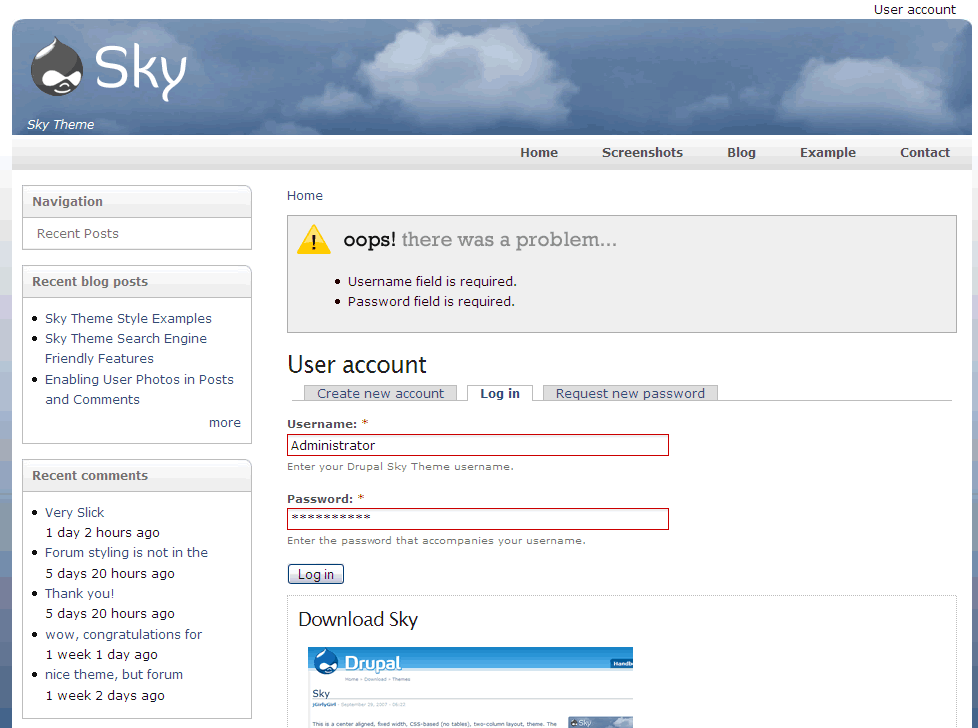
The header moves up when a page title is not present. For example, when I get an error message. (Please see attached screenshot).
| Comment | File | Size | Author |
|---|---|---|---|
| #2 | site_config.jpg | 98.54 KB | tdh |
| #1 | error_1.gif | 46.71 KB | jacine |
| header_moves.jpg | 46.11 KB | tdh |



Comments
Comment #1
jacineHi tdh,
I cannot reproduce this on the demo site. A page not found error results with a page title of "Page not found" and a login error message such as the one you posted returns a "User Account" page title, or the title of the page you tried to log in from. See attached screenshot.
This is the desired behavior, as there should always be a title for each page, except if you have no slogan and you're on the home page. If there is no page title set, which should never be the case, it will not have anything to print, which would cause the difference in space. Since I can't reproduce the error on the demo site, and you've obviously modified the theme, I'd have to think this is a result of something you've changed.
If I'm wrong, let me know how to reproduce the error and I'll look at it again.
Thanks :)
Comment #2
tdh commentedI get the problem when my home page is set to the default (/node) and then get the error message (by clicking login with it blank or incorrect credentials). If I change my home page to a user created page, then it does display the page title and works fine. But at the default /node it does not display a page title at the top.
Thanks,
Todd
Comment #3
jacineDo you have "site slogan" enabled in the theme config settings?
PS - "node" should not have a trailing slash on the site configuration page.
Comment #4
tdh commentedYes the site slogan is enabled in the theme settings. Removing the trailing slash after node took care of the problem.
You are great!
Thanks,
Todd
Comment #5
jacineOh good, I'm glad it's working... You're welcome :)