
 The 2026 Drupal Business Survey is open. Your response will help shape the future of the Drupal business ecosystem.
On this page
Import source (create a pattern), file or URL
You are browsing documentation for an older version of Drupal, which is not supported any longer, and the information may not be correct. See current documentation for Contributed modules
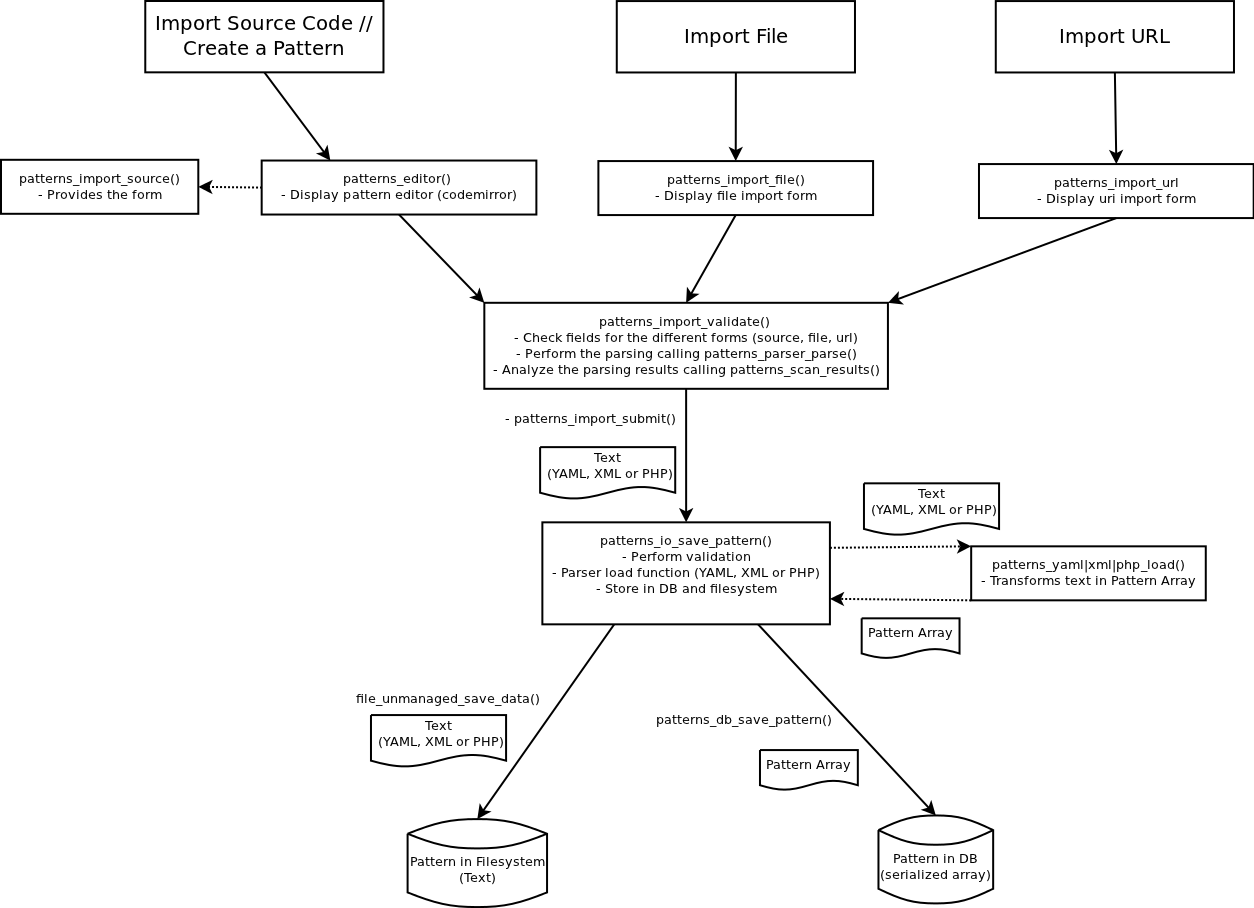
When we create a pattern (import source), the behaviour will be similar to the one explained previously for quick-run, but constructing a more complex form that allows the users to create some extra metadata. The same idea applies to “Import file” and “Import from URL”, they will return a different form than “Import source”, but the validation and submission (patterns_import_validate() and patterns_import_submit() in the file includes/forms/import.inc) functions are shared between all of them.
The diagram below provides a general overview, and the main functions involved are detailed in the next subsections:
Import source
-
The function patterns_editor() of the file includes/editor.inc is called, using "patterns_import_source" as a value for the parameter $form_id.
-
The form then will be constructed using drupal_get_form(), that will call the function function patterns_import_source() in the file includes/import.inc.
-
Once the form is submitted, patterns_import_validate() is called. This function validates the form fields depending on which form we are receiving (source, file or url) and it is the responsible of calling the function patterns_parser_parse() and patterns_scan_pattern(), that were already described in the previous sections.
-
If the validation is successful then the hook_form_submit() (patterns_import_submit()) is executed:
-
It will add an extension if necessary
-
It executes the function patterns_io_save_pattern() (includes/io.inc) to store the pattern in both the database and the filesystem:
-
Perform a set of validations: is not null, validate the code of the pattern, directory is writable, etc.
-
It will choose a different load function, depending on the format. Following our example (same code as node.yaml), the loaded function will be patterns_yamlparser_load() (that can be found in the .module of the submodule patterns_yaml_parser). The object then will be returned in an array format, in our case the values will be:
$pattern	Array [2]
	info	Array [7]
		title	Example Article creation
		description	Creates an example article node
		author	QSCience
		version	1.0
		category	Content
		core	7.x
		author_website	http://qlectives.eu/
	actions	Array [1]
		0	Array [1]
			create	Array [4]
				tag	node
				type	article
				title	Test Article
				body	lorem ipsum ...
-
- The $pattern object is then passed to the function patterns_db_save_pattern() (includes/db.inc), that will execute the query to create a new entry (or update if the pattern exists already) in the database, and to file_unmanaged_save_data(), that stores it in the filesystem.
- Then the user will be redirected to the main page, and the pattern is not executed.
-
Import File
-
The flow is very similar to the one explained for “Import from source”, but the function patterns_import_file() (includes/forms/import.inc) is called directly to generate the form.
-
The validation and submission functions are the same explained in the previous subsection.
Import from URL
-
The flow is very similar to the one explained for “Import from source”, but the function patterns_import_url() (includes/forms/import.inc) is called directly to generate the form.
-
The validation and submission functions are the same explained in the previous subsection.
Help improve this page
You can:
- Log in, click Edit, and edit this page
- Log in, click Discuss, update the Page status value, and suggest an improvement
- Log in and create a Documentation issue with your suggestion
