
 Come together with the global Drupal community in Rotterdam, 28 Sept – 1 Oct 2026. Sessions, contribution, connection, and Early Bird savings until 8 June.
Executing a pattern in PHP running mode
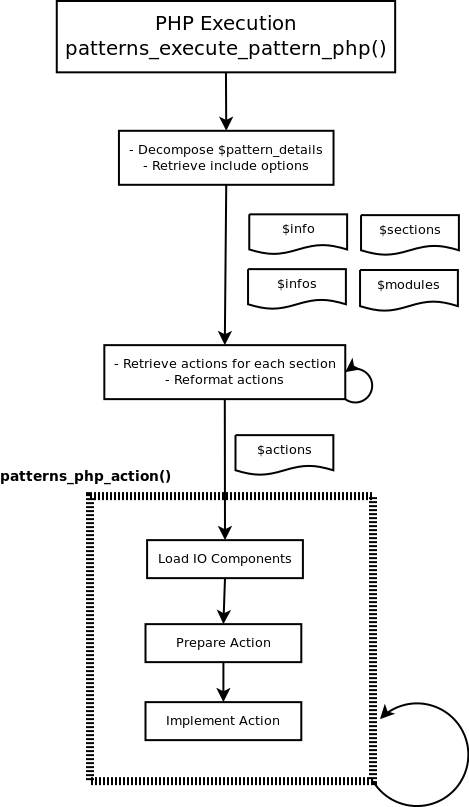
When a pattern is executed in PHP running mode, the core function patterns_execute_pattern_php() (includes/core/php.inc) is called. In this mode, the actions are run sequentially. The following diagram summarizes the main steps carried out by this function, while the common functions (prepare and implement actions) are described in the diagrams of each respective subsection.
Keeping with our example the following data are received:
- $patterns
pattern Array [2] info Array [7] title Example Article creation description Creates an example article node author QSCience version 1.0 category Content core 7.x author_website http://qlectives.eu/ actions Array [1] 0 Array [1] create Array [4] tag node type article title Test Article body lorem ipsum ... - $params
$params Array [10] pid 1 execution extend mode php run-subpatterns never confirm 1 submit Confirm form_build_id form-uEtwhgIz5faBmzn7DBL-AGDkqUE0E3YaDj5yHdO8tpI form_token zTBMxkjkiecd-A26XPB47LqaVap1qUsA-smXtsC37Q0 form_id patterns_enable_pattern op Confirm - $patterns_details
$patterns_details Array [1] 1 Array [3] info Array [7] title Example Article creation description Creates an example article node author QSCience version 1.0 category Content core 7.x author_website http://qlectives.eu/ sections Array [1] actions Array [1] 0 Array [1] create Array [4] tag node type article title Test Article body lorem ipsum ... modules Array [0] - $actions_map
$actions_map	Array [2]
	patterns	Array [1]
		1	Array [7]
			title	Example Article creation
			description	Creates an example article node
			author	QSCience
			version	1.0
			category	Content
			core	7.x
			author_website	http://qlectives.eu/
	map	<Uninitialized>
-
The next step consists of decomposing the variable $pattern_details into the info, actions and modules section in order to process them.
-
The include options are retrieved, which will not be used in our case since it is a simple pattern, but they would be used in the case there were embedded sub-patterns.
-
Then the function will loop parsing all the actions to create an array that can be re-formatted. This first step is carried on by the function patterns_parser_retrieve_actions_from_section() (includes/parser.inc), and it will return an array as follows:
$actions Array [1] 0 Array [1] create Array [4] tag node type article title Test Article body lorem ipsum ... -
A new function that modifies this variable ($actions is passed by reference) goes into action: patterns_reformat_actions() (includes/core/commons.inc). This function groups the action and the data that are being employed to perform that action. At this point, our variable looks as follows:
$actions Array [1] 0 Array [2] action create data Array [4] tag node type article title Test Article body lorem ipsum ... -
With this format, now every action will be executed. The function that takes care of executing a single action in the case of the PHP mode is called patterns_php_action(). This function will take care of:
-
Load the IO Components
-
Prepare the action
-
Implement the action
-
-
The steps taken to prepare and implement the action are detailed in the next subsection.
patterns_prepare_action() & patterns_implement_action()
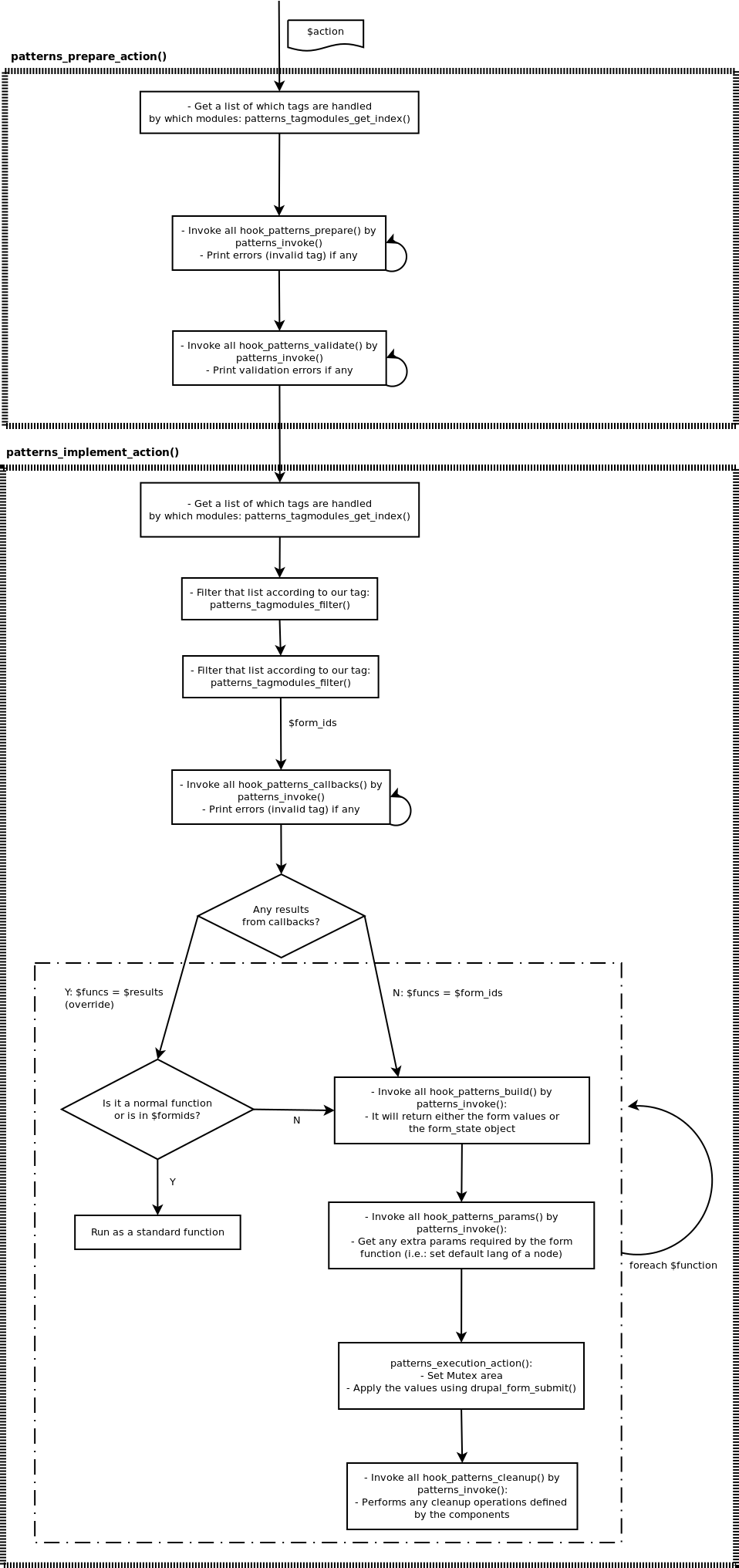
The diagram belows summarizes the main steps involved in the preparation and implementation of the actions:
Preparing & validating the action: patterns_prepare_action()
patterns_prepare_action function (in file includes/core/common.inc) will prepare and validate the action tags invoking the operation "prepare" and "validate" of the related component.
It makes use of the function patterns_tagmodules_get_index() (includes/tagmodules.inc), which using the function $tagmodules = &drupal_static(FUNCTION) and some internal functions that make use of the module_invoke function provided by Drupal, will generate an associative array with all the values for all the tags. This is the way we know the form id we will use to implement the action.
- The following code shows an example of the content of this array with some operations for the tag "block" and "node":
$tagmodules Array [24] block Array [6] descr Create/Modify/Delete Blocks create Array [3] 0 block_admin_display_form 1 block_admin_configure 2 block_add_block_form modify Array [2] delete Array [1] files Array [1] module block block_extract_all Array [4] color Array [5] field Array [5] instance Array [7] field_weight Array [4] menu Array [7] menu_item Array [7] node Array [7] descr Create/Modify/Delete Nodes create Array [1] 0 article_node_form modify Array [1] 0 article_node_form delete Array [1] 0 node_delete_confirm files Array [1] export Array [1] module node content_type Array [7] content_type_extract_all Array [4] shortcut_set Array [6] shortcut_link Array [6] shortcut_set_user Array [4] modules Array [5] theme Array [5] form Array [4] call_php_func Array [3] variables Array [5] vocabulary Array [7] term Array [7] user Array [6] role Array [7] permission Array [7] -
The function patterns_prepare_action() will call later patterns_invoke() (patterns.module), so all the hooks hook_patterns_prepare() are invoked. A detailed description about the function patterns_invoke() is given in the next section, but to conclude our example the function call in our case will be: node_patterns_prepare():
$return = $func($action, $tag, $data, $extra); - node_patterns_prepare('create', 'node', ['type'=>'article', 'title'=>'Test Article', 'body'=>'Lorem ipsum ...'], NULL) -
Afterwards the same patterns_invoke() (patterns.module) will be called again, but this time invoking all the "validate" hooks:
$return = $func($action, $tag, $data, $extra); - node_patterns_validate('create', 'node', ['type'=>'article', 'title'=>'Test Article', 'body'=>'Lorem ipsum ...'], NULL) - A $result array is then return. If everything is successful our pattern has been properly prepared and validated at this point, but no changes have been performed into the system since we will need to call again patterns_invoke() to perform the changes. This will be achieved in the next subsection, thanks to the equivalent function: patterns_implement_action().
Implementing the action: pattern_implement_action()
This function (in the file includes/core/common.inc) will perform all the actions to implement the pattern:
-
Invokes the following hooks: hook_patterns_callbacks(), hook_patterns_build(), hook_patterns_params() using the function patterns_invoke() (patterns.module) in a similar was as pattern_prepare_action() does with the hook_patterns_prepare() and hook_patterns_validate().
-
Calls the function patterns_execute_action() (in the file includes/core/common.inc), that it is the one that will call drupal_form_submit() to retrieve, populate and process the form.
-
Afterwards it invokes all the hook_patterns_cleanup(), using again the function patterns_invoke() (patterns.module).
Using our previous example (node.yaml), these would be the steps carried on:
- The function is called with the following values:
$action = 'create' $data Array [8] type article title Test Article body lorem ipsum ... uid 1 name root node stdClass CLASSNAME stdClass type article title Test Article body lorem ipsum ... uid 1 name root update false tag node - A custom error handler is set.
-
We call again the function patterns_tagmodules_get_index() (includes/tagmodules.inc), which using the function $tagmodules = &drupal_static(FUNCTION) and some internal functions that make use of the module_invoke() function provided by the Drupal API, will generate an associative array with all the values for all the tags. This is the way we will know the Form ID we will use to implement the action. First, this function is called returning all the values:
$tagmodules Array [24] block Array [6] block_extract_all Array [4] color Array [5] field Array [5] instance Array [7] field_weight Array [4] menu Array [7] menu_item Array [7] node Array [7] descr Create/Modify/Delete Nodes create Array [1] 0 article_node_form modify Array [1] 0 article_node_form delete Array [1] 0 node_delete_confirm files Array [1] export Array [1] module node content_type Array [7] content_type_extract_all Array [4] shortcut_set Array [6] shortcut_link Array [6] shortcut_set_user Array [4] modules Array [5] theme Array [5] form Array [4] call_php_func Array [3] variables Array [5] vocabulary Array [7] term Array [7] user Array [6] role Array [7] permission Array [7] -
And then it will call patterns_tagmodules_filter() to select only the information related to that tag ("node") in our case. After that, the set of available Form IDs gets reduced:
$tag_info Array [7] descr Create/Modify/Delete Nodes create Array [1] 0 article_node_form modify Array [1] 0 article_node_form delete Array [1] 0 node_delete_confirm files Array [1] export Array [1] module node -
Finally we will select only the ones for our action:
$form_ids = $tag_info[$action]; - $form_ids = $tag_info['create'] -
Which in our case will return “article_node_form”. Thanks to this, we do know the form we have to invoke in order to apply the changes provided by the pattern
-
Afterwards, we will gather information about the action. This variable is obsolete (comes from the re-writting process from Patterns v.6) and it will be removed in future versions.
-
Later all the hooks hook_patterns_callbacks() are called, using the function patterns_invoke(). In our case, the hook node_patterns_callbacks() (in the submodule patterns_components/components/node.inc) will be called, returning the Form ID to be called. Following our example since this is a CREATE action and the Content Type is article, it returns an array as follows:
$results Array [4] status 1 msg Execution successful result Array [1] 0 article_node_form details Array [3] action create hook callbacks function <Uninitialized> -
It is important to remark that since in our case we are implementing this hook, we will use this value for the Form ID instead of the one provided by default by the previous function patterns_tagmodules_get_index(). Depending on the case, the variable $funcs will have an overriden or default value.
-
Each of this functions is checked later:
-
In case is not a Form ID it is run as a normal function.
-
If it is a Form ID, it will be run using drupal_form_submit(). In our example, this is the case. Therefore we will call now patterns_invoke() as follows:
patterns_invoke($hook, $action, &$data = NULL, $form_id = NULL, &$extra = NULL) - patterns_invoke('build', 'create', array('type'=>'article', 'title'=>'Test', ...), 'article_node_form')
-
-
Therefore in our case we will build the whole form (although in other cases it can return the object) with all the extra data that is not provided in the pattern:
$results Array [4] status 1 msg result Array [9] type article title Test Article body lorem ipsum ... uid 1 name root node stdClass CLASSNAME stdClass type article title Test Article body lorem ipsum ... uid 1 name root update false changed 1348573591 op Save details Array [3] action create hook build function article_node_form -
Then all the required files will be included (in our example modules/node/node.pages.inc) and then we will check if the data is a $form_state or a $form_values.
-
Later all the hooks hook_patterns_params() are called, using again the function patterns_invoke(). This is necessary to provide the components the ability to add any other extra parameters. In our example, it will be necessary to set the language as undefined ('und'). These args will be passed to the function patterns_execute_action().
-
So at this point, we are ready to execute the action. Following our example, these are the values that are going to be sent to patterns_execute_action($form_id, $action_state, $params):
$form_id article_node_form $action_state Array [4] storage <Uninitialized> submitted false build_info Array [2] files Array [1] 0 modules/node/node.pages.inc args Array [1] values Array [9] type article title Test Article body lorem ipsum ... uid 1 name root node stdClass update false changed 1348573591 op Save $params Array [1] 0 stdClass CLASSNAME stdClass type article title Test Article body lorem ipsum ... uid 1 name root language und -
The function patterns_execute_action() (includes/corecommon.inc), will perform the following actions:
-
Clear all the caches.
-
Set the Mutex on by calling the function patterns_executing()
-
Call drupal_form_submit() with the arguments, using the PHP function call_user_func_array()
-
Finally we set the Mutex off.
-
-
The last step consists of invoking all the hooks hook_patterns_cleanup(), again using the function patterns_invoke():
$results = patterns_invoke('cleanup', $action, $clone, $form_id, $action_state); -
In our example this hook is implemented by the node component in order to make sure all the content types are updated ( _field_info_collate_types(true)).
-
Finally we clean caches, set the error handler back, and we have successfully executed a pattern.
Help improve this page
You can:
- Log in, click Edit, and edit this page
- Log in, click Discuss, update the Page status value, and suggest an improvement
- Log in and create a Documentation issue with your suggestion
