

 The 2026 Drupal Business Survey is open. Your response will help shape the future of the Drupal business ecosystem.
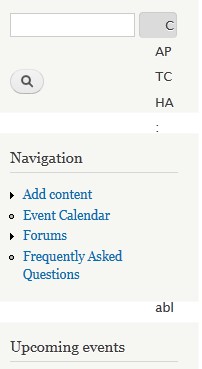
When the CAPTCHA admin links feature is enabled, the CAPTCHA admin fieldset does not fit in the limited space of the search form, which make things look a bit weird.
e.g. from #1758456: CAPTCHA doesn't show up for content type created by me: http://drupal.org/files/ScreenHunter_68%20Nov.%2004%2012.20.jpg
| Comment | File | Size | Author |
|---|---|---|---|
| #1 | ScreenHunter_68 Nov. 04 12.20.jpg | 11.56 KB | densolis |


Comments
Comment #1
densolis commentedsoxofaan
FYI - I was using a standard Drupal 7.16 install with a Bartik theme logged in as an administrator (and as user 1). The search box was in the sidebar first block. I've also attached a screen shot.
I did change the category from a feature request to a bug report.
The work around for this is turn off the "Captcha admin link feature" after you have setup your forms.
Comment #2
joostvdl commentedSame problem here.
Maybe an extra option can be added to set for a form the type to disabled so it will not shown at all.
Comment #3
metakel commentedI think it is better to let the module to "Add a Captcha administration link" to certain content type only. e.g. only to webform, but not other type like search form.
In all my sites, I prefer Captcha to protect the forms from spamming and robots. However I do not wish users to enter Captcha on search form. Having a Captcha administration link at the search fields breaks most sites.
Comment #3.0
metakel commentedremoved broken image
Comment #4
wundo commented