

Closed (works as designed)
Project:
Drupal core
Version:
8.0.x-dev
Component:
translation_entity.module
Priority:
Normal
Category:
Task
Assigned:
Unassigned
Issue tags:
Reporter:
Created:
6 Nov 2012 at 09:54 UTC
Updated:
29 Jul 2014 at 21:28 UTC
Jump to comment: Most recent file


Comments
Comment #1
plachComment #2
yesct commentedThis is totally up for grabs. It's a nice Novice issue, isolated and not spread across systems, with even some specific novice tasks (like screenshot or updating the issue summary).
Also, a little patch to change the name to language settings should get the conversation started.
Comment #3
fureigh commentedGrabbing it. :)
Comment #4
fureigh commentedThe attached patch changes the label from "Translation Settings" to "Language Settings" in translation_entity.module.
Before (screenshot):
https://www.evernote.com/shard/s163/sh/e6e38eed-9f8c-43c4-a2aa-3f64b9d46...
After (screenshot):
https://www.evernote.com/shard/s163/sh/f348b799-0970-4532-a0c3-5e4a13c94...
The other instance of "Translation Settings," not affected by this patch, is in translation.module and does seem to be accurately named:
Comment #4.0
fureigh commentedUpdated issue summary.
Comment #5
fureigh commentedRephrased the issue title. I'm not actually certain that this issue needs to be fixed, but just in case, the patch is in #4.
For context, content creators see a "Language" dropdown on the node/edit page (screenshot: http://bit.ly/VVk2KD) and "Translation" (rightly) in the translation-related vertical tab (screenshot: http://bit.ly/WUlIjH).
Comment #6
yesct commentedthat translation row in the field settings, what does that expose in the node add/edit? the translation vertical tab? I wonder if we have an issue then to remove that row from this table.
Comment #7
yesct commentedsince details went in instead of collapsed field sets. the ui looks different... and the translation row *can* be reordered now.
I guess new screenshots might help.
And it's ok to embed them in the issue comment. Using dreditor, this is really easy to do. It adds an "embed" button next to image files that have been added to a comment.
Comment #8
yesct commentedupdating tags.
Next steps here is a review, and also new screenshots (before and after)
Comment #9
dysrama commentedPatch applies, reviewed and tested.
Comment #10
plachSorry guys, but this is missing a bit of discussion: do we really wanto to perform this change? Which is the rationale behind it? Why a vertical tab that will appear only when translation is enabled and that will contain only translation-related stuff should be called "Language settings", which is a more generic term that elsewhere is used to indicate stuff usually handled by the Language module?
Comment #11
jamesharv commentedAs per fureigh's comment in #5, there is already a language select on the node form. The purpose of this Translation extra field on the form seems to be to allow a user to mark other translations as outdated - ie. it provides a widget used as part of the translation process, rather than being used for selecting a language.
Therefore to me, calling this field Language settings would actually be more confusing.
Comment #12
mitron commentedOn the manage field the label is "Translation" and can't be changed.
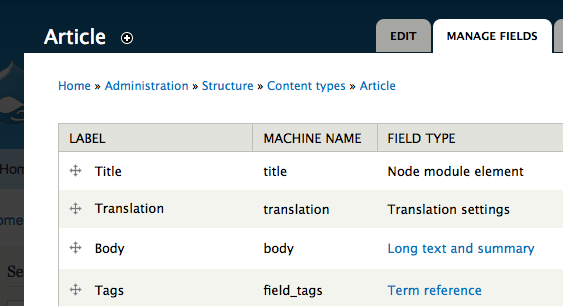
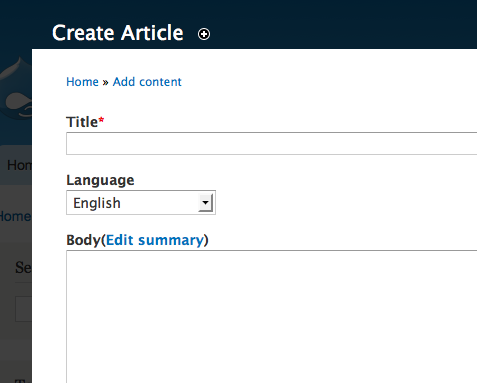
But on the add content screen, the label is "Language" and this is inconsistent.
It is not the field type that is confusing. Is is the inconsistency between the manage fields screen and the content screens that is confusing. The label should be "Language", the machine name should be language and the field type should be Language.
Comment #13
mitron commentedAs a follow up to #11, the purpose of this field is to allow the position of the "Language" setting on the Add content form to be changed. I think you were "confused" by the label.
Comment #14
chrischinchilla commentedHi everyone, at the DrupalCon Sydney Code Sprint and doing manual testing of the patch in #4 and it works fine. I'll let you carry on discussing it's worth though :)
Comment #15
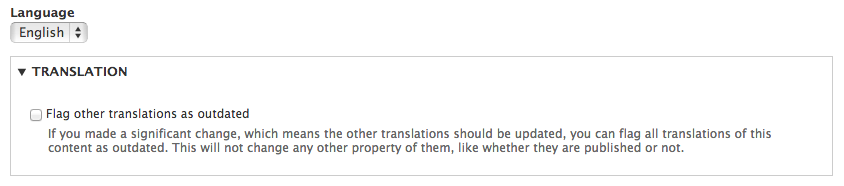
jamesharv commented@mitron The Language selection field is different to the translation settings field. See the attached screenshot. You only see the translation field when you create a translation of a node, or are editing a node which has translations.
Comment #16
mitron commented@ jamesharv: Try to move that "translation" field up or down in the manage fields screen. You'll notice that it causes the Language field to change position in the Add Content screen.
Comment #17
cbI wont comment on the requirement, but the patch at least looks fine.
Considering its been technically reviewed, is there another status we can use?
Comment #18
mitron commentedApparently, the reason the translation field is shown on the manage fields screen is so the "Language" field can be repositioned. There are no other options to change. To see the "Language" field in add content, you must select "Show language selector on create and edit pages" on the Content Language Settings screen.
Comment #19
yesct commentedI cannot find the comment in the issue this is supposed to be a follow-up for.
#1831530-13: Entity translation UI in core (part 2) has a list of a bunch of issues opened also on Nov 6, but this one is not listed there.
So... unless someone remembers the comment that asked for this follow up...
combined with the following screenshots, of plain 8.x with no patch, ...
I think this is closed works as designed, is a wont fix.
@miltron, I could not reproduce what you observed in #16
I wonder if you can add something about what was confusing... was it that when adding a node, the translations setting didn't show (just the language field did?)
also note that to test, add a few languages, create a node, create a translation, edit the node (then the node edit will show both the language field and the translation setting)
1
2
3
4
5
6
7
Comment #20
mitron commentedThere are many things terribly confusing about the translation system for a new user, but I'll try to keep this focused on this exact issue. However, I suspect that the general "WTFness" of the translation system to a novice could possibly be behind the existence of this issue.
This issue summary states that calling the translation-related field type 'Translation settings' could be confusing but does not explain why it could be confusing. At first, I looked at the field type and thought "What is confusing about this?" It was perfectly clear. Then I asked myself, "How could this be confusing?" and thought "Why is this field even on the Manage Fields screen?" It does not appear to affect anything. At the time, I had not selected "Show language selector on create and edit pages" so the Language field did not appear.
Later I learned that the Translation Settings field only appears on the Translation tab and not on the Content Create/Edit tabs. And its appearance on the Manage Fields screen allows changing its vertical position.
So this issue is not about the general confusions of the translation system but just the name of the field type and I believe that the field type is good and should not be changed. I concur with "wont fix."
Comment #21
yesct commentedscreenshots were added in #19, updating tags.
@mitron thanks alot. that extra insight is helpful. (closing it)
additional note: the translations settings field will appear on the content edit tab (but not create, you are correct).
it shows there if, there is also another translation.
right now, it's being used to hold just one setting: marking other translations as outdated, and that .. well is not needed if there are no other translations (like if creating/adding a new node). there is an issue that will add more settings to that fieldset #1807800-46: Add status and authoring information as generic entity translation metadata
I'm usually more careful to keep track of where a follow-up issue is coming from. Sorry about the confusions that caused with this issue.
@mitron You are in a ton of issues! So probably have enough to keep you busy, but if you want something new, just let me know.
@jamesharv @dysrama and others
if looking for more d8mi issues,
#1832870: Only show source translation column if there are 2 or more source languages (more than n/a and the original language). is almost there, but needs tests to get committed
#1899486: unify dropbutton use of translate/translations wording in links could use some input on a wording choice
#1833076: expand translation settings when editing outdated translation so remember to uncheck "needs updating" is a small patch that needs a review (and maybe a screenshot)
:)
@Christian Biggins your question in #17 about what status to use next after a technical review is a good question
In some cases like that, it's really helpful to add a comment suggesting the next task (in this case like: Next step: decide if this is required, if the problem still exists) and then edit the issue summary to add/update items (in this case like: need to decide if problem still exists, technical review done in comment #17)
Comment #21.0
yesct commentedFurther updated issue summary.