Objective
I'm trying to create a related content block using the contextual filter "Content: Has taxonomy term ID".
Background
I have read a number of posts that outline how to achieve this, but there seems to be an issue when the term reference fields have multiple values.
The posts I have read include, but are not limited to the following:
#1058674: Only works with first taxonomy term views3 D7
http://www.metachunk.com/blog/adding-related-content-view-drupal-7
http://www.gaslampmedia.com/blog/drupal-related-posts-blocks-drupal-7
Use Case Details
I have 2 content types on http://remove-stain.com that I'm trying to relate:
- Amazon Products
- Articles
They both have the term reference field for a vocabulary named "Cleaning Supplies" and the field for both content types is the same named "field_cleaning_supplies". The field is set to unlimited on the content type and is an auto-complete widget that takes comma-separated values.
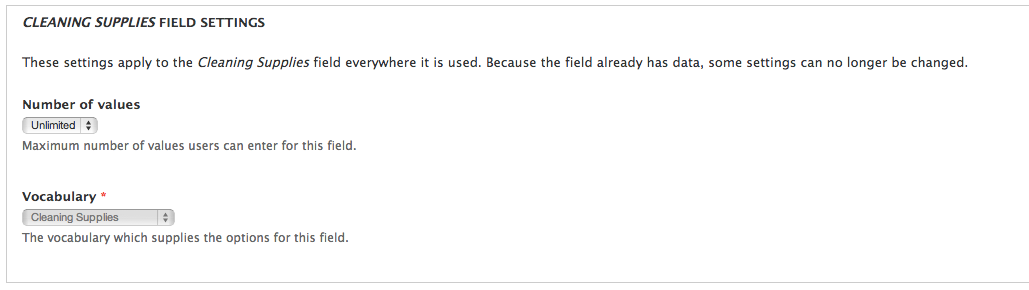
On the article content type the cleaning supplies listed are typically multi valued (e.g., bleach, hot water, baking soda) and for the amazon product content type, the cleaning supplies are typically single value (e.g., bleach).
On the article pages I would like to show a view block that has all the amazon products listed that share any of the cleaning supplies that the article has been tagged with. For example, if the article has bleach and borax listed, then I would like to show all amazon products that have bleach and borax in the cleaning supplies term reference field. Please keep in mind that both content types have the same term reference field, both are set to "unlimited", and both can contain multiple values. Essentially, I want to show any nodes of the amazon product content type that share at least one term.
What I've Tried
First off, it is important to note that this does work when the fields are not multi-valued (i.e., "unlimited"). I have got this type of view block to show for other related content on the site.
I've tried almost every permutation of selections on the "Configure contextual filter: Content: Has taxonomy term ID" configuration overlay.
The one that I believe should work is shown here:
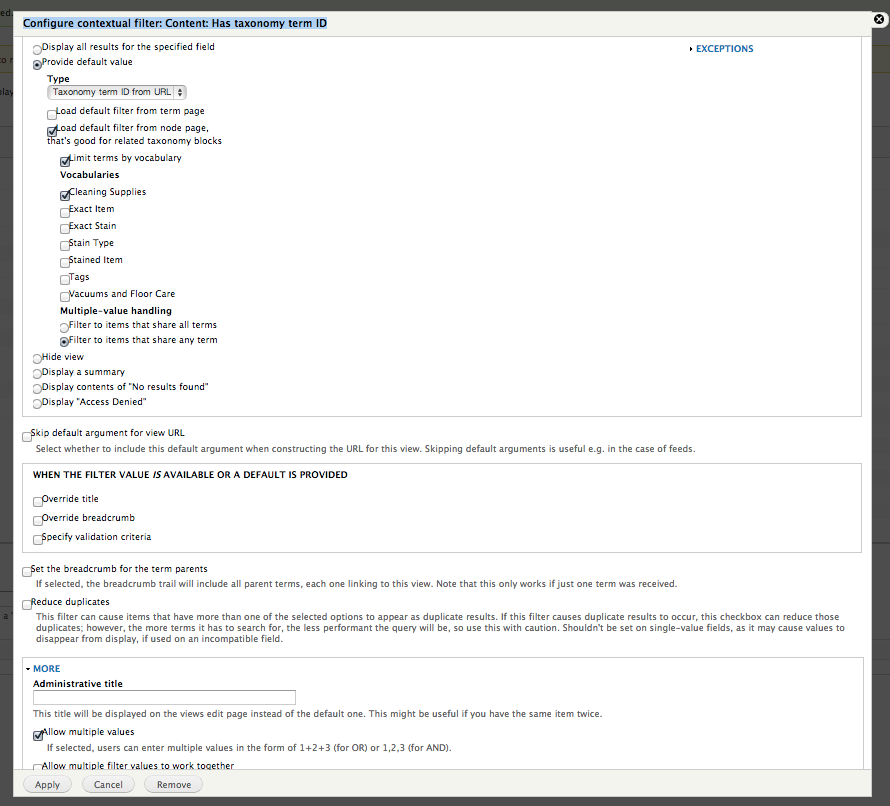
I've also tried the php code shown in http://www.gaslampmedia.com/blog/drupal-related-posts-blocks-drupal-7
Is there a known limitation to term reference fields that are set to "unlimited"? I have been successful with this configuration when the shared term reference field only uses 1 value.
I've tried views versions 7.x-3.5 and 7.x-3.x-dev. I'm using the latest version of Drupal core.
I have attached the view export also.
Please advise - help is very much appreciated.




Comments
Comment #1
AntiNSA commentedI am having the exact same problem. Any solutions? I am using drupal 6/views 3
Comment #2
Anonymous (not verified) commentedThought I'd jump in and mention that I'm using 7.x-3.5+42-dev, Drupal 7.21 (if it makes a difference)... not working. Used exact settings as above.
EDIT - just tried it with the current views-7.x-3.5 and it still doesn't work. ARG!!
EDIT - I found a work around, in case anyone is interested. Worked very well for my purposes: http://www.gaslampmedia.com/blog/drupal-related-posts-blocks-drupal-7 Hope this helps someone else!
Comment #3
dawehner... that's not critical.
At least the screenshot above is using content: has taxonomy TID which doesn't really care about term reference fields, so this should work out.
Comment #4
keti-1931 commentedi m also having same problem
subscribing and above doesn't worked for me
Comment #5
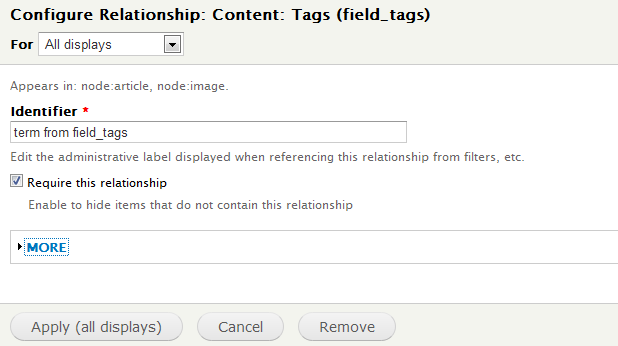
keti-1931 commentedi got it ....just in the contextual filter take the field term reference and select raw value from url and fetch the term id in url. and in relationships u just add the term reference. that's it
Comment #7
peterbarretto commentedketi-1931 can you please provide the in-depth steps of how you got it to work?
I am using alias url for the terms as tags/tagname, so what steps should i follow then?
Have attached the add contextual filter popup.
Comment #8
keti-1931 commentedhi peterbarrato,
i have two content types called video and posts. i wanted to show all related posts on video node page having same taxonomy terms. what i have done i try fetching taxonomy term (TID) for video content type in url using pathauto module (URL alias). then in contextual filters settings: selected that field . i have common field as tag for both content types which is autocomplete taxonomy term.and select raw value from url. in releationships also same thing. attching screenshots for your help.
Comment #9
peterbarretto commentedI am trying to display related photo content type on a photo content type page.
My tags alias is of the form www.sitename.com/tags/food so i have to select path component 2 in the raw value of the url right?
I still cant get it to work.
Check attached screenshots.
Thanks
Comment #10
keti-1931 commentedhi peterbarrot,
try this :
i m attaching screenshots for this particular view. what i understood is u want related photos on same photo content type node page. whereas comment 8 gives relationship between two content types. so i guess this will work for u.
Comment #11
peterbarretto commentedShouldn't the Tags be ticked under Vocabularies and require this relationship under identifier for the relationship filter?
I get an error "SQLSTATE[HY000]: General error: 1030 Got error 28 from storage engine" which is related to storage size. Will try to fix that issue and let you know if the related view works.