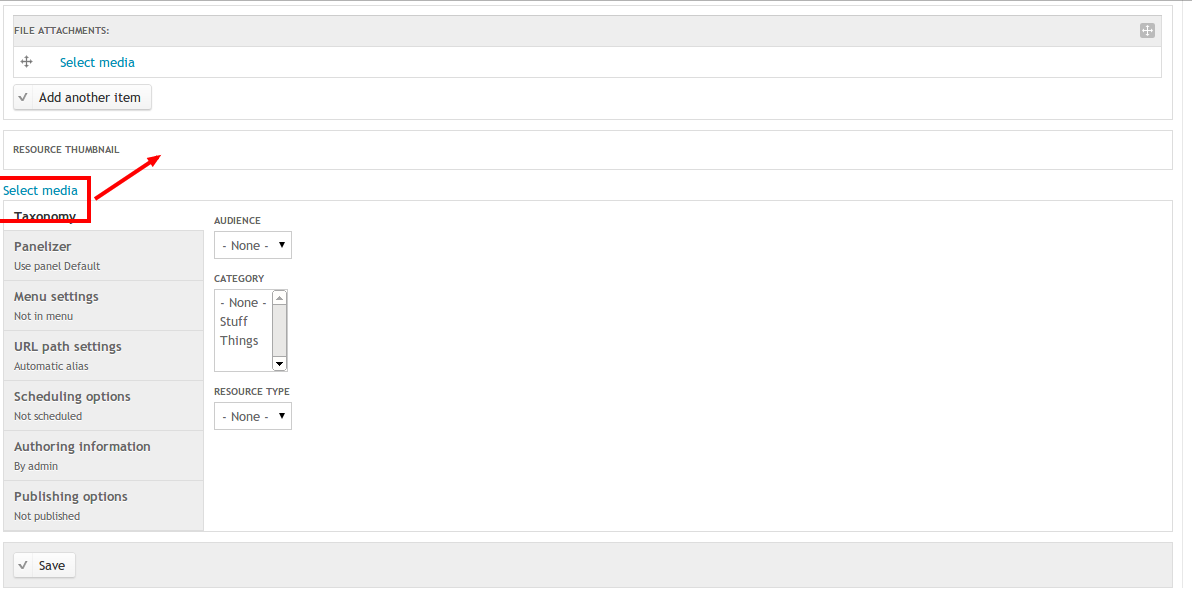
This issue appears on both 7.x-2.0-unstable6 and 7.x-2.x-dev. An image field with cardinality 1 has a broken display, I'm using the Rubik theme, but I think this is an issue with the rendering of it as the markup seems wrong:
The tag for the "Select media" link is outside the form-item div:
<div class="media-widget form-wrapper mediaBrowserLaunch-processed" id="edit-field-resource-thumbnail-und-0"><div id="edit-field-resource-thumbnail-und-0-title" class="form-item form-type-item">
  <label for="edit-field-resource-thumbnail-und-0-title">Resource Thumbnail </label>
</div>
<div class="preview launcher"></div><a href="#" class="button launcher" id="edit-field-resource-thumbnail-und-0-select">Select media</a><a href="/media/0/edit/nojs" class="ctools-use-modal use-ajax ctools-modal-media-file-edit button edit ajax-processed ctools-use-modal-processed" id="edit-field-resource-thumbnail-und-0-edit" style="display: none; ">Edit media</a><a href="#" class="button remove" id="edit-field-resource-thumbnail-und-0-remove" style="display: none; ">Remove media</a><input class="fid" type="hidden" name="field_resource_thumbnail[und][0][fid]" value="0">
</div>
Please see attached screenshot (note the correctly displaying widget above with Unlimited Cardinality)


Comments
Comment #1
acbramley commentedComment #2
Bill Choy commentedStill an issue in 7.x-2.0-unstable7. Quick fix is add the 'form-item' CSS class next to the 'media-widget'.
PS: I am also using Rubik for my admin theme.
Comment #3
acbramley commentedPatch #2 fixed it for me! Rerolled patch in appropriate format.
Comment #4
Bill Choy commentedThanks for the re-roll.
Comment #5
hefox commentedI'm having the issue with both image and file fields, and patch fixes it
Comment #6
aaron commentedCommitted to http://drupalcode.org/project/media.git/commit/a941f99
Thanks, guys.
Comment #7.0
(not verified) commentedimage field