Thanks for all of your work on this module. It's great.
I note that when I make a series of dates "available" and use the split days option, that the second day of that series is also marked as a split day but it should not be.
I note in your demo that your split says are only appearing for the first day and the last day of the series of available dates. Mine, on the other hand, show a split for day one AND day two, then the last day in the series.
I'll attach a screen shot. Can you suggest if I have something set up wrong? Or is this a bug?
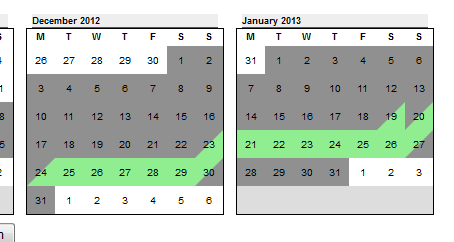
Note that in January, for example, my series of available dates should run from the 19th to the 27th. But note that the 20th is also listed as a split day. Hmm. How can I fix this? Note I'm using the DEV version of your module.
Thanks for any guidance you may have.
Dan




Comments
Comment #1
fietserwinCould be a CSS problem. How does the HTML of the cells look (when inspecting the element) and what classes are put on it? Try to (re)generate the CSS file on the styling page (admin/config/content/availability-calendar/styling).
Let me know your findings.
Comment #2
royerd commentedI regenerated the CSS file on the styling page, but it did not correct the problem.
I could try to paste in here the HTML and CSS but it might be easier if you just inspected them yourself.
http://www.primemountainrentals.com/rental-property-colorado
I can see the span tags, but I'm not sure what I should be seeing. If you look at Jan 18, 2013 that TD should be the same as the 19th. But instead, it displays like the 17th.
I can study the CSS but I bet you can sus it out much quicker than me. If you prefer me to copy the code here, let me know.
thanks for the help.
Comment #3
royerd commentedIs it worth me trying the non-DEV version of the program? I'm not sure why I'm using DEV version.
Comment #4
royerd commentedI replaced my DEV version with 7.4 alpha-1 version and it did not fix the problem.
(I guess I'll leave this alpha-1 version installed)
I notice that the same problem occurs when a user selects dates to reserve--the second day selection shows a half-day split just like the first day--but third, fourth, fifth day selections show full day reserve as they should. So the problem is not just limited to the initial display.
Comment #5
fietserwinI don't see the problems???? Except IE8, which is even worse then what you see... I will take a 2nd look at it, but that can take a day (or 2) :(
Comment #6
royerd commentedOK. Thanks. I understand. When you can take a look, let me know. I'm a little confused that you say you don't see the problems? Are you saying that you don't see the calendar displayed as in my screenshot posted above? (see the 19th and 20th of Jan 2013). The 20th should not be a half day. This happens systematically: the second day in the sequence always shows a half day.
thanks for your help.
Dan
Comment #7
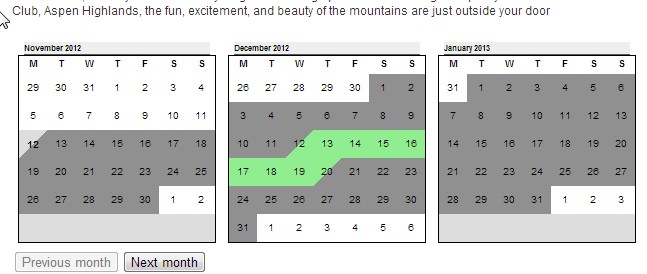
fietserwinThis is what I see in Chrome (what browser(version) are you using?):
Comment #8
royerd commentedThat's interesting. In both Firefox (newest) and Chrome (Version 23.0.1271.64 m) I see what I'm seeing in my own screenshot above. I wish I was seeing what you see.
Well, that does tell us something I guess. I will start looking on other browsers. Since you are seeing it displayed correctly, you can hardly help me by inspecting the CSS.
If you have any other ideas, let me know. I'm going to a Drupal meeting tonight. There may be someone there that can troubleshoot better than me. I will let you know what I learn (if anything).
Dan
Comment #9
royerd commentedI'm not sure how much this helps given that you can't replicate it with your browser--or that you are not seeing the same things as I see (even when we both use the latest version of Chrome??)
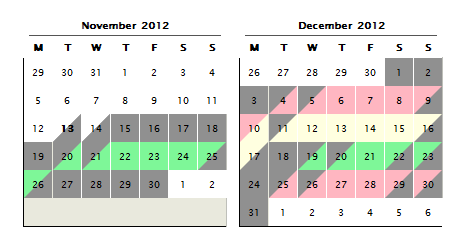
But I checked with a number of users last night and they all see what I see. But anyway, here's the calendars as they appear to me when I am editing the node:
And here's the same calendars as they appear after I save the node. Notice that the Green color (available) is the one that is acting up on the display side--but both colors act up on the edit side.
And now--and this seems important as a clue--I note that when I change the checkbox for "treat as available" in the Site Wide Settings so that the red color is set as "available" that then the red color misbehaves and the green color is fine. But if I change it back to default where the green color is the checked "treat as available" field, then that green color misbehaves again. So the problem I am seeing is only with the the color or field that is checked "treat as available." Does that help explain anything?
Dan
Comment #10
royerd commentedI'm sorry to bother you with these issues.
But I guess if I am not going to have users "search for availability" I can just uncheck all the boxes and my problem goes away. That's fine for me--but not for others who need that box checked if in fact this is really a bug and not just something peculiar in my setup.I'm glad to help troubleshoot things--but I can solve the problem just by not checking any of the "treat as available" boxes in the setup area.I see, if the green is not treated as "search for available" it cannot be clicked. So I guess I do need that checkbox marked. But marking that checkbox is what causes the problem.
Comment #11
royerd commentedYou might want to check again. You might have seen the site when I was experimenting with changing the colors. It turns out (see below) that the only cells affected are the ones that I mark "searchable" in the setup area. So the ones that are selectable are the ones that are not behaving correctly. Again, the second calendar day in a series shows as if its the first half day. So there are two first half days in every series in the green. The other colors (not selectable) are fine.
Comment #12
fietserwinThis is what I see when I check the styling and classes:
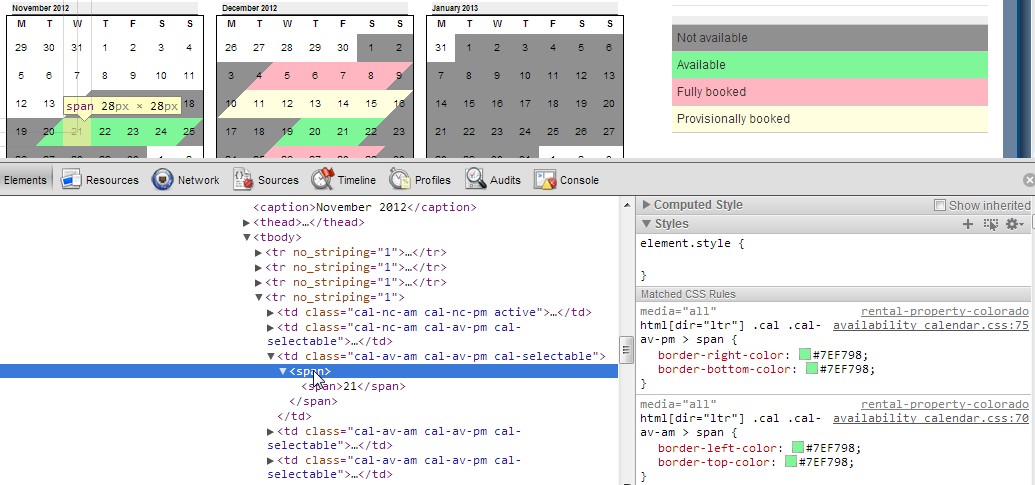
You see that both triangles (both formed by 2 border sides) get the right color. Can you post an equivalent screenshot from your non-working set-up?
If your suggestions are correct, it could have to do with some javascript error, either on-page or in a misbehaving add-on. On page seems unexplainable unless you (and all your friends) were logged in whereas I am not and that caused a change in what javascript is loaded.
edit:
- the no_striping tag you see is a known error in core, there is a patch but it has not been committed yet.
- what is your timezone (and your servers timezone)? I'm ahead of UTC (utc+1), I guess you are behind. Could have to do with it (but I hav no clue yet how). Can you test changing timezone to Europe (Paris/Amsterdam) on your browser computer?
Comment #13
royerd commentedquick report: I changed the time zone on the website to Paris but it had no affect on the display--but then I changed the time zone to Paris on my computer too--and presto! the display is correct. What does this mean about the problem? Does this suggest a permanent fix?
When I change the website default time zone back to America Eastern zone it has no affect--display still good. But when I set my computer clock from Paris back to America/Detroit (EST) then the display breaks again.
I have not tried other time zones. But this must be a major clue to the nature of the issue?
Comment #14
fietserwinI have been able to reproduce the bug, also locally. So I can confirm it is timezone related. This will ease the search for the cause and thus a solution. As a workaround you could disable the split-day option.
If I have committed a patch I will update the status here.
Comment #15
royerd commentedI did a bit more testing.
Any time zone on my computer that is a - (negative), say, from the international date line (-12) through Cape Verda (-01:00) the display does NOT work. But as soon as I set to Casablanca (which is universal time) or any of the positive adjustments like Paris (+01:00) or Tokyo (+ 09:00), the display works fine as it does for you. I assume you can replicate on your computer? The Drupal site default date seems to have no impact, but I have not explored that idea. But clearly I can make the display work or not work depending on how I adjust my computer clock.
Comment #16
royerd commentedOK. Thanks for your response. I wish I was able to help--I just don't know enough about programming. I can only find my way around CSS--but not the jquery or java or PHP.
Thanks for the module, and please let me know if I can help.
Dan
Comment #17
fietserwinx-post
Comment #18
fietserwinFixed and committed in alpha2.
Comment #19
fietserwinComment #20
royerd commentedThanks so much! Works great! You do a great job with this module.