
On this page
CiviCRM Prerequisite Check
Content for CiviCRM Prerequisite Check that allows you to determine prerequisites for specific CiviCRM event pages.
An example use case would be requiring someone to have a specific Drupal role in order to be able to register for a specific event.
The module can provide either a warning only or by preventing the registration. In the warning only mode the module will allow people to register for the event but it produces a list of people who got the warning. This could be used for identifying people who you need to review for other qualifications (e.g. classes or volunteer requirements).
At this time the warnings only work with the CiviCRM Multiday Event module.
Install
CiviCRM Prerequisite Check is a Drupal module and is installed using the standard Drupal module installation.
Configure
Create Field Group in CiviCRM
To create a field group in CiviCRM go to civicrm/admin/custom/group
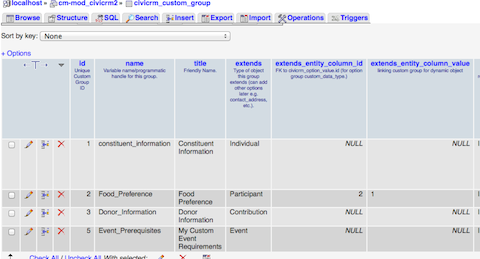
Create custom fields in CiviCRM titled 'Event Prerequisites'. Initially the field names have to match exactly because CiviCRM uses the human readable name to create a unique key for each field. Event Prerequisites creates Event_Prerequisites, which is what the module is looking for.
Once the field is created, you can change the human readable name. That will not change Event_Prerequisites in the civicrm_custom_group table.
Drupal Configuration
Go to admin/config/civicrm/civicrm-prereq-check to configure the module.
If you select warning only you must also be using the the CiviCRM Multiday Event module to get the reports on the warnings. This functionality may be moved to this module in the future.
Set Universal Event Denied Message or Warning which will be the default warning and the default if someone is denied from registering.
CSS
The field group that you create will show up on your event pages use CSS similar to this to hide it.
#Event_Prerequisites__2 .crm-accordion-wrapper {
  display: none;
}
Troubleshooting
CiviCRM Field Group Names
If you get this error...
PDOException: SQLSTATE[42S02]: Base table or view not found: 1146 Table '[DRUPAL DB].civicrm_custom_group' doesn't exist: SELECT id FROM {civicrm_custom_group} WHERE name = :name; Array ( [:name] => Prerequisites ) in civicrm_prereq_check_admin_settings() (line 46 of civicrm_prereq_check/civicrm_prereq_check.module).
You haven't added the CiviCRM tables to the Drupal settings.php. For more information go to civicrm/admin/setting/uf
Events Without Settings Stop Working
Once this module is checking for roles you must always have a role that can be validated for all events. This can be resolved by adding the anonymous role to your field group and then having anonymous selected for events that do not need other roles.
Help improve this page
You can:
- Log in, click Edit, and edit this page
- Log in, click Discuss, update the Page status value, and suggest an improvement
- Log in and create a Documentation issue with your suggestion
