

Closed (duplicate)
Project:
MaxLength
Version:
8.x-1.x-dev
Component:
Code
Priority:
Normal
Category:
Feature request
Assigned:
Unassigned
Reporter:
Created:
14 Nov 2012 at 21:03 UTC
Updated:
20 Jan 2020 at 07:27 UTC
Jump to comment: Most recent, Most recent file


Comments
Comment #1
weri commentedPatch added.
Comment #2
eelkeblokI was also looking for this functionality, (something similar to what happens when composing Tweets, where the counter will simply go to negative numbers when crossing the treshold, which basically allows you to first do a braindump, and then later edit to fit in the limits). However, I expected the setting "Force text truncate" ("Check this option if you want that the html (or the text) that the user inserts into the field to be truncated.") to do this.
From the code, it seems to do something quite similar to this; for items with a maxlength attribute (text inputs, presumably), it removes this attribute, causing the browser to stop enforcing the limit (correct me if I am wrong). Instead, it moves the validation to a validation hook, so that the limit is "soft enforced", i.e. only once you attempt to submit the value you get a validation error, instead of the browser stopping you to enter too many characters in the first place. However, I have a textarea field and on this, it doesn't seem to do anything (which kind of makes sense if the above is the only thing it does; textareas do not have a maxlength attribute).
Does it make sense to have this setting "double" as the switch for getting the functionality we are looking for here, since that effectively is for textareas what this already does for text inputs? Or am I missing something?
Comment #3
chasingmaxwell commentedI agree that the "Force text truncate" option (unchecked) should provide this functionality - and it does in some cases. The issue is that the maxlength="" attribute is being used and in most browsers this will prevent the user from entering anything beyond the limit before it gets to this module's JavaScript. I'm attaching a patch which uses a data-maxlength="" attribute instead which causes the "Force text truncate" option to work as intended.
Comment #4
Anonymous (not verified) commented#3 works for me with 7.x-3.2
Comment #5
logaritmisk commentedRe-roll for latest dev (9bbeb4b49ad624e38cd68e0d11514456b73ab080)
Comment #6
wiredescape commentedI feel this option is very important.
Any chance of this being re-rolled for 8.x?
Much appreciated!
Comment #7
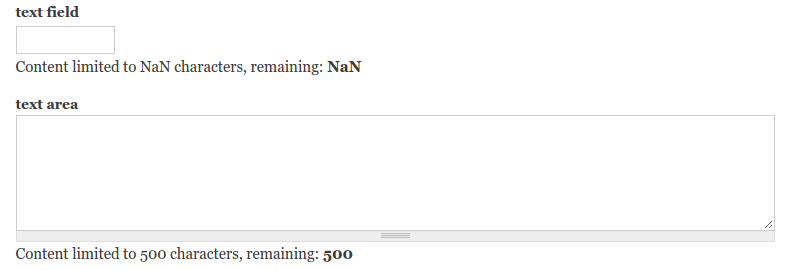
Xilis commentedPatch #5¸ breaks the module for normal text fields (screenshots below).
The screenshots are from a basic add content form (adding a new article which has 2 additional fields: text field and text area).
Before patch:
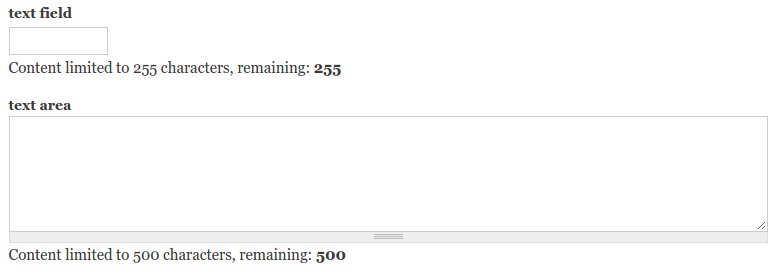
After patch:
Comment #8
albert volkman commented@WiredEscape this is already an option in the D8 version. Simply don't check "Force truncate" in the widget settings.
Comment #9
albert volkman commentedI think I may have misspoken earlier. The feature works... but I don't believe it's intentional. Here's a patch to resolve on 8.x first.
Comment #11
albert volkman commentedFixing PHP notices.
Comment #13
albert volkman commentedIt'd help if I actually made the correct patch...
Comment #15
bgilhome commentedI didn't find this issue until after I'd done more or less the same thing ... I added the option for a 'soft limit' number field, and '@softlimit' & '@softremaining' tokens for the label.
In terms of UX it may be a little overkill ... but FWIW here's the patch.
Comment #16
5n00py commentedPatch from #13 better for me. It more simple than #15 and more easy to review, test and commit.
Maybe we can finish #13 patch than create followup issue for #15?
What we actually need to complete work on #13 ?
Comment #17
ultimike#13 is working great for me - I vote that it gets committed.
-mike
Comment #18
5n00py commentedReroll #13 patch.
Comment #19
larowlanSee #2916687: Soft limit does not work on plain text fields because the Maxlength HTML attribute is used