I have a bi-lingual site with a content type project. There's also a vocabulary "Genre" with 4 tags. Projects can be tagged with a single term reference.
On the visitor side, there is a section named Projects, with a navigational menu to browse the 4 categories - all powered with a single view. The terms become navigation tiers which display projects tagged with corresponding term.
On the admin side, I need to have a view that sets the sequence for the projects to appear, within a category. The view has an exposed filter with 2 dropdowns: [language] and [genre].
Both visitor and admin views have only one sorting criterion - Draggable Views weight (asc).
The admin view works beautifully by itself, it displaysDraggable Weight field. Unfortunately the visitor view does not respect that weight - all items report weight euqal to zero. I'm lost as per what is wrong. Since the site is in an early construction stage, I could let you in to play with it.


Comments
Comment #1
moniuch commentedPlease see the below mockup image to see the problem
Comment #2
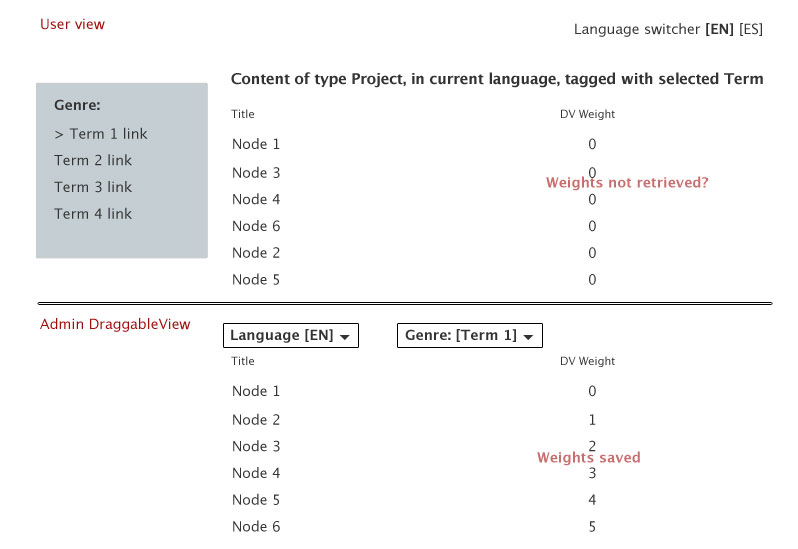
moniuch commentedUser-facing View:
Sorting UI View:
Note that the sorting view makes use of arguments (derived from exposed filter), while the user-facing one does not. I'd thinkt his might cause the problem - how would I prepare the arguments to make them look alike?
Comment #3
zacksmith commentedQuestion, moniuch:
Are you doing this with 2 separate views? I was, and having the same problem you were. Until I deleted my sorting view and simply added a new 'page' to the original user-facing view, with all of the same settings (overridden from the defaults). For some reason, that solved the problem for me. This leads me to think there's a separate draggableview order for each view, rather than the order being associated to the node itself.
Hope that helps. I would love to know if it does, because it may confirm or preclude my suspicions and help my understanding of how all of this works. Or did you have another way around this issue? Either way, good luck!
Comment #4
polI also have the same problem.
Comment #5
moniuch commented@zacksmith, I set up my sorting views afresh, although at this time I am not using exposed filters but the URL language prefix only just to get better regression testing routine.
I'm becoming suspicious about the
Draggableviews: Weight (asc)on the user-facing view. Looks like if you use Apply (this display) - you're going to uncouple the display and they will not work. As soon as you re-visit the criterion dialog and hit Apply (all displays), you will re-couple the displays internally.I will be watching this closely, but if I'm right then it'd be a matter of fixing the module so that it prevents this sort of disintegration.
Comment #6
enekid commented@zacksmith that worked for me! This has been driving me crazy for hours.
I thing that with your solution there is some kind of potential trouble with views cache, but at least it works know.
Comment #7
istryker commentedThis is another problem that was fixed in #1900068: Replace 'self' reference with '$view->name:$view->current_display'. The problem is how view sorts the information and how Draggableviews looks at the master display, instead of it's current display.
Views has a 'master' display (a.k.a default)
It stores all the information that is no overridden.
Let say you have a 'Block' and 'Page' display.
Sometimes, it looked to the 'master' display by default, as it didn't have its own setting. When you overridded 'this display', it gave itself the correct setting value. When you changed it back to 'all display' then it set master to it correct setting value, which gave you the results you wanted.
If the explain I just gave is confusing, then do not worry about it, as it is now fixed. The explain my become clearly if you look at the information when you import/export your view.
Marking as fixed
Comment #9
johnpitcairn commentedI am having exactly this problem, using latest dev.
Two page displays, A and B, in the same view. For debugging I have added Draggable Views: Weight as a field to both displays.
The draggable table display B works and saves, weights are correctly displayed.
The other display A has a primary sort of Draggable Views: Weight, referencing display B. The sort is not overridden. This display does not sort correctly, and all weights are shown as 0.
Comment #10
istryker commentedI just tried with a fresh install and dev version and it works no problem. You using Native or FieldAPI?
Comment #11
johnpitcairn commentedNative, on an existing view. I uninstalled Draggable Views, ensured all tables/variables were removed, and reinstalled. Now the drag handles don't show up.
I don't have time to debug further right now so I'm ditching Draggable Views for this project. I can sort by term weight for this view and I can safely give the users a non-views page to do that by including the taxonomy_overview_terms form.
Comment #12
istryker commentedJohn I need your view code exported to take a crack at this. I just tested Native and FieldAPI. They are both working correctly. You must have your view setup improper.
Comment #13
moniuch commentedI just had a chance to build another site with DraggableViews (7.x-2.0+55-dev). I have 4 views all of which have a reorder mate on a dedicated page. I use 2 displays within the same View. The playback view is an embed display, and I'm embedding it using views_embed_views, providing an argument to filter out some elements. For quite a while I haven't had any problem and even considered the bug to be fixed, until today. But I think I have a clue on where to look into.
The problems started when I added new elements. I had the "New elements at bottom" checked. After I adjusted the order, the elements still played at their former order. I looked at several places: views cache, cleared Drupal cache, I inspected the Draggable Weight field, everything looked fine, but the playback was incorrect.
...until I chose "Order View" from the contextual menu that appears for the View. That helped. Just opening the View and pressing the Save button right away cured the whole thing. I'm not sure if the code justifies it as a remedy, but if anyone bumps into it, just give it a try.