I feel like I'm being really dumb with this problem. I think the answer must be really simple, but I just can't seem to work it out:
I am using Drupal 5.2 with CCK, Location, GMap, GMap_location, plus others modules.
I have a CCK node type, with location information enabled. I use a GMap to collect the lat/lon information. I have setup everything so that collecting the location information works as required and the Node locations page displays a nice map with each of the nodes on it.
My problem is that I can't find a way to display a map on individual node pages. I want to show a local area map for the location that has been selected for that particular node. How do I achieve this?
Sorry if this is really simple!
Ian


Comments
Comment #1
jiangxijay commentedDid you add the location-map block to the content region of those pages?
Comment #2
ff1 commentedAs I thought... I am dumb! It's as simple as adding a block to the content area. Thanks for that :)
Comment #3
ff1 commentedA slightly more complex question then...
A block allows you to add the map to either top or bottom of the content region (depending on theme), but what if I have different content types whose maps need to be displayed in different regions of the page? Is there a line of code I could use in my custom-node.tpl.php file so that the map can be fully integrated into the node content?
Thanks again.
Ian
Comment #4
tom_o_t commentedI think this should work in your tpl file:
$block = module_invoke('gmap_location', 'block', 'view', 0);
print $block['content'];
More at http://drupal.org/node/164799
Comment #5
jiangxijay commentedOne thing to consider is to make a different view (of type GMap) for each content type, and generate a block.
Then you can place the block anywhere you want for each content type. (If you use pathauto to generate a path containing an identifying string, it's easy to include a block in certain types. Otherwise, I've seen some php code that activates blocks on certain content types.)
Comment #6
ff1 commentedThanks for the suggestions. I'll play around with those and let you know what I come up with.
Comment #7
summit commentedHi,
I have nodes with the google map code, and on those nodes the see-map links is shown.
I enabled the location-map block, but the block only shows the map of the profile-user-location.
See: http://isnow.in/test
The block is not connected to the node-content?
Can anybody help with this?
Another option is to get the real map showing on the node, and not the see-map links. I asked this allready also in another post.
Greetings,
Martijn
Comment #8
summit commentedHi,
I got it working with underneath snippet! thanks to: http://drupal.org/node/181340
The only thing what is missing is the variable to get this snippet not run with all page and weblink nodes.
Is there a variable, with which you can see if there is a map attached to the node?
Greetings,
Martijn
Comment #9
ultimikeWhy not just check to see if the $location['latitude'] and $location['longitude'] variables are not equal to zero? The only time that would fail is if you're at 0 deg latitude and 0 deg longitude (somewhere just south of Ghana in the Atlantic Ocean, I believe)
-mike
Comment #10
summit commentedHi Tom,
Will #4 also work under D6?
Will look into this!
greetings,
Martijn
Comment #11
d.holmen@gmail.com commentedI would also like to know that.
Comment #12
KrisBulman commentedThis sort of works for D6, same results all around though.. Firefox 3 craps out when GE is set as the default map.
http://groups.drupal.org/node/13364
Comment #13
yakker commentedI'm also having difficulty displaying a map on the node page.I have the block enabled in the content area, and I have the $content variable printing in the TPL (all the content is showing up).
I have a working key (works when I manually insert a map and initialize it with Google's suggested function for the API)...
Is there some command I'm missing?Weird sort of thing going on with Pathauto in my installation... or maybe a cache thing, but it's working fine now.
;)
Comment #14
gagandeep68 commentedHello
How Can I Show GMAP of particular location on Particular Node in Drupal Website???????
Comment #15
eriknewby commentedI know you posted this over a year ago. But I just recently had to deal with this, so thought I'd post here real quick incase someone else finds this helpful.
My solution was to create a block in views and use 'arguments' to pull the 'nid' from the path. Works great!
And then limit the block to only show on the particular node paths.
I'm using location, gmap, views running on D6.
Here are my argument settings in Views for my block view. (you'll have to tweak for your own needs)
Add argument 'Node: nid'
action to take place if no argument is present: "provide default argument"
Choose: "PHP Code"
paste:
What's happening here is I'm pulling the args via _GET. 'explode' to get rid of slashes and save args in an array.
In my case I needed the second argument, so I returned $path[1] as the first argument is $path[0]. This is where you may need to tweak for your own scenario.
And voila.
Remember to set the Block to display "only on listed pages" under the block's settings. In my case it was 'stores/*'
Comment #16
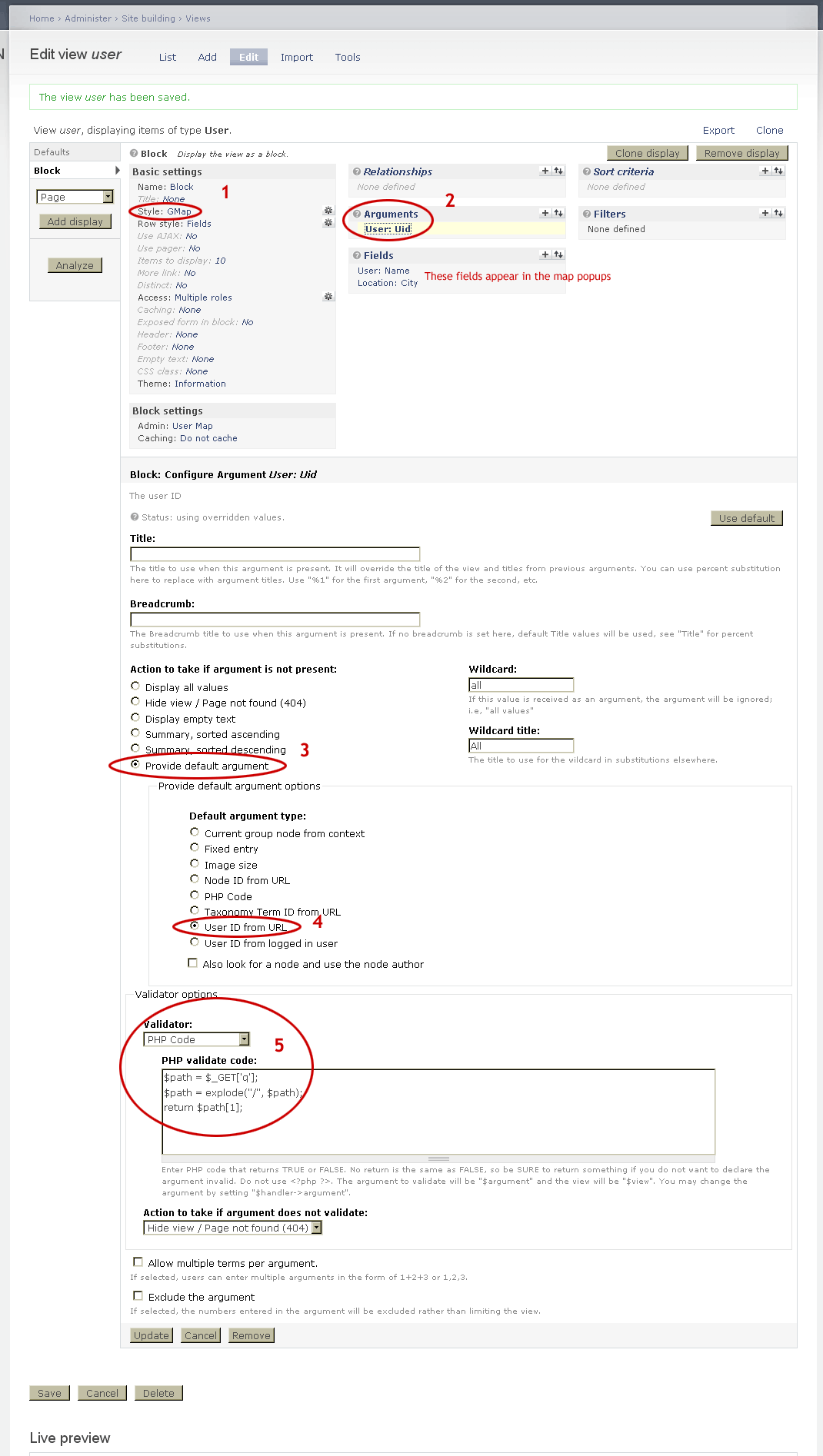
ChrisValentine commentedJust to add that you can also use eriknewby's procedure above do the same for a User node in Drupal 6. Build your View in the same manner and choose User: Uid as the only argument. Then pick:
Action to take if argument is not present:
Provide default argument
Default argument type:
User ID from URL
Validator:
PHP code
and for the code use:
 $path = $_GET['q'];
$path = explode("/", $path);
return $path[1];
Obviously the User record has to have geodata otherwise you won't get a map in the page at all.