Hi everyone,
Can you help me integrate OM Maximenu into AT Commerce?
I've tried following the OM Maximenu instructions which are:-
Main Menu - You have the option to make this as your main menu.
This will automatically replace existing main menu for OM Base Theme.
For other themes, add this print $main_menu_tree; to your page.tpl.php
Which I did in page.tpl.php on line 57
New code:-
<div id="menu-wrapper"><?php print $main_menu_tree; ?></div>
Original code:-
<div id="menu-wrapper"><?php print render($page['menu_bar']); ?></div>
Which places the menu items into the menu bar. But they render without a background, and they do not have the normal vertical stacking behaviour when viewed on a mobile device. See attached screenies, two of the default menu, and two of the OM Maximenu.




You can see these live at, default http://www.johnflower.info/dev and OM Maximenu http://www.johnflower.info/dev2
The reason I'm using OM Maximenu is that it supports jquery Menu, for expanding menu child links. Menu Minipanels doesn't.
Regards,
John


Comments
Comment #1
stan turyn commentedWhat is it that you need help with? Seems like everything is working and you just need to style it.
Comment #2
johnflower commentedHi Stan,
I'm not sure where to begin with styling. I know how to change the CSS to make the background black. But I don't know how to keep the OM Menu within the container. Can I do everything with CSS? Or do I need to play with php either in page.tpl.php or template.php?
The OM main menu doesn't transition correctly from horizontal to vertical. See below:-

Possibly Jeff Burnz suggestions for Menu Minipanels, using hook_page_alter(), might work? I did try them with Minipanels, but I got a function error. And Minipanels doesn't play nice with DHTML or jquery Menu modules.
http://adaptivethemes.com/menu-minipanels-in-adaptivetheme-instant-mega-...
Although I'm not sure where to find the machine name for my OM Maximenu.
Another reason I discounted Minipanels is that I couldn't get them to activate using touch on Android (version unknown). I also tried superfish but couldn't get it to activate via touch either. But even if Superfish did work I'm not so keen on how it puts out menus. I also looked at Gigamenu and Muchomenu. No joy with Giga, and I didn't try Muchomenu because it relied on Mini Panels.
Any suggestions?
Regards,
John
Comment #3
johnflower commentedI'm getting some joy playing with CSS.
Gets me:-
Which is good. I can work with colours and fonts. Is CSS my route to get the menu items to stay within the menu wrapper?
Comment #4
johnflower commentedPerhaps the key is in /sites/all/themes/at-commerce/css/responsive.smartphone.portrait.css and the other responsive.css files and using them to create css for OM Maximenu? Perhaps with:-
Am I on the right track?
Comment #5
stan turyn commentedYou are on the right track. If I were you, at that mobile breakpoint I would remove that dark back ground from menu bar and add backgrounds to
Comment #6
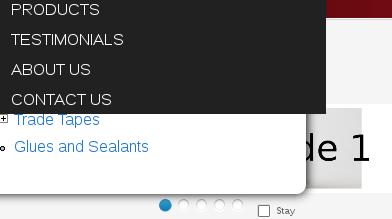
johnflower commentedCSS study time it is. I've made a little progress. I have a few overflow issues to work through, the OM Maxi Menu needs to appear on top of the other menu items, and the screen break points need tinkering. I'll get there. I haven't yet seen what AT Commerce's CSS does for it's native menu, maybe that'll throw me a bone.
The following code...
...gets me:-
Comment #7
johnflower commentedStill having trouble getting the maximenu to appear above the other menu links. Inspired by Jeff's post on Twitter style Login box, I tried:-
But no joy. Any ideas?
Comment #8
Jeff Burnz commentedIs it on the web johnflower?
Comment #9
johnflower commentedHi Jeff,
Thanks for looking in on this. My experimental site is:-
http://johnflower.info/dev2
CSS aggregation is off.
I'm not sure whether it is better to push the other menu items down, or just to overlay the Maximenu. I suspect the former.
BTW using your Sky theme at http://johnflower.org and wrote about how your theme helped me to make my site responsive at http://johnflower.org/blog/responsive-web-design-drupal
Regards,
John
Comment #10
johnflower commentedWorst case... can move the Products item to the end of the menu, then the dropdown works fine.
But having it at the top is better for search engines. In which case displacing the other menu items would be best when in the vertical configuration.
Comment #11
johnflower commentedTwo hours later. No progress. I'm going to have another go with minipanels.
Comment #12
johnflower commentedThis is my second time trying with Menu Minipanels. the first time I gave up because of an error:-
Attempt to assign property of non-object in ctools_block_content_type_render()
Which was raised as an issue at:-
http://drupal.org/node/1739718
and now has a solution, today it is patch or upgrade to dev version.
I also discounted it because i couldn't get jquery/dhtml expanding menus... but I now think this is not important. So the last thing is to figure out how to show the dropdown when tapping on the menu title. Possibly the Special menu items module is the way.
Comment #13
johnflower commentedI've decided to struggle with OM Maximenu no longer. It will take me too long to figure out how to make it work. I'm working with Menu Minipanels instead. Cheers Jeff and Stan.
Comment #13.0
johnflower commentedCorrected spelling