I have a map with popups enabled. In the popups I am trying to show a node's title and a small thumbnail. Every time I reload a page with a map on it, I always observe the same behavior:
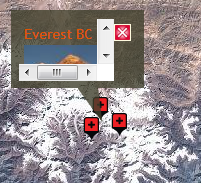
1) I click on a marker, the popup shows up but only part of the content is visible and scroll bars also appear - as if the "overflow" property of the overlay is set to "scroll". See the first screenshot for an example.
2) I close the popup and click on the marker again. This time the popup is sized correctly around the content and no scroll bars pollute the map ;-) See the second screenshot for an example.
Basically I open a popup, it has scroll bars, then I close it and re-open it and the scroll bars are gone.
Any ideas why this is happening?
I looked at the openlayers_style.css provided with the module and the only mentioning of the word "popup" is here:
.olPopupContent {
    padding:5px;
    overflow: auto;
}
I changed the overflow from "auto" to "visible" but that seems to have no effect.
Tested on the latest Chrome v23, FF17 with the same effect. In IE9 the issue is not observed. I am using Corolla theme.
Thanks!


Comments
Comment #1
kirilius commentedI figured this out by trial and error. The issue was caused by the theme and should be closed now.Comment #2
nigelw commentedkirilius can you share exactly what you did to remedy this? I am having the same issue.
Comment #3
kirilius commentedHmmm, I was too quick to say the problem was gone. I noticed that my the base theme for Corolla (Adaptive Core) was not enabled. I enabled it and the problem disappeared for a while. But not it happens again!
It behaves quite arbitrarily. Sometimes I see the correct behavior but most of the time it is what I described in the post above.
Comment #4
kirilius commentedHi there, any ideas? Does this mean that OpenLayers popups are not usable at this moment?
Comment #5
kirilius commentedFor some reason the version of OpenLayers in the issue got changed. Switching back to 7.x.
Any updates?
Comment #6
kirilius commentedHi there is there anybody else experiencing the same issue? Any ideas how to fix this?
Comment #7
cyprien2 commentedExactly the same problem here...
When i clear cache of the browser, the scrollbars appears.
This method (for 6.x version) doesn't work.
Any ideas ?
Comment #8
cyprien2 commentedOk, i've found the problem for me. It comes from the normalize.css.
It was comming with the tag img.
Original code :
When i comment the height: auto; and width: auto; it works :)
Comment #9
drupal27923 commentedI had a similar issue with a scrollbar on the x-axis in popups. To fix it I had to amend the line-height property of a parent container to 1.