
 The 2026 Drupal Business Survey is open. Your response will help shape the future of the Drupal business ecosystem.
On this page
Categories and Rooms
You are browsing documentation for an older version of Drupal, which is not supported any longer, and the information may not be correct. See current documentation for Contributed modules
The first step in setting up Room Reservations is to specify the categories and rooms.
Categories
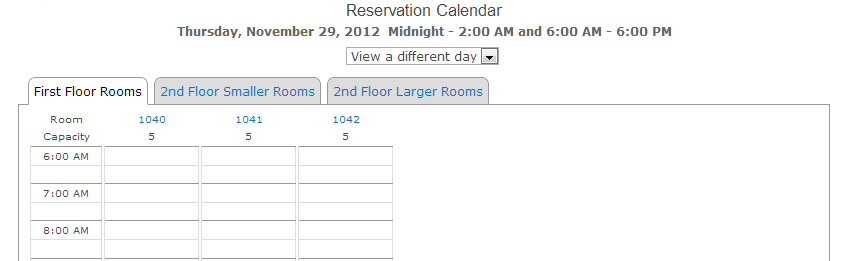
Categories make it possible to organize your organization's rooms into groups. The reservation calendar displays a separate tab for each category you create. The calendar has room for about 4 or 5 tabs, depending on how long the names are for the categories created. Each tab can display between one and seven rooms that can be reserved.
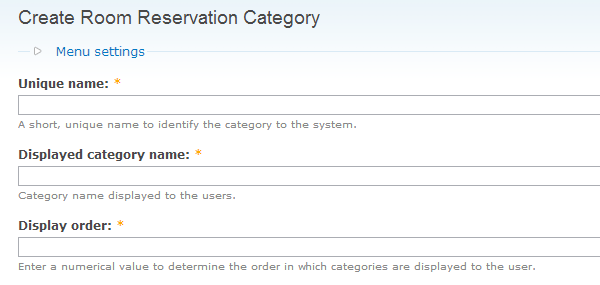
To create a category, go to [your application]/node/add/room-reservation-category, or navigate to Create content / Room Reservation Category. Enter the following information:
- Unique name - A unique name to identify the category to the application.
- Displayed category name - The name of the category that will be displayed on a separate tab in the reservation calendar. Keep this name short so that you will have enough room on the calendar for all the categories you want to display.
- Display order - A number to represent the order in which this tab should be displayed on the calendar.
Rooms
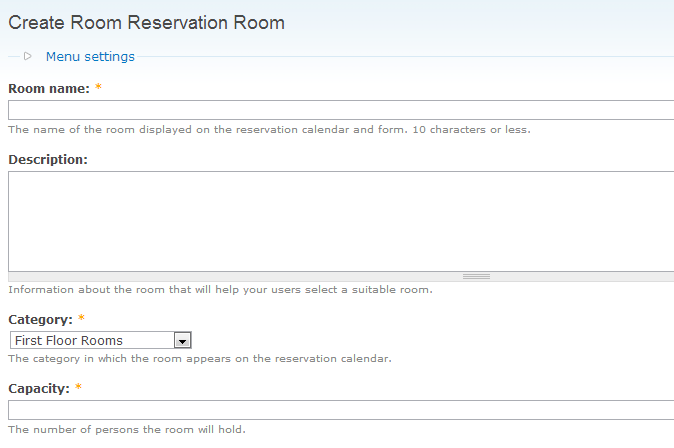
Create a record for each room that can be reserved. Go to [your application]/node/add/room-reservation-room, or navigate to Create content / Room Reservation Room. Enter the following information:
- Room name - The name of the room that will be displayed on the reservation calendar, reservation form, and confirmation and reminder messages. Keep the name short so that it will display correctly on the calendar. Rooms are displayed on the calendar in alphabetical order.
- Description - Information about the room that will help your users select a suitable room. This information is displayed on a Room Descriptions page. It can also be linked to from the calendar by clicking the room name.
- Category - The category group in which the room appears on the calendar.
- Capacity - The number of persons that the room will hold.
Help improve this page
You can:
- Log in, click Edit, and edit this page
- Log in, click Discuss, update the Page status value, and suggest an improvement
- Log in and create a Documentation issue with your suggestion
