
 The 2026 Drupal Business Survey is open. Your response will help shape the future of the Drupal business ecosystem.
General settings
You are browsing documentation for an older version of Drupal, which is not supported any longer, and the information may not be correct. See current documentation for Contributed modules
The General Settings page is used to configure miscellaneous options for the Room Reservations module.
Preview
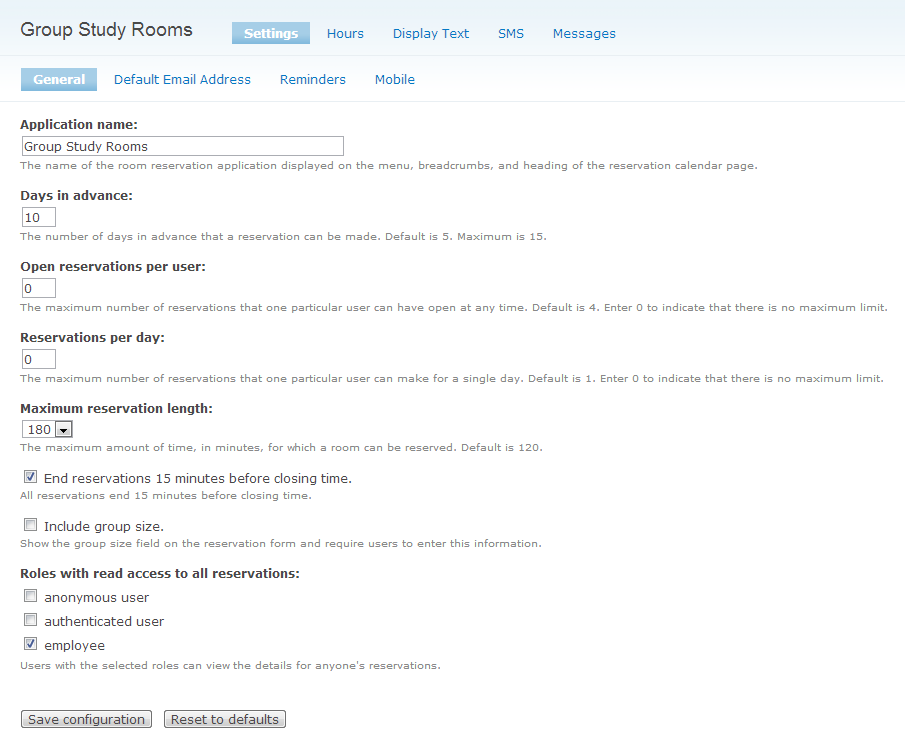
Fields
Application name
The name you would like to give to your Room Reservations application. This name appears on the page titles and menu.
Days in advance
Determines how many days in the future a user is able to make a reservation. The maximum value is 15 days and the default value is 5 days.
Open reservations per user
The maximum number of future reservations a user is permitted to have at any one time. Once a user has made this number of future reservations, she will not be able to make new reservations unless one of the existing reservations has been cancelled or the time has passed for an existing reservation. The default value is 4 reservations. Enter 0 to allow an unlimited number of reservations to be made.
Reservations per day
The maximum number of reservations a user is permitted to make for a single day. Once a user has made this number of reservations, he will not be able to make new reservations for that particular day unless one of the existing reservations for that day has been cancelled. The default value is 1 reservation. Enter 0 to allow an unlimited number of reservations.
Maximum reservation length
The maximum amount of time, in minutes, for which a room can be reserved. The default value is 120 minutes or 2 hours. The largest possible value is 240 minutes or 4 hours.
End reservations 15 minutes before closing time
If this option is selected, all reservations will end 15 minutes before the building is closed. For example, if this option is selected, and the building closes at midnight, then the longest period of time a room could be reserved at 11 pm would be 45 minutes, and the reservation would end at 11:45 pm.
Include group size
If this option is selected, group size will be added as a required field on the reservation form. Radio buttons will be displayed on the reservation form with values ranging from 2 to the capacity of the room being reserved. When making a reservation, the user will be required to enter the number of persons who will be using the room. This option is useful when use of the rooms is restricted to groups of 2 or more persons.
Roles with read access to all reservations
A user is normally only allowed to view the details of the reservations that she herself has made. However, some users, such as employees, may need to be able to view any reservation. Users with the roles selected here will have read-only access to all reservations in the system.
Mobile site url
When the application is accessed from this url, it is displayed in the mobile format.
Help improve this page
You can:
- Log in, click Edit, and edit this page
- Log in, click Discuss, update the Page status value, and suggest an improvement
- Log in and create a Documentation issue with your suggestion
