I'm using Windows XP with Firefox 2.0.0.7. I get the same odd-looking screen as shown at http://groups.drupal.org/node/6480#comment-19182. This odd- looking screen is the result I see when visiting http://therickards.com/mysite/demo.
However, when on the module's home page at http://drupal.org/project/mysite, the demo link takes me to http://therickards.com/mysite and I can see everything just fine on my screen. Everything there looks the way I assume the module's maintainer wants it to look - nice and clean.
NOTE: I do not use the MySite module but am submitting an issue per the request of the module's maintainer, Ken Rickard. I assume that Ken is using 5.x-2.13 on his demo web site, so that's the version I identified above. Ken, feel free to correct as you wish. I wasn't sure what "Component" to mark so I marked it "Miscellaneous".


Comments
Comment #1
vm commentedI see the same things in IE7
on the one site everything is overlapping, on the other its perfectly inline.
Comment #2
bonobo commentedHello,
I looked at three screens:
1. http://therickards.com/mysite -- a modified garland theme, fluid width, two columns, with no images that exceeded the column width, where everything looked fine
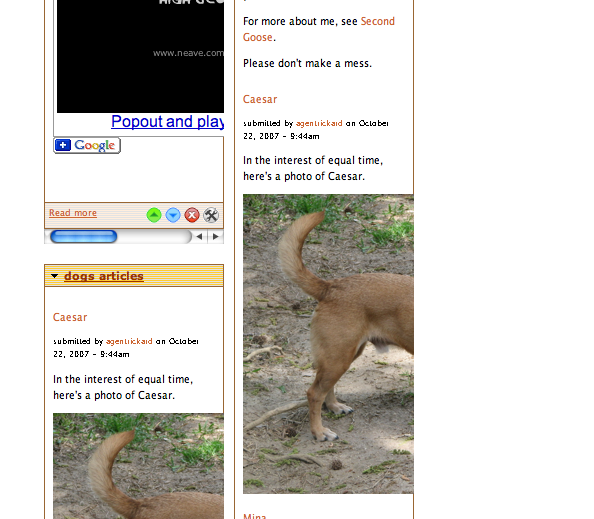
2. http://therickards.com/mysite/demo -- a theme that appeared to be fixed width, three columns, with pictures that exceeded the width of the average column, with overlaps occurring where pictures were larger than the average width -- the screenshot in this comment is what I saw as well, and it appeared that the left edge of the images was positioned correctly, but that the right edge overflowed into the other columns.
3. http://therickards.com/mysite/agentrickard -- a modified garland theme, fluid width, two columns, with no images that exceeded the column width, where everything looked fine
So, as I look at this, this feels like it has something to do with a fixed width theme vs a fluid width theme -- I'd be curious to see what http://therickards.com/mysite/demo looked like with the same theme as 1 and 3.
Thanks for taking the time to look at this.
Cheers,
Bill
Comment #3
bonobo commentedBTW, the above report is true for both FF 2.0.0.8 and IE7.
Comment #4
agentrickardAwesome reports.
So is the problem simply that the image is too big? There isn't much we can do to correct that from a code perspective. That may need to be left to "user choice" -- that is, if the item makes the page look odd, then remove the item.
In FF on the Mac, the DIVs auto-resize and cut the image -- see screenshot.
Anyone know of a way to force this on PC?
Two notes:
1) I don't really have good access to testing on a PC, so help is appreciated.
2) I don't know that we can account for all possible layouts in all browsers, just using CSS. The problem here seems to be that certain objects are too large. But we don't want to enforce a fixed size, either.
My hunch is that a slight change to this part of mysite.css might fix the problem:
Perhaps this:
Comment #5
agentrickardI forgot the screenshot.
I added the "overflow: scroll;" line on the demo site.
What does it look like now in PC-land?
Comment #6
bonobo commentedTwo screenshots of http://therickards.com/mysite/demo, taken in FF and IE -- I intentionally made the screen size smaller to see if I could force an overlap -- the scroll seems to be working well.
All that said, I agree, that this is an issue that cannot be solved by css alone -- user choice and overall theme design will need to be incorporated on a site by site basis.
Thanks for your work in looking at this.
Cheers,
Bill
Comment #7
bonobo commentedand the ie screenshot
Comment #8
agentrickardThanks a ton, bonobo.
Those screens are acceptable to me, since they don't break the page layout.
So the overflow solution might be the best one.
Any other thoughts?
Comment #9
Walt Esquivel commentedYes, http://therickards.com/mysite/demo is now looking good on my Windows XP running FF 2.0.0.7. Good job Ken!
Slightly off-topic question related to screenshots:
I was searching around for a good screenshot program for my Windows XP. Can anyone reading this provide a good suggestion or two? I was going to post my screenshot here but Bill beat me to it! Thanks in advance.
Comment #10
Walt Esquivel commentedOh, and I forgot to mention an open-source version (for Windows XP) is preferable. I found SnagIt but it runs about US$40.
Comment #11
bonobo commentedRE additional thoughts --
I think the scroll you have in place is probably the most generic solution, given that it won't break page layouts --
About the only thing I'd probably add in would be a line or to in a readme.txt --
"On fixed width layouts, images that extend beyond the default width of columns on the mysite pages will be forced to scroll in order to not break the page layout. As three column layouts create more narrow columns, you are more likely to see scrolling on mysite pages with 3 columns. The css that governs this behavior is on lines xx-yy"
But really, this is something where the "right" answer will vary on a site-by-site basis, and coming up with a one-size-fits-all solution isn't really possible.
Cheers,
Bill
Comment #12
agentrickardThe ReadMe addition is a good idea.
Of course, site admins can also prevent this by:
- Using only fixed width or only fluid themes with MySite. (There is a UI for this.)
- Removing the layouts that don't work with their themes (3-column, for one, might just be removed). This feature is already documented; you simply remove the file from the mysite/plugins/layouts folder.
The real bug here was breaking the layout, and I think we fixed that.
Cheers to all!
Comment #13
agentrickardWill commit later tonight.
Comment #14
vm commented@ walt with regards to a screen capture tool. without added software you can use the printscrn button and past the capture into any image editor. Although snagit IMO is worth the 40$.
Comment #15
agentrickardThis has been committed to 5-2 branch. I'm doing some unstable work on HEAD right now.
Thanks to everyone for pitching in.
Comment #16
(not verified) commentedAutomatically closed -- issue fixed for two weeks with no activity.