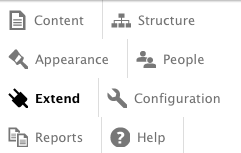
In the attached screen shot, the right borders on Structure, People, and Configuration, are smart enough to go away because they are at the ends of lines, but Help stubbornly keeps its border. It looks really weird when the window is narrow enough that the menu is a single column (and the user is stubborn enough not to switch to vertical mode).
These are the lines of CSS at fault:
.toolbar .horizontal .menu li:last-child {
  border-right: 1px solid #dddddd; /* LTR */
}
(toolbar/css/toolbar.theme.css). I assume there are corresponding lines in toolbar.theme-rtl.css.
Can we just get rid of that right border? The toggle switch already has a left border.
Related issue
#1852348: Toggle to change orientation of toolbar is not easily discoverable.


Comments
Comment #1
magunz commentedHi There, it seems fixed already. I've tested that on different browser and I am not able to reproduce it.
at 830px and less the toolbar is toggled to "toolbar-tray-vertical" 1 column
see the attached screenshot "Chrome.png"
Cheers
Comment #2
magunz commentedComment #3
wim leersThe proper solution is at #2228625: Ensure toolbar items do not flow on to two lines in the "Manage" tray IMO.