

 Come together with the global Drupal community in Rotterdam, 28 Sept – 1 Oct 2026. Sessions, contribution, connection, and Early Bird savings until 8 June.
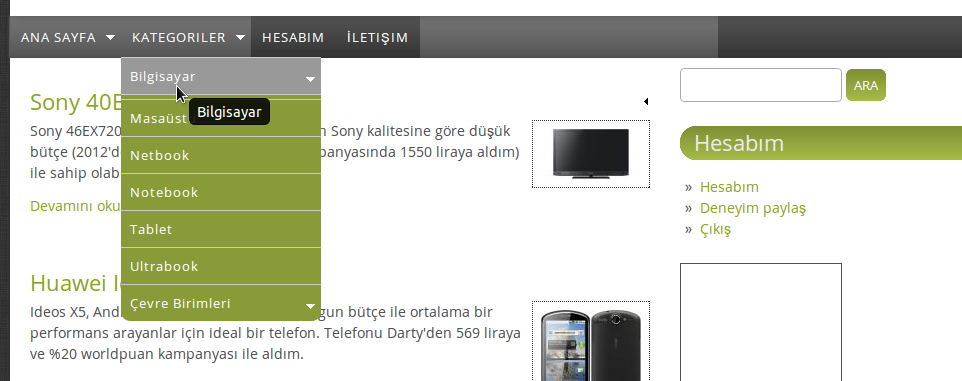
I'm using D 7.17 and I'm using taxonomy menu to add a menu tree to main menu with taxonomy terms. I can use sub menu items with some themes. Some themes don't display sub menu items. But bamboo theme shows submenu items but not correctly. All sub menus should indent to right, but with bamboo them all submenu items shown at same level and this makes menu unusable.
| Comment | File | Size | Author |
|---|---|---|---|
| #1 | Screenshot from 2012-12-09 11:39:24.png | 50.32 KB | coolman7 |
| #1 | Screenshot from 2012-12-09 11:39:20.png | 62.02 KB | coolman7 |


Comments
Comment #1
coolman7 commentedI attached screenshots.
First one is correct with another theme
Second one is incorrect with bamboo theme
Comment #2
danny englanderHi, Currently there is no provision for sub-sub or "tertiary" menus and that's why it's not working. I'm going to mark this as a feature request and I may get to it at some time in the future. You can either provide a patch or use another theme for now. Thanks.
Comment #3
danny englanderComment #4
bawoor commentedBamboo theme using CSS Menu for styling main menu. You can directly add the x level sub-menu style by editing 'menu.css' file in your css theme folder. this sample code to styling secondary submenu:
You can change 'depth-1' selector with 'depth-2' or 'depth-3', etc... for styling x level menu.
Comment #5
bawoor commenteddeleted by me ... Double post.
Comment #6
coolman7 commentedIt works.
Thanks
Comment #7
danny englanderOk I have addressed this issue in a new release, Alpha 8. It will also show up in dev. Alpha 8 is now available for download. I had to be thoughtful about this as I wanted to keep the original styling of the theme for those who are not using tertiary drop down menus. In other words, keep rounded corners on last item secondary drop down menus. There is a new theme setting checkbox to use tertiary menus or not. See the documentation for more info. Thanks all for the code and suggestions, I really appreciate it.