On a site I was building recently I created a little "random image" block. I wanted the image itself to be a link to the node for the image and couldn't find a way to do that. I thought about theming the image and then though - what about providing this as a formatter?
So, here is a patch that provides a second formatter that will take the normal theme_imageview_image code and make it a link to the node for the image. This is not as important on the /admin/content/types/imagenode/display settings but more for views integration (my use of it).
You can see this in action on http://www.denverspanishhouse.com It's a handy little feature which helps to prevent extra work for the themers or unnecessary "glue code".
This also expands the imagefield_field_formatter() function definition to capture the 4th $node parameter which was previously getting dropped.



Comments
Comment #1
gregglesThis still applies to the DRUPAL-5 branch.
I spent a little while re-rolling it but for some reason when I use a view with the "Image with link" option my $item is mostly empty. Any tips?
Comment #2
chrisfab commentedHi there.
For those people (like myself) who have no clue of how to use a patch file, I made this code for making the image link to it's parent node (see below). Simply replace the existing functions ('imagefield_field_formatter', and 'imagefield_field_formatter_info') in the 'imagefield.module' file with this code:
Comment #3
dopry commentedHow about those of you who don't know how to use a patch file learn? There is a great resource @ http://drupal.org/patch.
@chrisfab:
1) This issue queue is a place to post and test patches. You completely break that process by posting a shortcut hack that people cannot consistently test and comment on. This places more work on me to review to patch for inclusion in imagefield. Please refrain from commenting in the imagefield issue queue unless you are providing feedback on a patch, posting a patch, or reporting a bug.
2) The code you posted for copy and pasting does not accurately reflect the code posted in greggles patch.
Comment #4
jpetso commentedFound a duplicate at #224105: "Original image as link to page" formatter by naming the issue more exactly. As there are about three or four different "image with link" wishes in the imagefield issue queue, I take the freedom to assign the name of the duplicate issue to this one, and would suggest the formatter to be named that way ("Original image as link to page").
Comment #5
mdowsett commentedi don't know how to apply a patch anyways. How can I get this fix implemented properly? Will it soon be in an official release?
Comment #6
jpetso commented"How to use patches" documentation is available at http://drupal.org/patch - specific information about applying patches can be found at http://drupal.org/patch/apply. I can't tell you how to fix the patch, though... if I had the time and knew what's wrong, I'd post the working finished one by myself :P
Comment #7
mvalverde commentedgreggles patch really works fine for me on drupal 5.7 !
the only thing i would suggest in order to produce valid html is to replace the line:
with :
since the original patch code produces "A"-tags with "ALT" and "TITLE" attributes wich aren't allowed following W3C Specs.
Marco Valverde
www.explido-software.de
Comment #8
mdowsett commentedI applied the patch (I just learned how to! Yay!!!) and it seemed to go OK. I took a look at the resulting module and it seemed to take the new code just fine.
BUT it didn't seem to have any effect.
This is the site I applied it to:
http://www.viparagliding.com/booksanddvds
So the images in the left column should be click-able to their nodes right?? They still aren't.
Any ideas?
Comment #9
gregglesThis just provides another "formatter" in addition to the default. So, you would have to also change the formatter in your cck "display fields" tab and in any views you have. Did you do that?
Also, I'm unassigning myself since I don't have time/interest to sheperd this patch any further.
Comment #10
mdowsett commentedSorry...I don't follow what you are saying. I didn't think to change it in the view so thanks for that tip....but there is no further options since I did the patch.
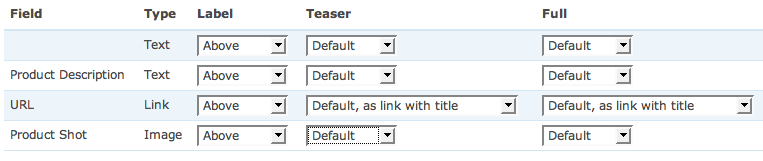
I went to the display fields tab in my content type and there are no formatter options (screenshot attached) nor is there an "As Link" option in the Views option (screenshot attached)
thanks for the tips
Comment #11
spiderman@mdowsett: i had to clear my caches in order for the new formatter options to show up (both in the Display Fields and Views options). after that, the original patch worked perfectly :)
Comment #12
mdowsett commentedwhat-do-you-know....I haven't changed a thing since my last post but I now went into the view to entertain/honour your reply and now the "image with link" is there in my view fields settings.
Must have been a cache thing.
Thanks for your reply...if you didn't follow thru with the reply, I probably would have given up on it.
Was this patch committed?
Comment #13
mdowsett commentedgeez....I tried applying the patch on another site - and got the same result (nothing).
I even cleared the cache, nothing
Ran update.php, nothing
Copied over the working imagefield module, cleared cache, ran update.php - nothing.
I guess I'll just wait a few months again and see if it magically kicks in...
Comment #14
dopry commentedI won't be adding this to 1.x, but have some formatter improvements to roll into imagefield from imagecache for 2.x. Greggles, thanks for the idea and patch.. I've just improved on the formatter logic a little bit...
Comment #15
maxiorelfor me it shows up after I created new cck field of this type.
Comment #16
mdowsett commentedI went and deleted the field and recreated it. Also deleted the field from the view I was using and deleted the attached files that were added to any existing nodes. thankfully I'm still in the early stages on this site.
this worked.
A fresh start is always good!