Problem/Motivation
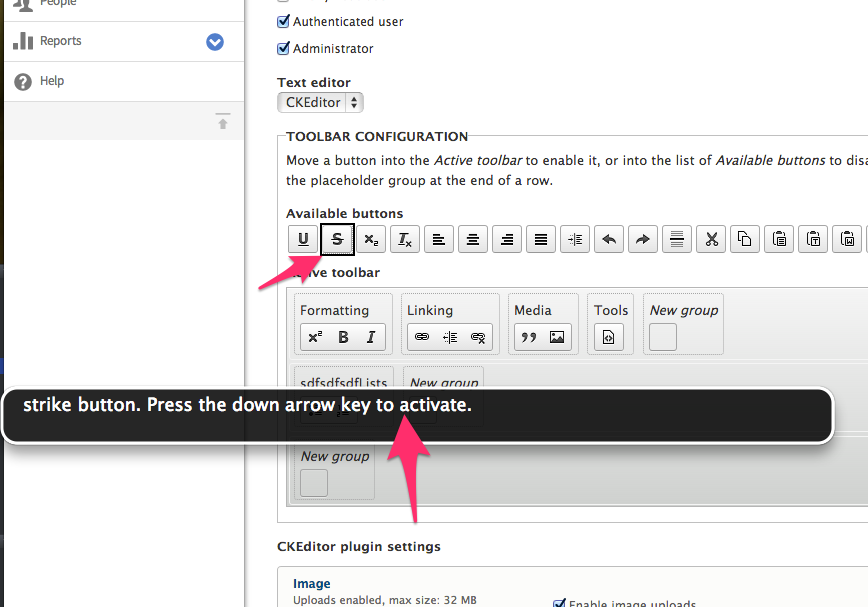
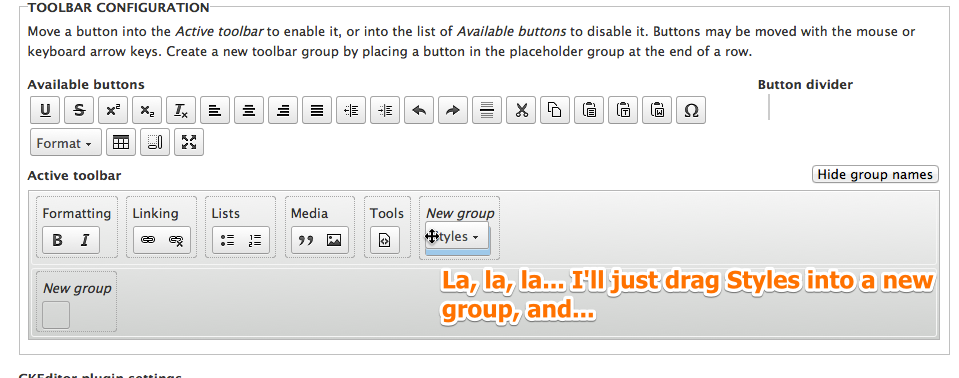
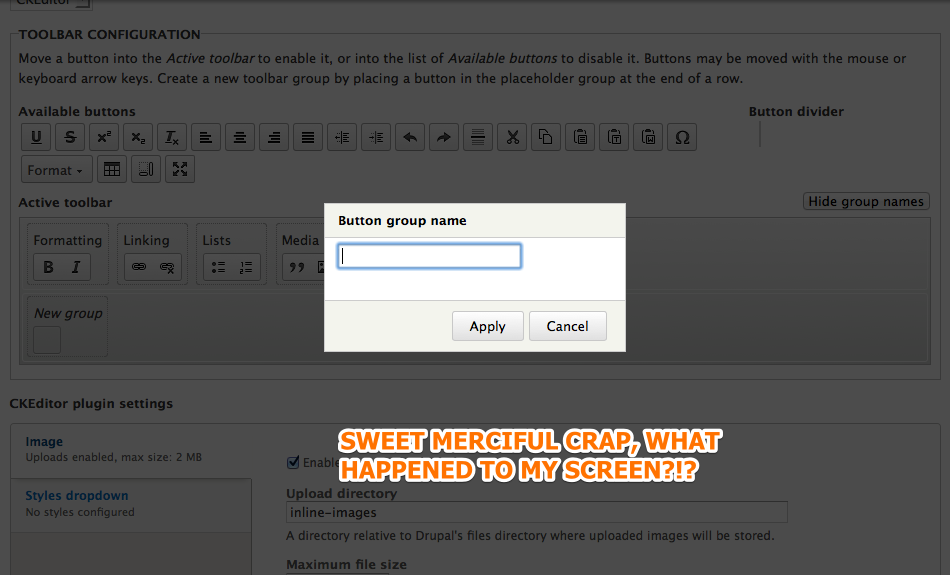
When configuring the Editor of a text format (such as at the path admin/config/content/formats/full_html), the Toolbar components of the CKEditor can be adjusted through a click, drag-and-drop interface.
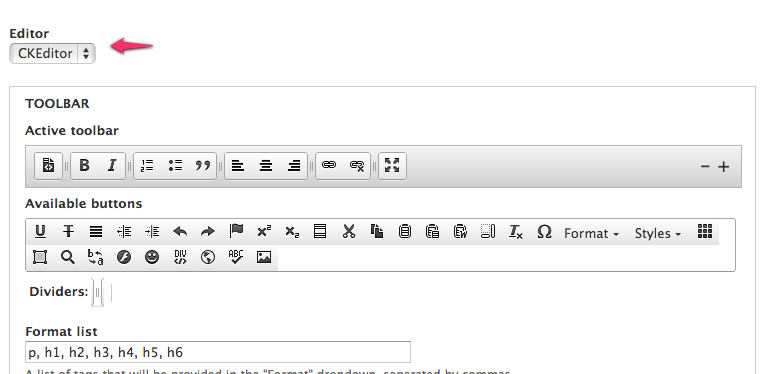
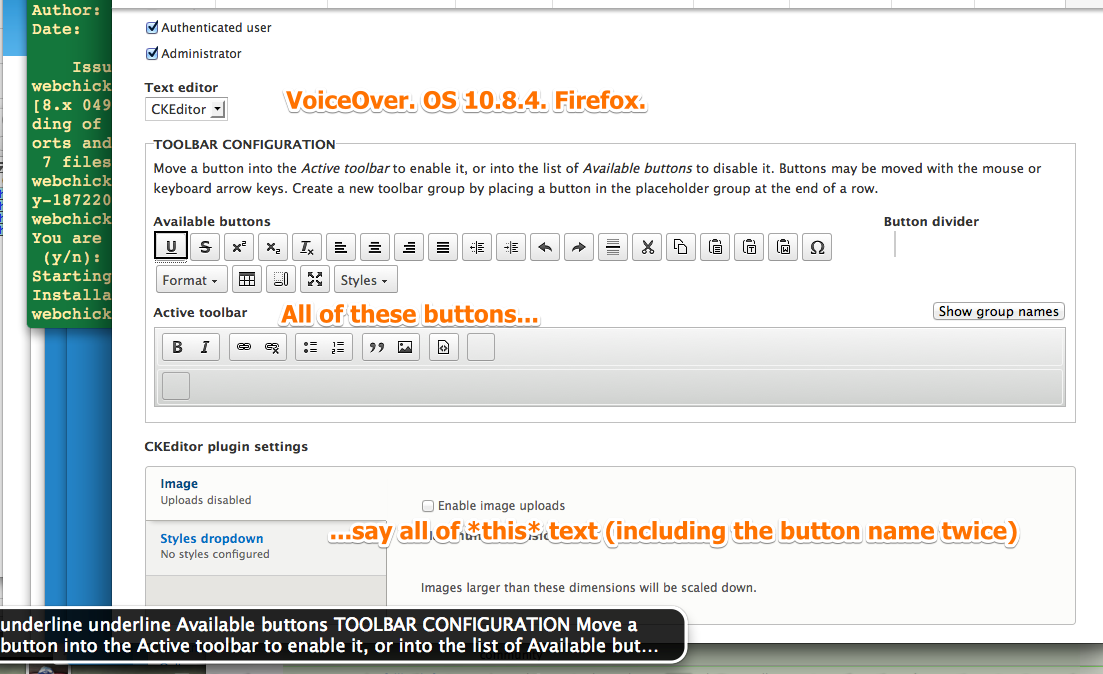
It is not possible to configure the CKEditor toolbar using keyboard navigation.
Turning off JavaScript results in no toolbar configuration.
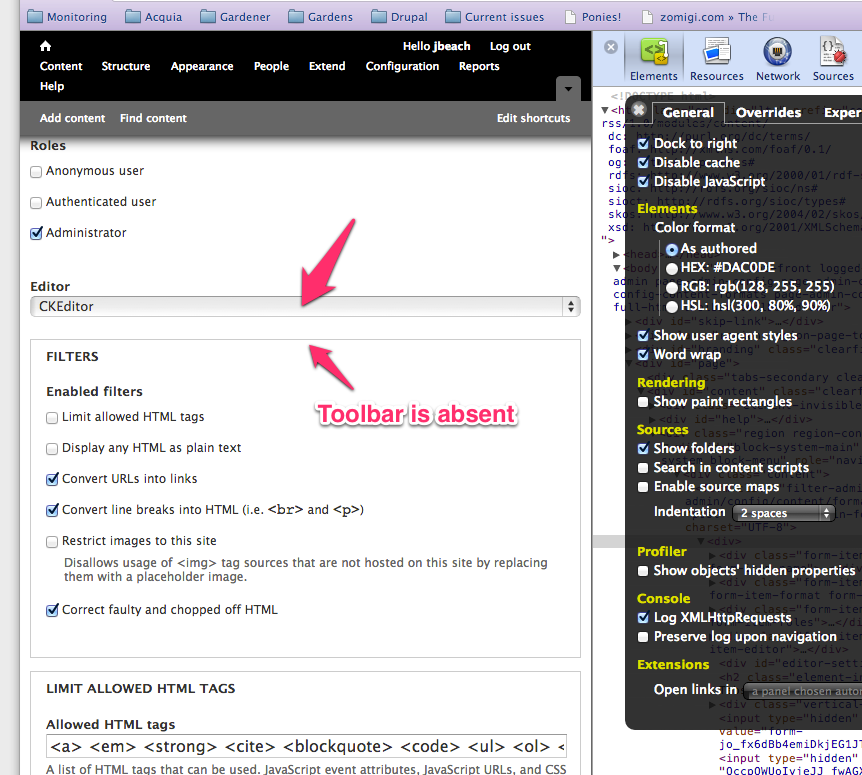
Proposed resolution
The drag-and-drop click UI should be driven from an HTML form that underlies the more complex UI. The complex UI could be augmented to respond to keyboard input -- this would be accessible. The non-js version form is desirable because it does not leave a site builder completely stranded if their UA cannot produce the complex interaction.
One of the first steps is to wrap the <img> tags that are used to represent CKEditor buttons in <button> tags so they can be accessed via keyboard input.
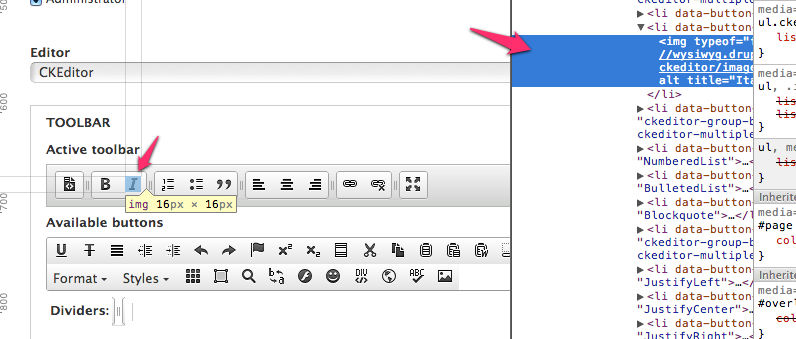
Once the CKEditor toolbar buttons can be accessed via keyboard input, we'll need to develop a way for users to mark a button as a move candidate, tab to a drop slot and activate a move of the candidate into the slot.
Remaining tasks
Determine a solid implementation through discussion.
User interface changes
The configuration of a toolbar should be achievable through keyboard input alone. Ideally, a non-js fallback will be provided.
API changes
(API changes/additions that would affect module, install profile, and theme developers, including examples of before/after code if appropriate)






Comments
Comment #1
wim leersOne could of course argue that since JS is an absolute requirement to be able to use CKEditor in the first place, that a no-js version is a nonsensical request.
I assume you're approaching this from the POV of a visually impaired user who is using a no-js browser, and that user should still be able to set up a WYSIWYG editor for his/her visitors?
Comment #2
quicksketchI've thought about how to solve this problem, and my suggested approach would be to simply use the arrow keys on the keyboard to move items around. Up/down arrows activate/deactivate any given button (or move them between rows) and the left/right arrows position the button into the correct location. Does that seem like it would be adequate?
I agree with this statement. We should focus on making the JS-version accessible. There's no point in making a non-JS version at all.
Comment #3
quicksketchOne followup on my statement here:
There *is* already a non-JS version (though you have to save the text format first to see it). It's just a plain text area containing JSON configuration of the toolbar. However this textarea is certainly not usable for any normal human and it shouldn't really be considered an alternative at all.
Comment #4
wim leersmoshe pointed out in #1833716-82: WYSIWYG: Introduce "Text editors" as part of filter format configuration that touch support is also missing.
I don't think it's an absolute requirement to make this work on smartphones; but it should work on tablets.
Comment #5
webchickThis is going to be a commit-blocker, so raising to critical.
Comment #6
falcon03 commented@quicksketch#2: Oh, I would like that things were so easy. If I understand correctly, we're talking about making a drag-n-drop accessible. Technically it should be possible, but practically I think it won't be so easy.
If we decide to work on making this drag-n-drop accessible, though, maybe we should focus on making drupal's drag-n-drop system accessible and then use it for CkEditor. Or am I missing something?
Anyway, does the demo at
quicksketch.org/wysiwyg
allow to test this behavior?
Comment #7
falcon03 commentedFor example, here:
https://www.ssbbartgroup.com/blog/2011/12/12/accessible-drag-and-drop-wh...
there are two links to two accessible drag-n-drop demo: the problem is that the first one works quite well with Voiceover, but the second one does not.
Anyway, tagging for our accessibility team.
Comment #8
quicksketchI wrote the table drag functionality that has been present since Drupal 6 (e.g. blocks, menu item, and taxonomy term reordering). It is also keyboard accessible via the arrow keys. I don't think this would be any more difficult. We're not actually making jQuery's drag and drop accessible, we're providing an alternative to drag and drop via the arrow keys.
Regarding mobile/touch support for drag and drop, I think jQuery UI will handle that problem eventually, if it doesn't already. As I understand it, adding touch support is (almost) as simple as adding additional bindings for touchstart and touchend instead of mousedown and mouseup.
Comment #9
falcon03 commented@quicksketch: Ok, I am very happy to be wrong regarding the difficulty. However, as a blind user, after dragging an element (e.g. a button) I need to receive feedback from my screen reader to know where I am going to drop it. This will be the hardest part, I think.
However, when things wil start to become "code", I'll review the eventual patch and give my impressions! ;)
Comment #10
quicksketchThanks for that feedback @falcon03. I had been thinking that you were referring to accessibility via keyboard manipulation, rather than drag and drop through a screenreader. Do you have any suggestions on how you might expect to handle an administrative situation where you have multiple rows of buttons that need to be put into a specific order?
Using the keyboard arrow keys could probably make it possible for a blind user to move buttons around, but I wonder how we could provide feedback on the current position. Ideally, I'd like to have a screenreader first announce the availability of the action, such as "Bold button. 3rd position, 1st row. Use the arrow keys to reorder this button." And then after the action announce the position such as, "The 'Bold' button is now in the 3rd position, 1st row." Unfortunately I'm not familiar with how to make screen readers announce such a thing.
Moving the button down (and therefor out) of the toolbar would disable the button. Moving a disabled button up would move it into the toolbar and enable it. Perhaps we can describe this simply through description text above toolbar configuration.
Comment #11
wim leers#10: Jesse Beach has experience with this and she might be of help here. Unfortunately, she's on medical leave for a few weeks right now. What you describe should definitely be possible. I think you're on a Mac, so: 1) enable VoiceOver, 2) use Safari or Chrome to browse a Drupal 8 site with the Edit module enabled, 3) you should be able to tab to enable Edit mode and then tab through the different editables on the page and edit them.
At appropriate times, you will hear announcements such as the one you're describing.
(I'm only posting this to indicate that this is possible; I'm by no means an expert — please always consider falcon03's feedback over mine :).)
Comment #12
falcon03 commented@Wim Leers: don't worry, you're right! :D
Just two facilities for Mac OS X users: (1) if you want to enable Voiceover, simply enter "Command + F5" (entering this hotkey again will turn off it) and (2) If you need a better quality voice (Fred is terrible, don't you think so? ;)) you can get one for free by opening the Voiceover Utility (shortcut: Control + Option + F8), then browse to voices from the settings category list and then select "Ad hoc..." from the "default" listbox.
If anyone needs support with a screen reader, feel free to ping me! :D
@quicksketch: well, currently I have no demo of an usable drag-n-drop for blind users. ARIA should have some roles/attribute to help us to deal with it, but from what I've read ARIA is not enough. Let me find some sources and I'll post them here during this week! :D
Comment #13
falcon03 commentedWell, the purpose of this comment is to bring up to the table some details on how a blind user could expect a drag-n-drop to work. These are my opinions and they haven't been discussed by the whole accessibility team yet (I'll ensure that this will be discussed soon).
The first thing we need to figure out is the best way to organize draggable items so that they can be dragged and dropped easily and in a logical way. I think we have two possibilities:
Once we figure out the best way to organize draggable items, we need to figure out the effective workflow to drag and drop an item using keyboard and a screen reader. We have two possible implementations:
This second implementation needs further details, but I need to think a bit more about them. Also, I mentioned wrapping draggable items into anchors, but I don’t know if we can wrap them into something better.
Comment #14
wim leersNote that at #1833716: WYSIWYG: Introduce "Text editors" as part of filter format configuration, for all rerolls of the patch posted last week, it's already the case that when you're using the page without JS, you get a "Configure" button, which when clicked will cause the relevant configuration form for the currently selected text editor to appear. So one (tiny) aspect has already been solved.
Comment #15
Bojhan commentedJust trying to help out here, but the scope of this issue seems a bit large. And I doubt its all soo critical it needs to be fixed pre-commit of CKEditor. For example, touch support, non-JS version are both not mission critical functions.
Comment #16
wim leersI've discussed this with the CKEditor guys (with Piotrek Koszuliński and Wiktor Walc) and asked for feedback.
As per http://docs.ckeditor.com/#!/guide/dev_toolbar, there are two ways of configuring the toolbar: item-by-item or group-based.
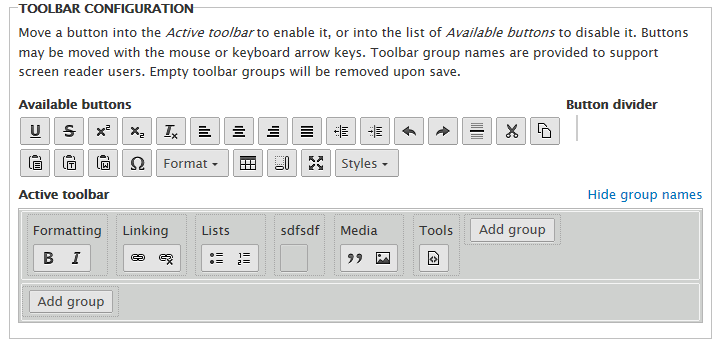
We're currently doing item-by-item. But the problem with our current approach is that there are no "names" for each user-defined group which would be translated into "voice labels" for each group, which is better for a11y. We could add this, but this would make the UI too complicated. Of course, there would still be voice labels for each individual button, so it wouldn't be an a11y disaster.
If we'd switch to a group-based toolbar configuration, then the user would have less control, but also less to worry about. There would be a predefined set of groups (the one that CKEditor ships with; all plugins define default locations for their buttons to be placed in a certain position in one of those groups), users would then be able to click/press each button to either enable or disable it and the button would automatically appear in its predefined group, in a predefined location (with some kind of highlighting indication because otherwise the user wouldn't immediately see where the button had appeared). That's also the downside: it's harder to see (for me at least) how to make this accessible
removeButtonsto exclude buttons the user doesn't want to use), only reordering of groups is allowed, accessibility of the toolbar configuration UI itself may be problematic.Note: I may have forgotten a few minor points because I had to rewrite this from scratch due to browser data loss :/
Comment #17
wim leersTagging; this helps the CKEditor folks track the "CKEditor in core" status on the Drupal side. On the CKEditor side, see http://dev.ckeditor.com/query?keywords=~Drupal.
Comment #18
quicksketchI'm working on providing a keyboard and screen-reader accessible that I should be able to provide later today.
Comment #19
wim leersWoot!
Comment #20
quicksketchOkay, here's a reroll that makes this interface as accessible as I know how to make it:
Because the additional JavaScript needed to take into account right-to-left movements (left and right arrows have flipped behaviors in RTL languages), this patch also includes CSS files for RTL support in the admin interface (we already have RTL CSS files for the rest of the module).
I'll work on getting this patch up on my demo site for front-end testing. @jessebeach and @WimLeers, if you guys would give it a code review that would be great.
Remaining issues I don't think should be directly addressed by this module:
Comment #21
quicksketchI had uploaded a slightly less polished patch. This one adds a few lines of additional documentation and removes a @todo for touch (since like I said above, this should be handled separately from CKEditor). Patch is relative to Drupal root, since this is written against the core patch version.
Comment #22
wim leersVery nice — it's already working very well :)
- Are you sure that using alert() is a good idea? (Jesse will probably know this.)
- There's no help yet on the minus and plus buttons (add/remove row).
I think this should be LTR? :)
Same elsewhere.
AFAIK it is customary to namespace events not on a "per-action" basis, but on a "per-module" basis. I.e. not "ckeditorSOMETHING", but just "ckeditor".
Comment #23
quicksketchNo I'm not certain, but it works very well with screen readers and it's very clear that it's a popup (the button announces it is a popup on focus and then on click it announces that an alert has opened). I think it's unlikely that users utilizing drag and drop or not using a screen reader will ever know they can click on the buttons directly, since the indication given by the cursor icon (with the "move" icon) is so great. I think we can consider the alert to be seen only by screen reader users, except perhaps on occasion where a user doesn't realize the toolbar is "real" or accidentally clicks on a button. So it's certainly better than doing nothing on click.
Two reasons: 1) it doesn't need additional help. The primary reason for the help is to announce the row number and position of a button. These buttons never change position and they already have a label announced by screenreaders as to their purpose 2) if you click on them, they need to add/remove a row, not show help. :)
Weird, I could have sworn we used RTL to indicate something had a matching RTL style. But you're right. No idea where I got that impression.
I'm not sure that custom is something that needs to be enforced, as it'd be perfectly common for a single module to attach two events to the same button if they needed to bind/unbind one (or more) of the events dynamically. In such a case, the module would need to provide more than just the module name. But in this situation, sure, we could easily change this to just "ckeditor", though I personally prefer that the namespace describes the action, as it makes reading the list of bindings on a DOM object clear what each binding does.
So from these, (assuming the alert() is okay), I think the RTL/LTR thing is the only fix that is definitely needed.
Comment #24
wim leersRE: alert: yeah, it *might* be okay, but it's far more intrusive than how Jesse did the a11y stuff for Edit.
RE: RE: remove/add remove buttons. HAH! Stupid me! :)
RE: event namespacing: it's definitely possible to do it your way. I'll ask nod_ to chime in on that.
And yes, the RTL/LTR thing is the only "definitely fix" thing from my feedback.
Comment #25
nod_for custom events, yes it's possible that a module might want to have several namespaces, but events can have several namespaces too. might want to combine one or two to make that more digest. Also we talked about that on this issue #674716: We need guidelines on usage of DOM events and jQuery's namespaced events even if it's more custom-event oriented.
but here the
clickis clearly redundant, it's the event type :) needs some improving.Comment #26
jessebeach commentedI went through the patch and made a few changes to the placement of ARIA roles and the some HTML. I tried not to change anything else about the HTML, CSS or JS that doesn't concern accessibility.
The changes facilitate the screen reader to interject with information about the button configuration form. Using ChromeVox will illustrate what I mean. My goal was to make sure a screen reader user knows what the form does and what the current state of the form is. I don't think it's 100% there, but I'd like some feedback on it.
The other major change is I removed the
alerts and replaced them with anaria-liveregion so the state of each button is read without arresting the page with an alert or injecting visual elements.Comment #27
mgiffordIs this still in sync with #1890502-41: WYSIWYG: Add CKEditor module to core I had trouble applying it against ckeditor_module-1890502-41.patch
Comment #28
wim leers#27: No, it is not; the patches here at #20, #21 and #26 are against #1890502-21: WYSIWYG: Add CKEditor module to core.
Comment #29
jessebeach commentedRemoved "; non-JS version not provided" from the title. A non-JS configuration for a JS-only feature doesn't make sense.
Comment #30
Bojhan commentedPlease provide a demo website, for a11y people to review.
Comment #31
wim leersReroll of #26 against #1890502-41: WYSIWYG: Add CKEditor module to core.
UPDATE: I just noticed that this patch, in combination with #1890502-41: WYSIWYG: Add CKEditor module to core introduces visual glitches. But that's not relevant right now; this issue is about the a11y; the visual glitches we can still fix.
Comment #32
falcon03 commentedOh, simply wonderful to see progress here!
Sorry I haven't had time to get on this before. Do I need to apply the CkEditor integration patch (I know the library is already in core) before applying this patch?
Anyway, maybe a demo site could help us getting more eyes on this: given the importance of this patch, I could make some blind (non-developers) screen reader users trying this feature to get more feedback...
Comment #33
wim leers#32: Applying #1890502-41: WYSIWYG: Add CKEditor module to core (i.e. CKEditor.module) and #31 (i.e. the latest patch in this issue that makes the toolbar builder more accessible) should do the trick. And: thanks! :)
Comment #34
mgiffordThe patch seemed to apply fine.
I'd like a working public site to apply both patches too though.
When I tab through the edit page, it still misses the toolbar.
When I try to use Opera Mobile to browse it as a Galaxy 2 smartphone I can select the buttons, but not after I I've selected the text. I can create a link but not hit OK to actually add it.
I think something's wonky, but I'm not 100% sure I've got a working environment to test. I just know I've applied both patches, cleared cache & am editing a full html page with ckeditor's toolbar displayed on it.
Comment #35
mgifforddidn't mean to remove
Comment #36
falcon03 commentedI had a look at the patch. Things are getting better, but we haven't reached a good point yet, unfortunately.
I tried using the modified interface with Mac OS X and Voiceover, but not with Jaws or NVDA.
After dragging a button and moving it around with arrow keys the only thing I hear is the label of the button that I am dragging and I don't know where I am going to drop it.
Another problem is that I am not able to understand where a row starts and where it finishes, so I am not able to understand which buttons are in a row and which ones are in another one. Could you implement the suggestion in #13 of grouping buttons in a table?
I confirm mgifford's issue: it's not possible to reach the toolbar configuration object by tabbing (btw, the whole toolbar configuration form seems to be wrapped in a particular object that I have to interact with before altering the toolbar configuration) and I have to say that we should improve screen reader feedback when dropping an item. In fact, a blind user needs to explore the new toolbar to understand that the button has been dropped. We could solve this problem by simply making the screen reader say something "X button has been dropped" (don't know the exact string, though).
Finally, I think that the whole mechanism to add/remove a row of buttons is not accessible: when I press one of these buttons I cannot hear anything to understand that something happened!
BTW: it's a bit unrelated (not too much), but is there any chance that we could apply these drag-n-drop improvements to the blocks drag-n-drop interface to make it accessible too?
Comment #37
quicksketchThanks everyone for the reviews! I had attempted to get a sandbox up and running, but with our 3 different versions of the module and troubles with D8, I couldn't get it all together easily. The next week we're launching a site, so I personally am going to be too busy to give this significant effort until after that is done.
In Mac OS X, in order for elements other than forms to be selectable you must change the "Full Keyboard Access" setting in the Keyboard preference pane to "All controls". This makes it so that the tab key includes links in web browsers instead of just form elements. Very little of the web is keyboard accessible if you can't click on links with the keyboard.
I haven't tried out the latest version of the patch, but assuming it works in a way similar to the previous iterations, clicking on the button will announce its current position and row. It sounds like this might be too ambiguous of an option however. Perhaps we should include the position and row as part of the ARIA label and update this in all buttons as a button is moved around.
As for the suggestion of using table rows, it sounds like this would alleviate the problem too, since tables typically have built-in support for row/column position. Unfortunately from a technical implementation, drag and drop in between tables presents a significant challenge. Existing drag and drop libraries do not work well with moving table cells, and if we moved things within table cells, you'd have issues trying to dynamically add/remove cells as needed. Keeping them as lists (especially since they're already working as such), will be a lot easier.
The changes we're doing here are specific to this interface, but the approaches are generic. This might serve as a good example to reference when building other accessible drag and drop interfaces, but it's unlikely that any of the code will be directly applicable to other interfaces.
Comment #38
jessebeach commentedThis patch is a reroll of #31 against #1890502-66: WYSIWYG: Add CKEditor module to core.
Comment #39
jessebeach commentedfalcon03, thank you for the feedback. I hope this update gets closer to the UX behavior that you described in #36. I updated the patch with the following behaviors:
I will set up a testing site in a moment so these changes can be reviewed quickly. Check the following comment for the location and credentials of the testing site.
Comment #40
jessebeach commentedFound a small issue while setting up the demo site. I need to attach a new patch.
The demo site is available at the following address with credentials
URL: http://ckeditor.qemistry.us
user: tester
password: tester
page: http://ckeditor.qemistry.us/admin/config/content/formats/full_html
This site will be available for a few days, then I will take it down.
Comment #41
mgiffordI tried doing this locally with these patches:
ckeditor_module-1890502-66.patch
1872206_ckeditor-a11y_40.patch
And also on the demo site (thanks!), but I couldn't tab to CKEditor let alone within it.
I might be missing something, but at this point I don't see how to access the WYSIWYG without a mouse.
Comment #42
bryancasler commented@mgifford, I was able to use the keyboard arrows to customize the editor....
Toolbar buttons may be moved by drag and drop or with the keyboard arrow keys. Move a button up into the active toolbar to enable it, or down into the available buttons list to disable it. Dividers are available to create logical button groups.
Comment #43
mgiffordHi @animelion - thanks for reaching out. I do think that more data is required though. I've tried on a Mac with FF & Safari. In our tests you can't TAB onto the editor toolbar, getting into the text area is fine, but from there it jumps to the next form elements, not into the toolbar. Now if there were an alert that pops up to remind folks that they can use the WYSIWYG that would be useful.
I brought this up in the Accessibility Skype chat and several others were having trouble using it, but we're now much further ahead.
First there are here are keyboard shortcuts e.g. CTRL+b for bold CTRL+i for italic and CTRL+L does the link. The title on the the link icons can also remind folks about the keyboard shortcuts.
ALT+0 provides accessibility help
ALT+F10 to access the editor & navigate to tab-list in the dialogue
I had to dig for this, but on the Mac it's: FN+ALT+F10 (or fn+option+F10). This probably needs to be updated in the help as otherwise it's just going to be annoying for Mac users.
It seems to work, but this needs to be more discoverable. If you've got 3 Drupal accessibility experts who have no idea how to get into the admin menu, then the general content admin will have no idea.
EDIT: Lots of info on this page here (though seems to be 2 years out of date) - http://ckeditor.com/blog/CKEditor-WAI-ARIA-Usable-Accessibility
Comment #44
jessebeach commentedOk, I think I understand now mgifford. You're talking about the usability of the CKEditor wysiwyg editor itself. That's a fair point. My experience with it was the same in that I tabbed into the edit area and then right out. I had to go read the documentation to learn the
ALT + F10trick to get into the toolbars.But this issue is about configuring a CKEditor toolbar, not using the CKEditor wysiwyg.
This is a demonstration video of me tabbing through the configuration UI: http://screencast.com/t/16fnfbcpH
We want to pass judgement on the configuration experience in this issue, not using the editor. Using the editor is also an issue, but one we should kick over to the CKEditor team.
Comment #45
mgiffordThere are things that can be done to improve the accessibility of the CKEditor integration and how it is presented to Drupal users, but we can open those up as a new issue. These wouldn't be big things, but more polish.
I think we can say the known accessibility issues are sufficiently addressed for this issue.
Now what needs to be done to make this RTBC?
EDIT: Also, I did do some testing of the editor from my iPhone.
Worked pretty well there too.EDIT2: Actually I was wrong on that. Or maybe I just haven't figured out how to use it with my iPhone.
Comment #47
falcon03 commentedI would like to test a bit deeper the patch before marking it RTBC.
Firstly, given the importance of the patch, I think we should test it using Windows + Jaws and NVDA. I'll do this ASAP.
Also, I have a tabbing issue in the toolbar configuration form (the wrapper for the toolbar configuration is not focused by tabbing), so IMO the issue needs a bit more work.
I agree with jessebeach: we should avoid talking about two different aspects of the toolbar into the same issue. The problem outlined by mgifford exists, and we must solve it, but in a follow up (IMO).
Comment #48
wim leersThe patch at #40 has now been merged into the main CKEditor module patch at #1890502-78: WYSIWYG: Add CKEditor module to core, as per mgifford's comment at #45.
mgifford, please remove the "needs accessibility review" tag at #1890502: WYSIWYG: Add CKEditor module to core when you deem it ready.
Comment #49
jessebeach commentedGetting a "good but not perfect" version of CKEditor into core will make the development, testing and review process much much easier. We will no longer need to build the patch in this queue off the patch in another queue and reroll as the dependency patch changes.
We will continue to improve the UI, visual and aural, after feature freeze. That is not in question. Right now we want to get to a place where we know the limitations and we decide we can live with them for a short time because the resolutions are documented or the problems are at least defined.
Having CKEditor in core will accelerate the integration and bug finding/fixing efforts. We should balance perfection with progress.
Comment #50
mgiffordMy discovery issue is listed here - #1904986: Make Keyboard Controls Discoverable in CKEditor related to my post in #43 above.
Comment #51
falcon03 commentedSorry, but I think I have to change status to "NW".
Using Firefox 18.0.1 and NVDA 2012.3.1 on a Windows XP SP2 machine I cannot drag any button using the arrow keys.
But unfortunately this is not my abitual windows testing environment, so I'll give more details about the problem later.
BTW, I noticed that this patch has been merged into the CKEditor module addition one.
But I wonder if we'd not better keeping this issue separate from the CKEditor module addition one. This way this issue won't block the CKEditor module addition one and, at the same time, will make this patch easier to test/reroll/work on (IMO).
Comment #52
falcon03 commentedOh, and I forgot: can we disable the overlay module from the demo site for this issue? Overlay is not so screen reader friendly.
Comment #53
mgiffordI wonder if this is a windows problem in general? I haven't tested this in windows yet for keyboard only users.
Does JAWS give you any errors? How does it differ from the experience with VoiceOver?
Someone disabled the overlay which is good.
Comment #54
wim leersOT: I thought Overlay was pretty good or at least better than dialogs in terms of a11y? You may want to chime in at #1889150: Simplify overlay look, *only use for contextual operations* regarding Overlay.module versus jQuery Dialog in terms of a11y.
Comment #55
Bojhan commented@WimLeers Its both crap atm :) So there is little to discuss, untill jQuery releases their improvements to jQuery dialog a11y which overlay needs to adapt.
Comment #56
falcon03 commentedComment #57
jessebeach commentedAs Falcon03 mentioned in #51, much of the code in this thread was incorporated into the ckeditor patch that went into core.
I've rerolled this patch, mainly just replacing the custom ARIA live implementation with
Drupal.announce. We can continue improving the keyboard/screen reader support from here.Comment #58
falcon03 commentedSetting as "needs review" for testbot. I'll try to give a detailed feedback soon.
Comment #59
quicksketchThis looks cool and I'll review it when I get the chance, though I probably shouldn't be assigned the issue.
Comment #60
mgiffordDefinitely wanting to get @falcon03's & @quicksketch's view on this.
In my testing it seems to be much better. Unfortunately in moving a wysiwyg button with VoiceOver all I get is the name of the block repeated. There's no way of knowing what has been done or where that button is sitting now. It simply repeats the name of the button. Simply repeating "Outdent button" is no where near as useful as "Outdent button moved 2 down list"
I was testing here:
simplytest.me/admin/config/content/formats/full_html
Comment #61
catchComment #62
mgifford#57: ckeditor-a11y-1872206-57.patch queued for re-testing.
Comment #63
mgifford#57: ckeditor-a11y-1872206-57.patch queued for re-testing.
Comment #64
quicksketchHere's a reroll with the following changes:
I'm also downgrading this issue to "normal" because the current system is already accessible in some way. A lot of our improvments were integrated into the original patch that got committed. This new patch is only improving upon the current work.
Comment #65
quicksketchHere's a separate issue for touch support: #1955926: CKEditor admin interface not touch-compatible (Add jQuery Touch Punch to core)
Comment #66
wim leersYay, quicksketch++ :)
@mgifford: curious what your a11y feedback to #64 is! :)
Comment #67
falcon03 commentedI don't know the reason why, but the latest patch brings the toolbar configuration form to the point where no feedback about dragging and dropping was given by screen readers.
Anyway, from my blind-user perspective I find really hard to use this configuration form. The main problem is that I find really, really hard to understand which group a button belongs to. So it's hard to understand how the toolbar is going to look like after dragging and dropping some buttons (including dividers). Unfortunately hearing row and column position of a button doesn't give me the context I need to know exactly what I'm doing.
When CKEditor show its toolbar with a rich Textarea, it does something great. I don't know what markup it uses, but it shows a list of groups (toolbar menus) and I can easily surf through them. Once I find the group that I am interested in, I can easily surf its buttons (and not buttons that belong to other groups if I do not want to). I think that using the same approach in this configuration form would give me the context I need.
Long story short, I think the configuration form should work like this: the CKEditor toolbar should be rendered the same way it is rendered when it appears next to a rich textarea. Clicking a button should activate the "drag this element" event. After dragging this event, I should be able to surf the toolbar jumping from a group to another and/browsing buttons that belong to a group. When I do this, I would like to hear the name of the group or the label of the button that the cursor is placed on and, if I am dragging a button, something like "you're dragging x button" (where "x" is the label of the button that I am dragging). When I am dragging an element and I click on a button it should be dropped into the cursor position and I would like to hear something like "X button has been dropped".
Last (but not least), we shouldn't bind dragging and dropping buttons to using arrow keys.
Finally, I have to say that I am not sure this text is clear. Let me know if you need further details and/or have some questions!
Comment #68
quicksketchThanks @falcon03 for your feedback. Could you describe what method you use to drag and drop the buttons? I've been putting effort into ensuring that the interface is navigable via the keyboard (that should give you feedback after every button movement at least), but it sounds like you can organize a toolbar via a mouse even without seeing the position of cursor or the buttons. Do you use an equivalent of holding down the mouse button, moving the button to the new position, and then releasing the mouse button?
Matching the markup CKEditor provides normally is technically challenging because the groups don't exist yet while you are creating the toolbar. The way we're assembling groups currently is by letting the user move the group dividers to any position they want, and it will make the buttons on the left into one group and the buttons on the right into a second group. This makes for a simple implementation where everything is all in one list together, rather than having nested draggable areas.
Comment #69
quicksketchOn this last point, we don't think we can remove the keyboard support. It's fine if you don't use the keyboard support, but navigation via the keyboard is still a large factor in overall accessibility. Why would we want to remove it entirely?
Comment #70
falcon03 commented@quicksketch: My reply is between your questions.
You wrote:
Thanks @falcon03 for your feedback. Could you describe what method you use to drag and drop the buttons? I've been putting effort into ensuring that the interface is navigable via the keyboard (that should give you feedback after every button movement at least), but it sounds like you can organize a toolbar via a mouse even without seeing the position of cursor or the buttons. Do you use an equivalent of holding down the mouse button, moving the button to the new position, and then releasing the mouse button?
Technically emulating a mouse with a keyboard and a screen reader is possible, but it does not work well. When I said "we shouldn't bind the dragging and dropping to arrow keys" I meant that e.g. on Mac OS X i can browse the page using arrow keys, but also using some other shortcut provided by Voiceover (e.g. "Control + Option + Right arrow" to go to the next page element or "Control + Option + Left arrow" to go to the previous page element). I can also browse the page with a touchscreen mobile device (e.g. an iPhone) or with the Macbook trackpad, as well as tabbing through various page elements. After dragging a button, I would like to move it around with these other shortcuts, not only using arrow keys. But talking to @jessebeach in the Skype Accessibility group about another issue I found out that can be hard, if not impossible, to manage this kind of navigation. What do you think about?
You wrote:
Matching the markup CKEditor provides normally is technically challenging because the groups don't exist yet while you are creating the toolbar. The way we're assembling groups currently is by letting the user move the group dividers to any position they want, and it will make the buttons on the left into one group and the buttons on the right into a second group. This makes for a simple implementation where everything is all in one list together, rather than having nested draggable areas.
Ok, I can understand. But this is the most important issue I found: while for sighted user this mechanism can be obvious, I'm afraid that for blind users it cannot. Additionally, this mechanism has another issue: in CKEditor (but not when it is used by Drupal, see #1900246: Menu item labels have been lost and comment #3 of that issue for steps to reproduce), each group has a "title" (or "name" or "label", I don't know how it is called). When browsing between groups or between buttons that belong to different groups, I can hear the name/title/label of the group. Let's say that I want to add a new group: how can I set a label/title/name for the new group with our configuration form?
Comment #71
wim leersThe most important aspect you found, falcon03, is #1900246: Menu item labels have been lost if I understand you correctly.
The answer is simple: http://docs.ckeditor.com/#!/guide/dev_toolbar. There are two types of configuration:
Now, it is possible to define names for any set of subsequent buttons when using item by item configuration (so: user-defined groups) — see the first example at http://docs.ckeditor.com/#!/guide/dev_toolbar-section-2. It's also possible to implement this. But it will make the UI inherently much more difficult to use, because the person that configures the CKEditor toolbar will have to think about assigning names, whereas now that's not necessary. Worse, the current CKEditor toolbar configuration UI (which is as minimal as possible) would have to be extended to somehow somewhere allow these names to be entered.
(I discussed this with the CKEditor developers and our current approach seemed to be the best compromise, at least initially: CKEditor is still fully accessible, only without the button groups.)
I hope this explanation was mostly clear.
Comment #72
wim leersAs per #1900246-6: Menu item labels have been lost, marked #1900246 as a duplicate of this one. That issue is about the symptoms/consequences of the choices we make on the CKEditor toolbar configuration side.
Comment #73
falcon03 commented@Wim Leers: thank you very much for this explanation. It was really clear and I can understand perfectly the situation now.
Unfortunately I have to say that group names are really important. As I have already said, group names allow me to skip easily buttons that I am not interested in, since I can browse through groups before browsing through buttons that belong to a group.
You can say that there are hotkeys to do quickly what I want, and you're definitely right. But people don't always remember hotkeys or know about their existence.
So I hope that we can refactor this configuration form to use group names (or maybe delete it at all, providing just a default toolbar configuration).
Comment #74
wim leersThis is not a simple refactoring. That would require a rewrite (mostly). The UI will have to work completely differently, because of this entirely new concept of groups.
This is absolutely unacceptable, because it'd make it impossible to customize the CKEditor toolbar configuration.
The only choices we have are: 1) rewrite, 2) to enter groups in the current UI: disable JS and enter JSON configuration for the CKEditor toolbar in the format that CKEditor expects (i.e. the current UI is JS-only), 3) live with slightly lesser a11y.
I think the only sane choice is #1 (rewrite), but there's of course only so much time and we want to move forward on other fronts too.
I sincerely hope quicksketch thinks I'm being silly and that the ability to set group names isn't synonymous to an (almost complete) rewrite. He's also the person who wrote the current drag-and-drop UI so he's definitely in a better position to judge this.
Comment #75
quicksketchI agree with Wim that I don't think a default-only toolbar configuration would be a good fit for Drupal. We're now hinging (or hoping to hinge) other functionality on the toolbar, such as the allowed tag list, since it's easier for an end-user to place a button for bold than it is to enable a
<strong>tag.I can't immediately think of a good solution for naming individual groups. If you named a group, you'd also probably need to be able to move that entire group to a new position at the same time. Say if you named the first group "Formatting" that contained bold, italics, and strikethrough, but then you decided you wanted the first group to be "Media" instead, which contained the Image button. You'd need to be able to swap the positions of the entire groups at the same time. If you just moved the buttons, the group labels would now be mismatched with the buttons inside of it. At the same time, you still need to be able to move the individual buttons within groups. Like I said in #68, I don't think nested draggable objects is going to be a good solution.
Regarding places to enter a group label, here are a couple of ideas:
Comment #76
wim leersI think this is the most elegant solution. It's still a new set of accessibility problems though.
Comment #77
mgifford#64: ckeditor_toolbar-a11y-1872206-63.patch queued for re-testing.
Comment #78
mgiffordI like that the patch in #64 keeps the CSS outline. I do think we should re-roll the patch to try it with the toggle as recommended by @Wim & @quicksketch
Comment #79
quicksketchThis issue has me worn down. The current patch is an improvement on the accessibility (though apparently not good enough yet). Adding support for named groups of buttons sounds like a feature enhancement and should probably be a followup. The end result of this issue is making me feel like writing a friendly UI for 99.9% of Drupal audiences isn't worth the disproportionate amount of effort to support the 0.1%. We've literally spend 5 times as long making the UI more accessible as it took to write it in the first place. As far as an effort/return investment goes, spending more time increasing the usability of a UI that administrators will need to configure once per site is not worth it.
Comment #80
Bojhan commented@quicksketch I think thats understandable, a11y issues have worn me down in the past as well. But its likely there are some unique scenario's here at play, that make it hard for this to be easily accessible. I think its common when we invent new interaction patterns, that it comes with a significant a11y burdon in both figuring out the best approach and implementing it, sadly there is often no clear roadmap to fixing a11y issues. In the end we are doing this for the cause, there is no return on investment calculation you can make, I think thats important to remember even when you are demotivated by the substantial time investment in issues like these.
I think it makes sense for you and WimLeers to perhaps skype/chat with falcon03, because the propositions here seem to indeed carry way too much overhead that will negatively impact ux and code. I think we need to take a step back and revaluate our direction here. I don't think that manually assigning names to groups of buttons is an feasible option, you cannot introduce such overhead on the sitebuilder for any purpose.
Is it possible to do this should be done automatically - maybe those groups wil be non-sensical but I am quite sure for the majority of buttons this approach would be fine. In the cases where one wants very specific group names, because maybe there are dozens and dozens of special buttons - then contrib could provide this solution.
Comment #81
falcon03 commented@quicksketch: When I reported these issues I didn't want to demotivate you... I know that fixing them is hard, but unfortunately these issues exist and can give blind people a hard time.
As @Bojhan said, maybe we'd better chat to discuss these issues in detail. Let me know if you, @Wim Leers and anyone else are interested in this proposal, so that we can establish a good time for anyone (I'm from Italy). There is a Skype accessibility group, but we could also have a private chat on Skype or IRC.
We should figure out a solution as soon as possible, maybe before Drupalcon Portland; otherwise, as @mgifford suggested in the Skype accessibility group, we can sit at a table at Drupalcon Portland and figure out the best solution! :-)
Comment #82
mgifford@quicksketch accessibility is a definitely a huge challenge for any evolving software. It's often a matter of madly rushing around to try to keep up with the really wonderful stuff that folks are developing (but that often introduce barriers for participation).
I was hoping I could find the relative growth of JS in D8 from http://www.ohloh.net/p/drupal but it's not nicely broken up at this point. The front end has gotten way nicer, but also substantially more complicated from a code perspective.
Picking an editor for D8 is a huge step. Sadly all of the editors have had accessibility challenges with them. CKEditor had some good ground initially on making improvements, but there are still lots of known issues:
http://dev.ckeditor.com/query?status=!closed&component=Accessibility
Not that it will be addressed quickly by CKEditor, but is this ultimately something that should be solved upstream in their issue queue? I didn't see it listed there. I am much more certain that this community can fix the problem. It isn't something right now that is even on their radar as far as I could tell.
Comment #83
quicksketchThe toolbar itself for CKEditor is already quite accessible. The original problem brought up here is that the task of configuring the toolbar is not accessible enough.
A second issue was brought up in #67. We're currently not naming our groups when they are configured. So in addition to making the task of configuring a toolbar accessible, we need to make sure that the resulting configuration is also accessible. (Basically, we need an accessible UI for creating an accessible UI). There aren't any problems with CKEditor that need to be solved here, we just need to figure out how to make a UI for configuring it.
Comment #84
mgifford#64: ckeditor_toolbar-a11y-1872206-63.patch queued for re-testing.
Comment #85
mgifford#64: ckeditor_toolbar-a11y-1872206-63.patch queued for re-testing.
Comment #87
wim leersThis is for after July 1. It's not a feature, so it's fine to fix it after July 1. We won't have time before then.
Comment #87.0
wim leersUpdated issue summary.
Comment #88
quicksketchComment #89
jessebeach commentedRerolled against HEAD (99dba0a3fc9880f8da74b897c98cf6265439a219).
Getting ready to start development on this issue again.
Comment #90
jessebeach commentedI've read through all the comments and feedback. Thank you all for the reviews and ideas for improvement. I've got a good sense of how we can make the configuration UX better for keyboard users without too much heavy lifting; just some clever usage of ARIA attributes and HTML structure. I should have something to test tomorrow some time.
Comment #91
wim leersYay! :D Go Jesse!
Comment #92
jessebeach commentedI suggest we address this issue in two parts:
I'd like to make first part, improving the authoring experience, the Critical issue. This will arguably affect more people, since creating content is an activity that will happen magnitudes of order more often than configuring an editor.
We would then downgrade this issue (part 2) to Major. The editor configuration is possible with a keyboard, but the usability and UX are terrible. Such a bug is not usually a release blocker, but it shouldn't be a Normal.
I've made #2072927 a Critical and downgraded this issue to Major. I'm going to work on #2072927 first.
Comment #93
falcon03 commented@jessebeach: thanks for your efforts. I'm really looking forward to test a patch for the other (critical) issue. From what I understood, it was caused by our current way of configuring the CKEditor toolbar because it does not store which group a button belongs to nor allows an user to type the name of a custom group created through the configuration form.
Comment #94
wim leers#93: that's correct!
Comment #95
jessebeach commentedAdding a sprint tag to track the current work for the Spark team.
Comment #96
jessebeach commentedPorted work from #2072927-8: Improve CKEditor toolbar authoring accessibility here.
Sorry for the issue churn. I'm trying to get these issues addressed hewing as closely as possible to a minimal viable product. It turns out that we can't improve the authoring experience without also improving the configuration experience at the same time, so that the configuration schema integrity is maintained.
Tests are not yet passing. My focus now is to get all the CKeditor tests to pass, which mean updating the CKEditor admin forms to reflect the new configuration schema. This will break the UI at first. Focusing on the tests now will at least bring the functionality back to where it was before the configuration change to introduce toolbar groups.
Comment #97
jessebeach commentedRerolled on e2e00fdae4b088d62ec2a7164ef401f3c84c6967
Comment #98
falcon03 commentedI know that the patch is not complete yet, but I wanted to give it a try; unfortunately, it seems that the toolbar is no longer shown (or, at least, a screen reader can't intercept it) after applying the patch.
Comment #99
jessebeach commentedfalcon03, you couldn't find the toolbar on the text format configuration form or on a node edit form?
You're right, the patch here is definitely in a "needs work" state. It's my next task.
Comment #100
falcon03 commented@jessebeach: I couldn't find the toolbar on the node edit form. I know that the patch needs work, but I just wanted to report the issue in case it was not known. :-)
Comment #101
jessebeach commentedSorry, the patch in #97 contained an error, so the toolbar wasn't rendering because of it.
The patch fixes that error and cleans up the rest of the ckeditor tests. All tests are now passing.
This allows us to start updating the JavaScript component of the module to enable an accessible interactive experience.
Comment #102
jessebeach commentedSetting back to needs work. I just wanted the bot to run to verify that we're starting from a clean test base with CKEditor toolbar groups plumbed through from configuration to HTML in both the configuration screen and on an entity edit form.
Comment #103
jessebeach commentedIncremental update. Buttons are now drag-droppable between groups only. Groups are sortable as well.
Next patch
Comment #104
jessebeach commentedThis is still a patch under development, so it might contain some debug and console statements.
The configuration of a toolbar can now be editing through drag and drop again. Buttons can be shifted as well as toolbar groups. Save works as expected.
I'm cleaning up the HTML, CSS and ARIA attributes now.
Comment #105
jessebeach commentedI was tumbling further and further into spaghetti code as I tried to work changes into the existing structure. It finally struck me that I had to refactor the code to do the type of cleanly separated visual, aural and keyboard views we need to make this accessible. So this patch introduces Backbone and our View patterns to this configuration component.
Comment #106
jessebeach commentedI've done extensive testing on the drag-drop configuration interaction. You can drag buttons to new groups and rename the groups. I'll be working on the keyboard interactions next.
Comment #107
wim leersFirst: wow, this is a huge patch. I guess that was to be expected.
Manual testing
When using CKEditor on the full node edit form
The configuration UI
Code review
(Only the first 20% or so, i.e. pretty much only PHP — will review more tomorrow.)
Why the more explicit prefixing? It's fine, but it's also overkill.
This is a very odd new pattern, it's kind of like a "partial theme function". I've seen shorter ones , but because this one is so long, it feels weird. Not saying you should change it, but let's keep this in mind and if you see a way to make it feel less weird, go ahead :)
Extraneous newline.
Hahaha, "whitesmoke" :D
typo
Nice :)
Comment #108
jessebeach commentedCorrect, I'll revert this back soon. I just needed to test that row manipulation works.
I'm looking ahead to the keyboard interaction. If you pick up a button with the keyboard before you create a row, you'll need to put that button back, navigate to the create row button, navigate back to the button list, grab the button and then navigate to the new group in the new row. If the groups are always available, then you're never stuck with that egg-chicken problem. Any time you pick up a button, you can place it in an existing group or create a new one just by placing the button.
We could reduce the vertical space by making the placeholder groups visible only during a drag-drop sequence.
I was thinking the same thing. Maybe we open the toolbar into a "preview mode" as soon as the user goes to move a button. We'd have a toggle as well, but we can trigger that toggle automatically when they express through interaction the intent to configure the bar.
Crap, I thought I'd had that working :/ It at least worked with the
<hr>tag. Oh how I wish we had front end tests for these sorts of things.I just extended existing code here. The pattern feels JavaScripty so I went with it. It could do with a theme function instead.
Comment #109
jessebeach commentedI was only able to get to the button group dialog code today. I added validation that a name is provided and dealt with the cancel button. I also spoke to tkoleary about the design changes and got input from him. Most importantly, he believes that the drop targets are not larger or prominent enough.
Comment #110
jessebeach commentedI've added all of the keyboard controls to move buttons, groups and dividers around. The last bit of work is a @todo that I added to deal with canceling the naming of a group. In this case, the moved button needs to be put back in the position it was in before it was moved into a new group.
Dealing with setting a key press event on the Drupal dialog form took me about 2 hours to untangle. Handling an enter key press is wicked difficult because you also need to suppress the form submit. It took me a while to finagle just the right combo of bubbling suppression and bindings to get the behavior I wanted.
Up next, linking aural updates to the model/DOM updates in the Aural View.
Comment #111
wim leersI reviewed the overall JS. I think this is heading in the right direction; it's indeed applying structure to the spaghetti that was there. It already is a big, big step forward :)
I think it could still be cleaner/more explicit/more structured, but I think that's because you're not done yet. Maybe we should down together and figure out what's worthwhile — we don't want to spend too much time on this, but then again it's also what enables better/easier tight CKEditor plugin integration with Drupal 8 over the next >5 years, so it might be worth it after all.
As per the above, I only have few remarks for now:
This function doesn't do any sorting; it ensures that CKEditor buttons that are enabled ("active toolbar") are also allowed by the filter settings, if not, then it disables them ("available buttons").
Something like
disableFeaturesDisallowedByFilters, or the less verbose but also less exactdisableDisallowedFeaturesseems more appropriate.Not AFAIK. E.g. enable the "Styles" button. Now go make configuration changes. That will trigger this event, and hence will fire this event handler.
Beautiful!
this.getRowNameThese variables are not defined in this scope.
Nitpick: AFAIK Drupal doesn't use
{type} argNamestyle docs, buttype argName. There is some code that does, but it's the exception.Unused.
Comment #112
jessebeach commentedThis update completes the work to produce an aural interface for changes to the toolbar configuration. It's good enough to test while we're at DrupalCon Prague.
I updated the Drupal.behaviors.detach method. It had not been updated to parse the new configuration correctly.
I fixed canceling placement of a button in a new button group with the keyboard. The button move was not properly reverted through the keyboard view.
Still left to be addressed.
Comment #113
jessebeach commentedHere's what I have from work completed during DrupalCon Prague. I've commented all the new code and jsHinted it.
I have not attempted to refactor all of the JS or PHP code that relates to the editor configuration. So there are still some odd patterns in the code that existed before.
What I could use some help with now is verifying that the feature checking code still works. For example, when the configuration page first loads, the Styles feature vertical tab is always present, even though the button for the styles dropdown is not part of the Basic editor configuration. If the styles button is added to the toolbar and then removed, the styles vertical tab is removed as well, as expected. So something in the initialization sequence is running correctly.
Other than verifying the ckeditor features support, we'll want to do a heuristic and usability evaluation of the interactions introduced in this path. The patch can be tested on a path like this one:
/admin/config/content/formats/manage/basic_htmlComment #114
jessebeach commentedHere is a simplytest.me link to test the patch in #113: http://simplytest.me/project/drupal/8.x?patch[]=https://drupal.org/files/ckeditor-configuration-a11y-1872206-113.patch
Comment #115
quicksketchI tried this out in Simplytest.me and found a bunch of strange behaviors, sorry if you were already aware of these:
- In Firefox, the "focus" outline when highlighting buttons now shoots off the left side of the screen.
- I expected that I could hit the delete key to remove a button from the toolbar. Apparently the old version didn't do this either, but after leaving it alone for a while and coming back to it, I had assumed this functionality to be part of the keyboard support. Maybe it should be a separate issue. Removing a "separator" element is particularly difficult with the mouse, so accessing it with the keyboard and hitting delete would be a welcome ability.
- Likewise in the "expected but didn't work" category, the Escape key doesn't work within the modal for canceling the creation of a new group.
- I'd like to see the group names give indication that they will do something when clicked. This could be done with setting the cursor on span.ckeditor-toolbar-group-name to "hand" and setting a hover style (i.e. make it look like link), or the span could just be changed to an anchor tag directly but that would affect the tab key behavior. (I didn't realize you could just set tabindex=0 to allow spans to be focusable, but maybe using a native element that is always accessible by default is better?)
- Actually I just realized you can drag the entire group... that needs visual indication too. Maybe we could use CSS to put a grabbie handle on each group to indicate it's draggability?
- When used in the overlay, moving a button to a new group with the mouse causes the button to jump out from under the cursor. As long as you ignore the visual misdirection, dropping the button still works. When overlay is not used, this problem does not occur.
Overall, the changes look great. The ability to specify groups is unobtrusive yet part of the workflow. The only thing I'd like to avoid changing is the always-there new row. I find the explicit actions for adding/removing rows to be more clear than automatic removal and addition of rows.
Comment #116
wim leersFeedback
That is being fixed in #2089631: Showing/hiding of CKEditor plugin settings is fragile, automate it (breaks in narrow viewports and when enabling CKEditor), it's a pre-existing problem that we don't need to solve *here*.
Changes
ConfigurationModel'sgroupTitlesVisibleattribute.)CKEditorAdminTestdidn't pass anymore; fixed it.input.focus()with$(input).focus(), unfortunately.ConfigurationModelBackbone model was defined slightly incorrectly, which caused its default values to not be picked up, which then caused subtle problems later on.display: inline'd, through an inline style attribute. It was ajQuery.toggle()side-effect (to show/hide the button group names). Now I'm usingjQuery.toggleClass()plus some CSS to show/hide the button group names, and the problem is gone.jQuery.sortable({cancel: 'SELECTOR'})to simply exclude the placeholder groups from being draggable, which also fixes the problem, and simplifiesendGroupDrag(). I also set an appropriate cursor and made sure the user cannot accidentally select the group names text by addinguser-select: noneCSS.That small change, which you probably did an early stage, caused the CKE configuration UI to not break anymore, but at the same time it now included only the *enabled* buttons, rather than *all* buttons!
#115: most of your feedback has been incorporated! :)
I cannot reproduce
I didn't implement
yet because now everything *is* working again, so we can review the rest first, then determine if there's anything else that needs work besides the way we allow users to create new rows.
Comment #117
mgiffordI just did a quick test and we need more input from screen reader users. However, couple things from an accessibility point of view.
I couldn't approve the title without using a mouse here:
I also wondered why you were using this class rather than the visually-hidden, but then saw the Show/Hide group names button on the right. That probably makes sense to do it this way.
I do think it would be better to use a heading rather than a span, as that would provide a better relationship to the list of links that follow:
We could also use the aria-labelledby attribute as described here: https://developer.mozilla.org/en-US/docs/Accessibility/ARIA/ARIA_Techniq...
There should be a semantic relationship though between the header and the list though.
Comment #118
wim leers#117: thanks for the prompt review!
button:focusstyling is far too subtledata-drupal-ckeditor-toolbar-groupattribute on button groups was useless.data-drupal-ckeditor-toolbar-groupattribute (which was actually the group name, not the HTML-class-ified group name) was only being used internally in the PHP, not in the JS, so I made sure that it doesn't show up on the client-side anymore. Slightly simpler HTML on the front-end now.aria-labelledbyto label button groups.Comment #119
jessebeach commentedWim addressed quicksketch's review in #115 (thanks for the review!) with his patch in #118. Wim, thanks for the input! The one comment that hasn't been addressed is this one:
This UX pattern represents, to me, a compromise. Adding a specific action to add or remove a row means that a user, specifically a blind user, must make a decision to add a row before a button or group is "grabbed". With the UX pattern in this patch, a user must simply grab a button or group and move it around. There are no decisions to be made beforehand regarding where the button or group will be placed; you can create a place to drop it as part of the moving action.
I would really like to keep this pattern as a compromise between visual and non-visual folks.
So, in this update, I've done the following:
spanelement that wrapped the group label has been changed to anh3following mgifford's comment in #117. I believe the group labels are using thearia-labelledbyattribute correctly already.This patch feels ready for testing for me. I'd love to get falcon03's input since he has already put so much thought into this issue.
Comment #120
jessebeach commentedTest the patch in #119 on simplytest.me
Navigate to this path once you have installed your new site:
/admin/config/content/formats/manage/basic_htmlComment #121
wim leersYour explanation for why we shouldn't have the add/remove row buttons makes sense. I had the feeling you did it for a reason like this one, I'm glad I didn't change that yet.
And with that, I believe we are indeed in the final stretch for getting this patch committed. I personally have no further complaints, since I fixed those myself already in #116 and #118.
Just for good measure, I went through the code again, looking for flaws. I found a few nitpicks (that I missed myself earlier):
This still needs a comment, I forgot to add that in #116.
Missing trailing period.
s/Default/Existing/
(I know, I added this comment, my bad.)
Not, it is not :)
Enable the StylesCombo button. Then start typing some styles in its setting, e.g. "p.callout|Callout" and "address.special|Special address". Then blur the textarea where you typed those things.
Now a
CKEditorPluginSettingsChangedevent will fire, which will trigger this code path. This code path will then talk to the server, retrieve the updated "hidden CKEditor config" which is used to generate features metadata, and then the updated features metadata will cause the<address>tag to be added to the list of allowed HTML tags.As you can see, a very necessary code path :)
Why? Because doing something like this requires duplicating this type of logic everywhere?
This is not *that* common to do, and neither all that complex.
I don't think we have to provide convenience methods for *everything*.
Missing trailing period.
Leaving at "needs review", because these things are code nitpicks, they're not blocking accessibility review!
Comment #122
quicksketchThis is looking really good. Still experiencing the "disconnected cursor" problem. Again, it only happens *in the overlay* and *in Firefox*. :\
Personally, I find the always-there new row to be a trade-off that puts emphasis disproportionally on accessibility over usability, but overall this patch clearly moves things forward overall on both fronts, so I can't knock it.
Comment #123
mgiffordJust a re-roll of 119.. Someone else needs to apply changes from 121.
Comment #125
mgiffordNot sure why I'm getting these errors here admin/config/content/formats/manage/basic_html
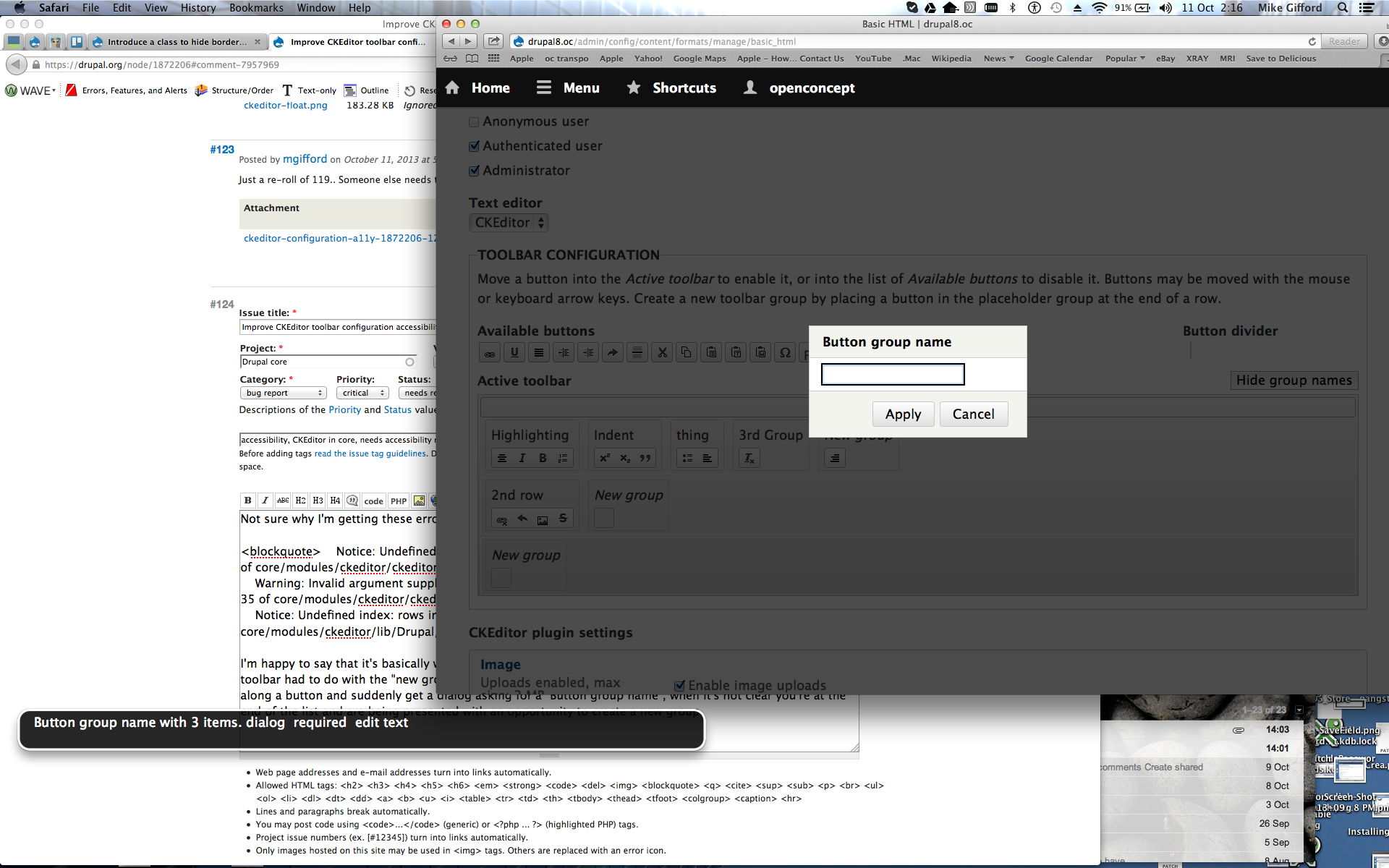
I'm happy to say that it's basically working now. The only problem I came across with creating the custom toolbar had to do with the "new group". From a usability perspective it's bit shocking for someone to bring along a button and suddenly get a dialog asking for a "Button group name", when it's not clear you're at the end of the list and are being presented with an opportunity to create a new group.
What is the button row before the row of groups? That doesn't make a lot of sense to me, but you can with a mouse move items into this row above the groups.
The row of group numbers are actually wrong though. The first row of grouped elements shouldn't be row 2 of 2 and the 2nd row definitely shouldn't be button group 3 of 2.
It did work though the first time I tried it. I could position the buttons and have a good sense of where I was. This is just how @quicksketch's bug above looks like in Safari & VoiceOver.
I reloaded the page though and then it just jumped down the the vertical tabs below.
Comment #126
jessebeach commentedquicksketch, for the longest time I couldn't reproduce the displacement of the drag icon that you documented in #122. Then I happened to scroll the overlay a little and I tried again. Bingo. So what seems to be happening is the jQuery UI Sortable plugin is not taking the iframe's scroll offset into account. Or the plugin doesn't deal well with a fixed positioned, scrollable iframe. This is not altogether unreasonable. But it means that we can't really fix this without hacking the plugin.
Luckily, Overlay's days are probably numbered. #787896: Add a link so that administrators can return to their most recently visited non-admin page
I've addressed all of Wim's comments in #121.
I would of course really like to get someone to give another pass on an accessibility review for this patch. That being said, I do strongly feel that these changes represent a significant incremental improvement. Further improvements are of course possible. For instance, we are now using the "complex" CKEditor configuration that specifies toolbar groups in the end-user UI. For blind authors using an editor to create content, this means they will be able to navigate the toolbar using the best accessibility standards that CKEditor has in place. That change required us to update the configuration UI at the same time. I have striven to make this UI expressive both visually and aurally. I'd love to get verification of this. Below is a link to test this patch on simplytest.me.
Test on simplytest.me
Comment #128
jessebeach commentedmgifford, I believe the "extra row" issues you're running into are from a corrupted reroll or install. Try the patch in #126.
I agree. I can add a string to the announcement when a user reaches the last existing group, that moving the button out of the current group will create a new group.
Comment #129
jessebeach commentedAddressing mgifford's usability concerns from #125:
For a button, the option to create a new row is announced when the active button is in the first position of the last row. Moving a button to another row always places the button in the first position, so this announcement will be heard whenever a button is moved into the active toolbar or moved between rows. The option to create a new button group is announced when the active button is in the last position of the last group of a row.
The option to create a new row with an active group is announced when the group is in the first position of the last row.
The extra announcements add more context. Thanks for the suggestions!
Test this patch on simplytest.me.
Do we need to do anything else to get this committed?
Comment #131
jessebeach commentedRolled a new patch. I think the last one was rolled incorrectly.
Test this patch on simplytest.me.
Comment #132
jessebeach commentedgo bot, go
Comment #133
wim leersFrom #126:
Yes. Let's not let good (or in this case: "very significantly better") be the enemy of perfect.
Jesse has been pushing this forward for many, many weeks. It may not be perfect. But unequivocally, it's a huge step forward on two levels:
Let's achieve perfection in further iterations to fix the remaining small problems individually when they are discovered.
So, I say, let's get it in, so we can stop rerolling a >100 KiB patch.
(I also tested the patch in #131, and it's working great.)
Comment #134
cosmicdreams commented+1 RTBC, but this will need a follow up to fix the remainder.
Comment #135
webchickReally sorry, but this no longer seems to apply for me. :(
Re-testing to see if this is just my problem.
Comment #136
webchickOh, wait, I get it. #2089631: Showing/hiding of CKEditor plugin settings is fragile, automate it (breaks in narrow viewports and when enabling CKEditor) conflicts. I will test this one and if it's good to go, I'll roll back the other one in the meantime since this is a critical. Stay tuned!
Comment #137
webchickI have not read the rest of this issue yet; I'm probably repeating stuff other people have said, but I like going into UX issues blind so I can not be tainted. I mean no disrespect. I'll go back after this and read what other people said.
So the biggest thing, and I don't claim to be an accessibility expert by any means, but this is whack:
When I would expect to get that huge whack of instructions is when tabbing into "Toolbar Configuration," *not* on every single button I tab into within that fieldset. That feels like a commit blocker, unless I've just done something horrible to my machine.
Second thing. I love the "Show/hide group names" button there. Lovely. Is there a reason we can't default this to "hide" like we do row weights, skip links, and various other accessibility features? This way, there's no degradation as far as a visual user is concerned. It seems that when you attempt to drag in a toolbar icon, it automatically shows the group names (yay!) so that shouldn't be too terrible of a change.
There's a lot of jarringness that happens here:
I notice that when you click on a group name, you still get the same modal, so can we just make it so this "auto-pop" doesn't happen on first drag, and your group is just called "New group" until you deliberately name it something different?
And finally, this is happening (once again, in Firefox 24.0, OSX):
- Do various configurations. For example, move button A into Formatting, button B into Lists, whatever.
- Either drag a button into an unnamed group, or click on an existing group name to get the pop-up. Enter "Whatever" and hit ENTER.
- The screen reloads and you lose all of your changes. (*&!*(&!(@!*
:(
Hopefully these are all small, reasonable changes to fix. I would really love to get this in for alpha4 (Friday) if possible, so we can get further accessibility testing done e.g. at BADCamp on a non-moving target. GREAT work getting it this far! If any of these are horrible things that need tons of more time, please push back and we can resolve them later, as long as they don't introduce critical issues (the two critical ones feel like the "hitting enter causes data loss" bug [unless that's just an issue with modals generally] and the "available buttons are not actually accessible because they repeat the entirety of all of the instructions every time" bug).
Comment #138
webchickSorry. :\
Comment #139
webchickOk, now read the past 50 or so comments, although it is past midnight here so I might've missed something. :)
Looks like both Mike and I ran into the "AHHHH!!" problem with the modal. ;)
quicksketch said:
"The only thing I'd like to avoid changing is the always-there new row. I find the explicit actions for adding/removing rows to be more clear than automatic removal and addition of rows."
I agree with this, too. Jesse stated it's a compromise in the design for both visual and blind users, which is fair enough for initial commit, I think. But let's make a "normal" follow-up for it to see if we can brainstorm something even better later.
Looks like we might also need a follow-up to further tweak the ARIA language, per Mike's comments.
The overlay blip also needs a follow-up, but it should be postponed on nod_'s patch. Then hopefully we can mark it "won't fix" shortly thereafter. ;)
Comment #140
wim leersComment #141
webchick"No, we can't do that. When a user creates a new group, that's a conscious choice. Hence it must be consciously named. If we don't force the user to choose a name, then many will stick with the default of "new group" and then we end up with CKEditor instances for end users that are equally bad or even worse than before this patch."
What? No one's going to leave something called "New group" sitting there. :) If they do, then they deserve whatever they get, and their users will yell at them. :) Or, they won't notice because they're not using a screen reader, and will never find out that these groups have names. Either way, it doesn't make sense to default to "You're too stupid to set up your own site," IMO.
Comment #142
jessebeach commentedStraight re-roll of #131. No changes made yet. Just providing this so others can continue testing.
Comment #143
jessebeach commentedRe: #137, the repetition of the fieldset description. Maybe this was a JavaScript error issue? When I tab over the available buttons, this is what I get in VoiceOver:
Can you retry with the patch in #142?
Comment #144
webchickNope, I can consistently re-produce this in Firefox 24.0, even on simplytest.me.
Comment #145
falcon03 commented@webchick, I've not tested this patch at all, unfortunately. However, I have to say that we should enforce site builders to make their websites as accessible as it can be in any possible way. And of course enforcing users to give a name to the CKEditor toolbar's groups is definitely something to do. Blind users could of course report the issue (about missing toolbar groups) to site builders and they could fix it... But isn't producing accessible content in the scope of a CMS?
So, the "You're too stupid to configure your website" concept is really appropriate regarding accessibility. Unfortunately, reality shows that none cares about accessibility if 1) They know the consequences of producing content that is not accessible to people with disabilities or 2) They are enforced to do that or 3) the platform they're using do the job silently for them.
Comment #146
jessebeach commentedI don't think we can fix the VoiceOver/Firefox issues. Firefox just simply doesn't integrate well with VoiceOver in Macs:
http://accessgarage.wordpress.com/2008/08/21/firefox-and-os-xs-voiceover...
Comment #147
webchickfalcon03: Sorry, I didn't mean that we should shove accessibility under the rug. What I did mean is that "New group" has both visual and aural affordances (it's called "New group" as opposed to "Formatting" or "Linking" or something sensible, and it's italicized/emphasized unlike the others) to denote "Hey, bozo. You should change this from the default value." So we should just trust that people will do that, and not create a very jarring visual user experience with the entire screen suddenly blacking out expect for this small modal box asking for a name as soon as you put something in the group in order to "babysit" site builders. We don't do this sort of babysitting anywhere else, so I'm not sure why we'd do it here.
Bummer about FF and VoiceOver. :( I was really hoping that would just be a quick markup change. I guess if the "hit enter on modal and lose all of your changes" issue is generalized to all modals and not just this one, we can probably do a few more small tweaks and then call this good.
Comment #148
jessebeach commentedDerp derp. This was an easy fix. I was missing a reference to
eventin the signature of the function that prevents the form from submitting when the enter key is pressed. One line fix, illustrated below.Putting on my UX hat for a moment, the always-there new row suggests to a user that creating a new row is possible and that to do it, you simply drag a button into the new group. We're providing an affordance. This is a configuration screen and we want to make the configuration actions salient.
But, I've developed a compromise here that I hope works. The extra row and placeholder groups are only visible once the user starts configuring the active toolbar. Hiding the group names also hides the extra row.
I am inclined to leave the interaction alone. We don't want users to create a new group and leave the label as "New group". They can cancel out of the modal and not have any change to their configuration occur. Changing it allows for bad accessibility support and turns a one-click configuration action into a two-click configuration action.
Regarding mgiffords comment about aria-labelledby, this attribute is already in place.
***************
That's all of the commentary so far addressed in this patch.
Test this patch on simplytest.me
Comment #150
Bojhan commentedI wholeheartedly support Angie's position on this, although we should where possible support workflows that focus on making things more and more accessible the affordances here are enough to trigger that state, there is no need to give a "label this dude!" kind of message.
Being considerate also means, not being jarring - and its more likely people will care for a11y if the system as a whole is considerate and informative about choices, rather than when it tries to force you into certain decisions.
Comment #151
falcon03 commented@webchick: well, once again we have different point of view on users-babysitting! :-)
However, in this case I don't really "see" the side effect of the interaction. I admit that I've not tested the patch (I'm attending a CS degree course at university and I'm busy for most of the day having lessons and studying). Anyways, I think Jesse is right: if a site builder does not change the name of the group (what does tell us that the user will change it, since that name is in bold?), we could easily end up in a situation that is worst than the one we have today without this patch.
Comment #152
falcon03 commented@Bojhan: just wondering, since this is a 100+k patch, can we discuss uix/usability in a follow up (even critical, if needed)? I know that each issue should be "self-contained" at this point in the release cycle; however, the removal of the enable/disable module functionality used this pattern as well.
Comment #153
webchickJesse and I discussed this and think we landed on something that will make both UX-ish folks and a11y-ish folks happy. Simply change the "drop zone" for each "New group" area to a button that says "New group." When clicking a button, you're deliberately initiating an action, so it's not jarring at all to then get a pop-up then asking for more details. This will then require site builders to enter something meaningful, which solves the a11y issue, without introducing new UX patterns that we don't use anywhere else.
Comment #154
webchickAlso, big +1 for:
"But, I've developed a compromise here that I hope works. The extra row and placeholder groups are only visible once the user starts configuring the active toolbar. Hiding the group names also hides the extra row."
That seems great! :) Then we keep the discoverability, but only expose it in context.
Comment #155
jessebeach commentedI roughed out the "Add group" button. If this feels like a good solution, then I'll clean up the patch and get it in for real.
Test on simplytest.me
Comment #156
cosmicdreams commentedAlso, and I'm not sure this is relevant, but CKEditor itself has some accessibility updates that are noteworthy:
http://ckeditor.com/blog/CKEditor-4.2.2-Released
Specifically:
http://dev.ckeditor.com/ticket/10753
http://dev.ckeditor.com/ticket/10812
and possibly others.
I can't figure out by looking at it what version of 4.2 we're using. Perhaps 4.2.0? If so we have some low hanging fruit that can be fixed by updating.
Comment #157
webchickCool, here's what #155 looks like.
When just loading up the configuration page:
As soon as you either click on one of the buttons in "Available buttons" (or keyboard navigate to one and press an arrow key):
"Add group" pops open the modal as before.
Yay! That looks great.
Something is wacktastical though (once again in Firefox 24.0, because I really enjoy causing Jesse pain :\) because I can't even type into the modal without it kicking me back to admin/config/content/formats with "The text format Basic HTML has been updated." Presumably that's why it was marked "do-not-test" :)
Anyway, this looks great to me and resolves all of my previous concerns, and I don't believe degrades the a11y in any way relative to the previous patch.
@cosmicdreams: We're currently effectively running a "dev release" of CKEditor 4.3. See #2039163: Update CKEditor library to 4.4 which attempts to move us to a proper release, but is blocked on upstream fixes. But in other words, if those accessibility fixes are in 4.2, we should already have them.
Comment #158
webchickOh, I lie. The wacktastical thing is happening in Chrome too. Yay. ;)
Comment #159
Bojhan commented@webchick That sounds like a fine solution.
The whole group thing might be a little flabbergasting because you don't actually see the labels in your content creation page, can we add a small piece that it is shown to screenreaders? .
Comment #160
wim leers#156: you can find which version of CKEditor Drupal ships with by looking at
ckeditor_library_info(). The 4.2.2 brings minor end-user accessibility improvements/bugfixes, this issue is about allowing the administrator to define a more accessible CKEditor configuration in a more accessible manner. We continuously update to the latest CKEditor. There's an issue right now to update to the CKE 4.3 beta, which includes 4.2.2 changes: #2039163: Update CKEditor library to 4.4. So: no worries, we'll get those improvements, but they are not related in any way to this issue :)#153/#157: that's a nice conceptual compromise, but the visual compromise is awful, IMHO. Before, everything in the visual/drag-and-drop CKEditor toolbar builder UI was visually consistent, nice, balanced. By adding that "Add group" button (that will be styled differently in every operating system and possibly even every browser), that is now guaranteed to be broken. However, that's a super tiny nitpicky problem, so that can be a future follow-up :)
I agree with falcon03 that in this case, we must force the user to do the right thing, even if that makes the UX slightly less nice. What's most important? To have a nice "text format/editor config UX" or a "great screen reader UX"? The former affects one person, the latter affects many. Hence I think it's worth making the admin UX slightly less nice, if that's what it takes to guarantee a better screen reader UX.(UPDATE: That was actually solved by moving to the "Add group" button approach in #157.)
#159: Yes! We should update the "Toolbar configuration" fieldset's description to explain what these groups are for! Good call :)
Comment #161
jessebeach commentedI've added a sentence to the fieldset description.
This rounds out the "Add group" button implementation. I've tested in FF, Chrome, and IE. I had some finicky issues with the key press events, but I believe I've gotten them all sorted. This patch should be ready to go now.
Comment #162
wim leersCode review
And why this clearfix?
"clear: both" in CSS *and* a "clearfix" class on the element where this class exists on. Accident?
WOW! Crazy work-around! Stupid Firefox :(
Manual testing
I did manual testing and found two problems:
Comment #163
wim leersNW, unfortunately :(
Comment #164
jessebeach commentedThis was broken. I've fixed it. The introduction of the add group buttons changed the way that key presses are handled slightly. In fact, it's made the key press handling a little easier, which is nice.
We need this wrapper in order to have something to push the active configuration toolbar top margin against in IE. The buttons in IE are enormous; they span over a single line height and when floated, they overlap the content below them. womp womp.
Yes, copy-paste accident from the roughing out of the change. I've removed the
and
button-primaryclass to the buttons so that they hook into the theme styling.Comment #165
wim leers(That's why I said "mostly".)
Once that's restored, this is RTBC.
Comment #166
Bojhan commentedCan we apply the button styling used for the other buttons there? It's a bit strange there is a sudden hard corner one.
Comment #167
wim leers#166: I hope Jesse understands what you mean, but I have no idea. Providing sufficient context in issue comments is better, and preferably too much than too little.
Comment #168
Bojhan commentedI am referring to the new style that was added for the "Show Group names" this is not matching any styling I have seen elsewhere. At the very least the roundness should match that of the CKEditor buttons that are close to it.
Comment #169
wim leers#168: that's no style, that's default browser style. That's precisely the concern I raised in #160. Improving that can be a follow-up.
Comment #170
jessebeach commentedI tried applying the standard button styling. I'm a little worried that the contrast is insufficient. Here's a comparison of the browser styling versus the standard button styling.
I would really like to avoid going down a path of inventing a new button style here. As soon as we change anything about a button's styling (the corner rounding for example) then ALL of the default styling is lost. We would then need to style everything about the button. I know, it's annoying :/
Wim, I added the close function back. I mistakenly assumed that we don't want to remove the dialog from the DOM in this way because the Dialog spec specifies that a dialog should persist, yada yada yada. Anyways, the function is back in.
Comment #171
Bojhan commentedWhy don't we just fix the style now? Followups like that tend to take foreeever.
Comment #172
jessebeach commentedGo bot go!
Comment #173
jessebeach commentedBojhan, the question is, what should the style be?
Comment #174
Bojhan commented@Jesse I would just go with the way CKEditor styles its buttons. Given that most of the buttons in this area uses buttons with a different kind of styling than core (and/or the style guide), it makes sense to stay consistent to that.
Comment #175
jessebeach commentedI turned the "Show group names" toggle into a link.
I reused the CKEditor button styling for the "Add group" buttons. What do we think?
Style change in IE9.
Style change in Chrome.
Comment #176
mgiffordI just applied #175 and when testing it with voice over http://sc4de5d91fa3c73f.s3.simplytest.me/node#overlay=admin/config/conte... in Safari (with VoiceOver).
Pressing the down arrow on the image didn't activate it. It just skipped down to the Image Vertical tab below the CKEditor configuration.
I tried it without overlay too and it also didn't work.
Comment #177
jessebeach commentedWhat image specifically? The "Insert Image" CKEditor button.
You do bring up that Safari doesn't want to tab to
atags by default. #headmeetdeskI'm fixing this. Hopefully it resolves your issue as well.
Comment #178
jessebeach commentedmgifford, in order to tab to link elements in Safari, you must toggle a preference checkbox in the Safari preferences:
Comment #179
mgiffordJesse, I do appreciate the screen capture with "Press Tab to highlight each item on a webpage" and indeed it was selected. Nice to have that reminder and confirm.
The problem I'm seeing isn't happening on Firefox, Chrome, ChromeVox, Chrome without VoiceOver or Safari without VoiceOver. It's specifically broken when Safari or Chrome is used in conjunction with VoiceOver.
Firefox & VoiceOver are broken and may not be fixed any time soon. Opera's got problems with tabbing over the buttons, but that's outside of the use case we're aiming for.
However, JAWS & VoiceOver are two of the screenreaders that we should be testing with. I just do testing with VoiceOver.
I just loaded your most recent patch up with SimplyTest.me and tested it again.
I think that Down/Up arrows with VoiceOver are reading next/previous line and overruling your commands.
That's the best I can get from:
http://accessibility.psu.edu/voiceover
https://www.apple.com/voiceover/info/guide/_1131.html
Comment #180
jessebeach commentedI'm not getting this behavior with either Chrome or Safari using VoiceOver. Maybe you've got custom bindings to the up/down keys? I can use the up/down keys to move the buttons around. Here is a video.
http://www.youtube.com/watch?v=-_w-GEjNep0&feature=youtube_gdata_player
Comment #181
mgiffordI think I was reporting a problem with my VoiceOver. I haven't tracked down what the problem is (despite all of Jesse's support). However, I was able to verify that it worked on another Mac. So not sure how to track down that problem, but it no longer presents an issue for getting it into Core.
Comment #182
webchickIs that an RTBC? :)
Comment #183
mgiffordYes.. :)
Comment #184
webchickOk, great. I did some more testing today in VoiceOver and I can no longer figure out how to break this. :)
Committed and pushed to 8.x. YEAAAAHH!! Awesome work, all! This is kick-ass.
Comment #185
wim leersYAY! :D
Go Jesse!
Comment #186
mgiffordThat's really amazing.. Great that we've resolved this difficult issue!
Comment #186.0
mgiffordRemoved note about needing to apply a patch as a prerequisite—that patch is in core, yay!
Comment #188
hadi_gsf commentedHello
I'm a new user of drupal and I use a ScreenReader software (JAWS) with windows to create my site with drupal.
Can i apply this patch to drupal 7, or is there any other solutions for drupal 7? or I just have to wait for years untill drupal 8 gets released.
I'm just about to work with drupal, and lots of people advise against running drupal 8 alpha as a new user.
I really want to remove some unused toolbar buttons from my editor so it'd be an easy job to navigate in my editor environment.
Thanks.
Comment #189
nod_Hi,
The code is widely different for Drupal7, there is no backport for this planned (that I know of).
I don't think we have a good solution for JAWS on D7 right now.
Comment #190
mgiffordHey @hadi_gsf - CKEditor isn't going to be brought back into D7. However, CKEditor is it's own project and you can get involved in the issue queue there: https://www.drupal.org/project/ckeditor
I am not sure why you'd be warned against using Drupal 8 as a new user. As someone trying to learn about Drupal, this is a great place to start. It's not a great place to start if you are looking to launch a site this year.
Would be great to have you involved as a JAWS user.
Comment #191
hadi_gsf commentedThanks guys for your replies. I see that d8 is getting lots of new accessibility changes, so i might wait for its release time then build my desired website off it..
Comment #192
mgifford