

Postponed (maintainer needs more info)
Project:
Flex Slider
Version:
7.x-1.0-rc3
Component:
Miscellaneous
Priority:
Normal
Category:
Support request
Assigned:
Unassigned
Reporter:
Created:
29 Dec 2012 at 13:16 UTC
Updated:
2 Mar 2016 at 23:24 UTC
Jump to comment: Most recent, Most recent file


Comments
Comment #1
juc1 commentedOK I think I found this...
Comment #3
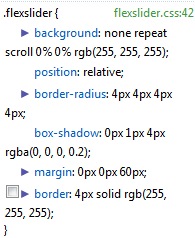
tusik commentedDid this fix it for you? Because I have removed those 60px from the stylesheet and still have over 120px of unwanted space below the slider.
I can't even grasp with Firebug where is that coming from....
Comment #4
minoroffense commentedI would look at Drupal's default list styles as well. Also ensure you're using the right version of the FlexSlider library (1.8+ for 7.x1.0-rc3, 2.0+ for 2.x)
Comment #5
juc1 commented@ cara1940 - yes my flexslider is ok with no unwanted space. I could take a look at yours if you tell me the link...
Comment #6
tusik commentedCiao minorOffense and Juc1. Thank you for your responses.
@minorOffense: yes I have the right library and will follow your advise and revise the drupal default li styles.... it's possible that's where the issue is coming from.
@Juc1 - I have the site installed locally for development. I will try to find time this week to deploy it remotely and accept your offer to take a look (if checking the defualt li styles doesn't solve it), because I have spent countless hours on this on my own and could go nowhere. Thank you!
Comment #7
tusik commentedAnother important thing is I KNOW it' s related to some class/id involved with the functioning of the slider, because if I remove the slider block, the next block immediately below moves into position right below the header, without any margin at all. Also I assign an image style to the slider field for the images, which for some reason causes a blank slide, when we are at the blank slide, it happens the same as described above. So it's something to do with the div that contain each sliding image, I think...But I can't quite precise which...
Comment #8
minoroffense commentedIf you can provide a link to see the site I might be able to help.
Comment #9
busla commented.flexslider {
margin: 0;
}
Proably not the best solution but did it for me. This might cause an issue with the pager though, which I´m not using.
Comment #9.0
busla commentedx
Comment #10
cassien commentedHacked in that file :
contrib > views_slidshow_cycle > theme > views-slideshow-cycle-main-frame-row-item.tpl.php
Just removed all spaced
Comment #11
wiredescape commentedI am getting white space below slidshow when Pager Controls = off in Flexslider option set. Although the pager is not displayed when switched off, the html list and styling margins and padding for the pager buttons remain which creates white space. I suppose all the html related to the pager should be removed or hidden when the pager is switched off?
Comment #12
icgort33 commentedAfter removing the 4px border etc I was still left with a whitespace under the slider. After a few hours of debugging one thing that fixed it was adding:
.slides, .slides > li, .flex-control-nav, .flex-direction-nav {
margin: 0 0 -16px 0;
}
FlexSlider 2 library with Drupal
Version: 8.x-2.0-beta1