

Closed (duplicate)
Project:
Drupal core
Version:
8.0.x-dev
Component:
CSS
Priority:
Normal
Category:
Task
Assigned:
Unassigned
Reporter:
Created:
29 Dec 2012 at 13:20 UTC
Updated:
10 Jan 2015 at 07:31 UTC
Jump to comment: Most recent, Most recent file


Comments
Comment #1
Snugug commentedThis is a terrible idea. There is no such thing as "not mobile content". If you want to hide this from small viewports, ask the following question: do we really need it for the large viewports. If we need it for large viewports, we should not hide it just because someone is on a smaller viewports. There are a plethora of responsive table solutions, we should implement one of them (or come up with our own) before we start willy-nilly hiding columns for small viewports.
Comment #2
shyamala commentedComment #2.0
shyamala commentedAdded admin/config/people/accounts/fields & admin/config/people/accounts/display
Comment #2.1
shyamala commentedremoved additional li
Comment #2.2
shyamala commentedadded admin/config/regional/date-time
Comment #2.3
shyamala commentedadded admin/config/user-interface/%
Comment #2.4
shyamala commentedAdded admin/content and admin/content/comment
Comment #2.5
shyamala commentedAdded admin/people/permissions
Comment #3
lewisnymanThis is the direction that has already been implemented in core. See the patch commited #1276908: Administrative tables are too wide for smaller screens
Comment #3.0
lewisnymanAdded admin/people/roles
Comment #4
shyamala commented@lewisnyman updated issue as a follow to the patch implemented at #1276908: Administrative tables are too wide for smaller screens
Comment #4.0
shyamala commentedfollow up issue to #1276908: Administrative tables are too wide for smaller screens
Comment #4.1
shyamala commentedAdded admin/reports/updates/update, admin/reports/views-plugins,admin/structure/block, admin/structure/block/list/bartik, admin/structure/block/list/seven, admin/structure/block/list/stark
Comment #5
andypostHere's a issue to unify code for draggable admin listings #1855402: Add generic weighting (tabledrag) support for config entities (DraggableListController)
Comment #5.0
andypostEdited no of columns
Comment #6
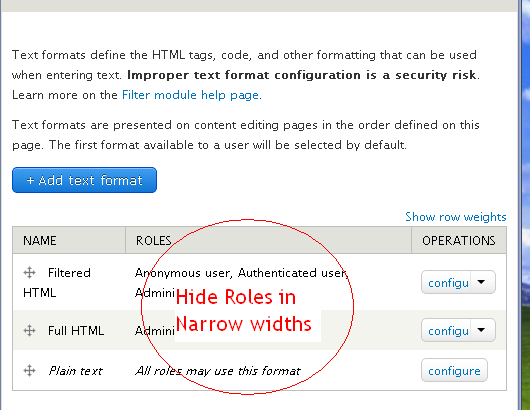
shyamala commentedSuggested resolution for admin/config/content/formats the text formats configuration page:
This page is a 4 column layout with the weights option.
In this page the Role column(2nd column) and the show weights option can be hidden by default in Narrow Screens. In Narrow screens the user will then be able to view the list of text formats and act on them. User will also be able to Toggle to "Show all columns".
Comment #6.0
shyamala commentedadded filter/tips = 4 column
Comment #6.1
shyamala commentedremoved admin/content as this works fine.
Comment #7
shyamala commentedAn approach similar to the resolution detailed above needs to be adopted for admin/config/regional/date-time to retain retain first & last column in narrow screens.
Comment #7.0
shyamala commentedRemoved admin/content/comment - works fine
Comment #8
shyamala commentedAn Approach for pages:
admin/config/people/accounts/fields - 7 column
admin/config/people/accounts/display - 5 column
admin/people/permissions - 4 column
admin/structure/block - 4 column
For many of the Admin pages, we may not be able to selectively hide the columns, especially the field configuration pages, the user permissions page. For such pages we could adopt a solution similar to #1490402: Redesign tabs and the content header suggested by @LewisNyman
Comment #9
jwilson3We can try to hide extra data in the existing tables that Drupal core produces in the Admin UI, but let's not forget that Drupal is built to be extensible.
If a site builder creates a table View for administrators, to replace or augment an existing admin page like /admin/content/content, and the Seven theme's layout completely *breaks* on this page, is it the sitebuilder's fault? IMHO, it's the theme's responsibility to support the fundamental issue of too much data in a row (or header) to fit into a narrow screen.
The obvious solution for this scenario is to add a wrapper around the view table, that denotes that the view is a table layout (this currently doesn't exist), and use
overflow-y: scroll;on that wrapper. Then you come to the problem of keeping sticky headers in sync as you scroll horizontally. -- for me the solution here is also easy: simply don't allow sticky headers when the table header width is wider than the viewport width.Thoughts?
Comment #10
jwilson3Answering my own question, it looks like views already supports Responsive Tables #1796230: Support responsive tables based on the Filament Group's solution.
So with that in mind, where does this issue now stand?
Comment #11
lewisnymanLet's work with the assumption that not every admin table will become a view. Let's finish implementing what we started in #1276908: Administrative tables are too wide for smaller screens
Sadly that is not an adequate solution either, testing showed that it's incredibly difficult to keep track of which row is the one you want when scrolling horizontally.
Comment #12
lewisnymanOk I've applied the table solution to
admin/config/content/formats
admin/config/regional/date-time
I was going to do the others but I'm really struggling to find out where these are kept. Can someone drop me a hint with admin/config/people/accounts/field?
Comment #13
c4rl commentedRelated #1876712: [meta] Convert all tables in core to new #type 'table'
Comment #14
andypostWe need to solve common trouble with tables in core #1876718: Allow modules to inject columns into tables more easily
So making columns and easy alterable
Comment #15
echoz commentedRelated: #1975352: Wide table can push table wider than viewport
Comment #15.0
echoz commentedRetain first & last column, hide other columns by default on narrow screens for: admin/config/content/formats & admin/config/regional/date-time
Comment #16
lewisnymanIt feels like this was succeeded by #2280035: Add another responsive tables solution that doesn't hide content. Feel free to reopen though.