

Closed (fixed)
Project:
Commerce Stock
Version:
7.x-2.x-dev
Component:
User interface
Priority:
Normal
Category:
Feature request
Assigned:
Unassigned
Reporter:
Created:
29 Dec 2012 at 13:30 UTC
Updated:
12 Jun 2014 at 19:04 UTC
Jump to comment: Most recent, Most recent file


Comments
Comment #1
guy_schneerson commented@candelas
I am not sure what the issue is can you give more details?
Is the issue with the backend/admin editing of the stock field or the add to cart quantity field?
Comment #2
candelas commented@guy_schneerson thanks and sorry to answerd so late.
i ended to use 7.x-1.1, but next month i am doing other site where i will be needing version 2.
my problem is that i dont want to show decimals.
if i display the field or i edit it, i always get decimals.
i get: 10,00 and i want: 10
thanks for your pacience with my bad english :)
Comment #3
headbank commentedApologies if doing so myself contravenes etiquette, but I'm elevating this to "bug report" category as (in my opinion) it's not appropriate for the module to maintain stock as decimals by default. Surely the overwhelming majority of people using this module will only require simple integer-based stock levels.
I can understand it might be beneficial design-wise to use floats behind the scenes to make it easier to also cater for those who need them as well as the majority who don't, but I'm seeing decimal values both while editing the product and viewing it in the store, neither of which should be the case by default (again, IMO).
If this is not how the values are supposed to be displaying, then it's a bug of a different kind (which seems to be affecting myself and candelas). If so, I'm happy to assist debugging on request.
Comment #4
guy_schneerson commentedheadbank thank you for your feedback.
I am still not sure of the exact nature of your Issue, this is my understanding.
I can see why you may want to (1) to default to integer but this will be a new feature as at the moment we are supporting both use cases.
I can also see the logic of setting (2) to scale 0 by default.
Please can you confirm this are the two issues you have. also Once I understand your Issue I will be able this Issue a better title.
Looks to me like those two changes can improve the ux for site builders and stock administrators but it is not a bug.
I will be happy to look at this when I have the time or review any proposed patches you or anyone else will submit.
Comment #5
Sinan Erdem commentedHello,
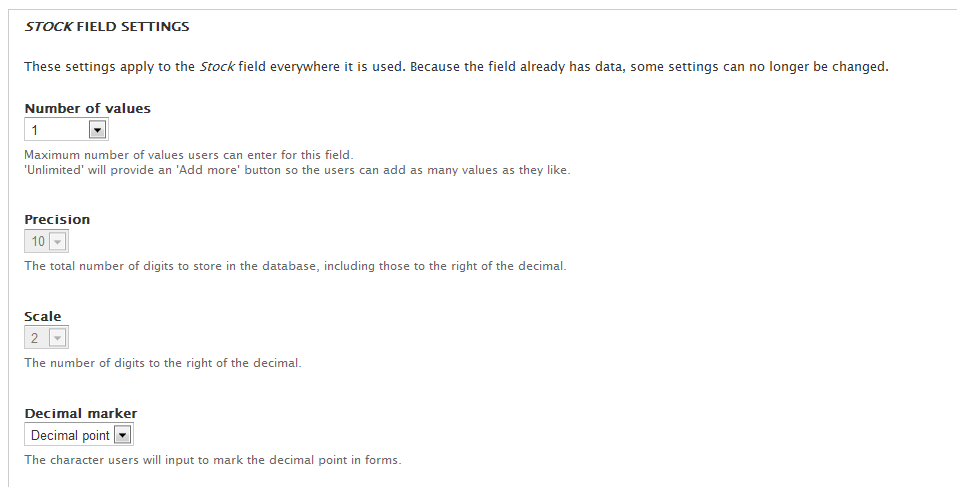
@guy_schneerson, I tried to change the default scale, but in my case it is not editable. They are greyed out and stuck at 2. Do you know why? Attaching a screenshot.
Comment #6
Sinan Erdem commentedI beleive this is because of: "These settings impact the way that data is stored in the database and cannot be changed once data has been created."
But the stock module immediately puts some data on database when it is enabled. How can we change it?
Comment #7
guy_schneerson commentedHi @Sinan Erdem no easy answer.
Once a decimal field has any values it becomes looked by Drupal and cant be changed
The commerce module dosen't need to create the field itself so you can create it yourself however the Drupal ui will no let you create a field without the field_ prefix so you may need to do this programmatically.
Another thing that may work is enabling the field for a product type that has no products you can create a dummy one, before the field is enabled on any other types. this may allow you to edit it (haven't tested).
I suspect that in the long run if this proves to be an issue it should be addressed in the display of the field i.e. widgets and formatters.
Let me know how you get on.
Comment #8
Egan7 commentedhi @ guy_schneerson,
I have the exact same issue. I cannot uninstall the module nor can I change the pre-existing field of stock to delete the decimals.
I think I have followed your instructions but the only way to add stock to a new product type is to add the existing field commerce stock but that has 2 decimal places in the field settings that cannot be changed.
What can I do?
Comment #9
davidvina commentedSorry for my poor english.
I had the same problem. I finally solved it deleting all the products, after this I can change the number of decimals in stock.
Comment #10
headbank commentedHi guy_schneerson, sorry for so late a reply but I didn't have notifications enabled in my profile :(
Yes, you pretty much have it: I'm suggesting that integer, or zero-scale, should be the default across the whole project. I honestly can't even conceive after all this time who would keep stock as decimals, or of what, but I guess it must apply for someone. They surely must be in the tiny minority of people who'd use this module though, no?
Comment #11
guy_schneerson commentedI think this should be handled by widgets and formatters.
One way you can get around it is (need testing):
Comment #12
yann.sladek commentedHi guy,
that's did the trick to me, thanks a lot for your advice
By the way, I must agree with all previous comments : integer must be the default and decimal should be an option (I guess it can be marked as an enhancement)
Thanks a lot for your work
Yann
Comment #13
mrpauldriver commentedAgree that the workaround at #11 works well. Though an easier option to configure the decimals before stock values are created is needed
There will be situations where a decimal value is appropriate however. For example building supplies - Order 1.5 tonnes sand
Comment #14
guy_schneerson commentedThanks yann.sladek & MrPaulDriver for testing this.
I agree that the current default is not ideal however as Drupal does not provide an option to change this after it is set, it is the most exclusive one.
My plan for this is to keep the field as a decimal value but to provide options that will control the widgets from a configuration option so it only provides decimals if needed.
It is helpful to know this is an issue of concern to a number of people so setting the state to needs work.
Comment #15
synth3tk commentedWhere are you with this? To be quite honest, it's a bit strange for one to assume that decimals should be default when a majority of users only need positive integers. It's also strange that this still isn't an option with an easy way to adjust it.
Really frustrating, but at least we have the workaround in #11 until then.
Comment #16
guy_schneerson commentedThanks synth3tk and the rest of you for your feedback, I haven't considered this to be a big issue but looks like lately it is the most active feature request so will give it priority.
and will try and get it into the next release.
Comment #17
guy_schneerson commentedNote to self:
should be easy to use a hook_form_alter() on the "commerce_product_ui_product_form" form and set the forms:
and
Need to think about the best way to control this, options may be:
Comment #18
guy_schneerson commentedThis patch adds an option on the product bundle edit page for "Allow decimal quantities for stock administration"
The default is not checked
Comment #19
guy_schneerson commentedUpdated patch had a stray 'und' language.
Was a quick patch so really needs testing, please help.
Note: this patch works with the decimal filed as enabled by the module, so no needs to make any configuration changes
Comment #20
guy_schneerson commentedCommitted http://drupalcode.org/project/commerce_stock.git/commit/c0da40e
Also added an uninstall to remove the variables created.
Comment #21
guy_schneerson commentedneed to update readme
Comment #22
guy_schneerson commentedUpdated readme http://drupalcode.org/project/commerce_stock.git/commit/3e6e54f
Comment #23
rkendall commentedHi Guy,
Thanks for your work on this.
I was just testing the latest dev version that includes your recent commits, but it didn't seem to be functioning as suggested. I have enabled simple stock management for an existing product variation type and found that it adds a decimal field formatted to 2 places even though I did not check the option to allow decimal quantities.
I'll try the work around at #11 but if you could have another look at your code that would be good.
Cheers
Comment #25
headbank commentedHi Guy, sorry for my long absence from this - I got taken off the project for a long period, but I'm back on it now (hopefully to the bitter end!)
I applied the patch to the current release, at that point having created some variation types and some products on which I'd enabled stock management, but then disabled it again before patching.
After patching I created a new variation type (did not see the checkbox at that point), created a product (the stock value for the default product variation was initialised as "0" rather than "0.00", I noticed) but when I then viewed the product, the stock still shows as a decimal.
I do see the checkbox when editing the variation type, and it is unchecked, but the field is obviously still a decimal.
I guess this is because the stock field was still predefined in the DB because I'd previously used it, even though I'd subsequently removed it from all existing variation types that were using it?
Comment #26
jeremyr commented#11 worked for me, but then when you display the stock field on the node it still formats as a decimal despite the formatter setting under Manage Display. I got around this by setting the format setting to "Unformatted".