

Closed (duplicate)
Project:
Drupal Commons
Version:
7.x-3.0-beta2
Component:
Theme
Priority:
Minor
Category:
Bug report
Assigned:
Unassigned
Reporter:
Created:
3 Jan 2013 at 16:17 UTC
Updated:
19 Mar 2013 at 13:48 UTC
Jump to comment: Most recent file



Comments
Comment #1
blacklabel_tom commentedHi,
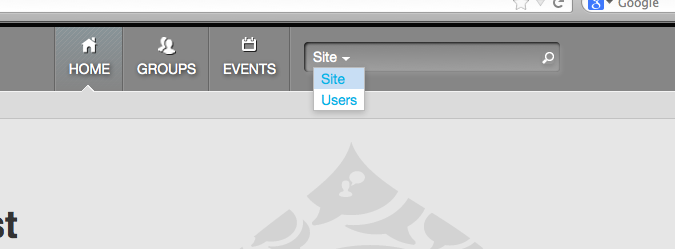
Should also say this is the commons origins theme. It looks like the link for the site/user dropdown is too wide and is pushing the magnifying glass off the edge.
I'll have a go at getting a patch up today.
Cheers
Tom
Comment #2
ezra-g commentedMoving to the Theme component.
Comment #3
blacklabel_tom commentedJust a quick update, this looks to be caused by the Javascript that creates the site/user drop down.
It looks like its giving the drop down too much width and it is worse in Chrome. This is site wide as the activity stream on Chrome has large gaps after each drop down for following, etc.
Cheers
Tom
Comment #4
autolyst commentedJust an update on this one
On the latest Commons Beta 2 this issue looks to be mostly resolved. I no longer see the search field or the select field pushing around the magnifying glass, however Safari is still being victimized by the theme. I have attached screens for Safari and Firefox. I did find a quick fix to the CSS that corrected this for me, it is a line that based on my code inspector is currently ignored in Firefox and Chrome but does push things around a bit in Safari.
In profiles>commons>themes>contrib>commons_origins>css>global.base.css Line 405
You can change:
to
This corrected it for me and the line has no affect on both Firefox and Chrome but shows some love to Safari.
See the 5th screen shot after the change.
I hope this minor correction helps on this, or closes the issue. I don't know anyone with a Windows based machine, so I have no way of testing IE so for all I know this change initiated a Zombie apocalypse for that browser. (proceed with caution)
Comment #5
blacklabel_tom commentedI've rolled this change into a patch and will test in IE when I get a chance
Comment #6
ezra-g commentedThanks for the patch! Marking as a duplicate of #1917980: Magnifying glass icon out of line.