Active
Project:
Omega
Version:
7.x-3.1
Component:
User interface
Priority:
Normal
Category:
Support request
Assigned:
Unassigned
Reporter:
Created:
8 Jan 2013 at 04:23 UTC
Updated:
4 May 2013 at 16:14 UTC


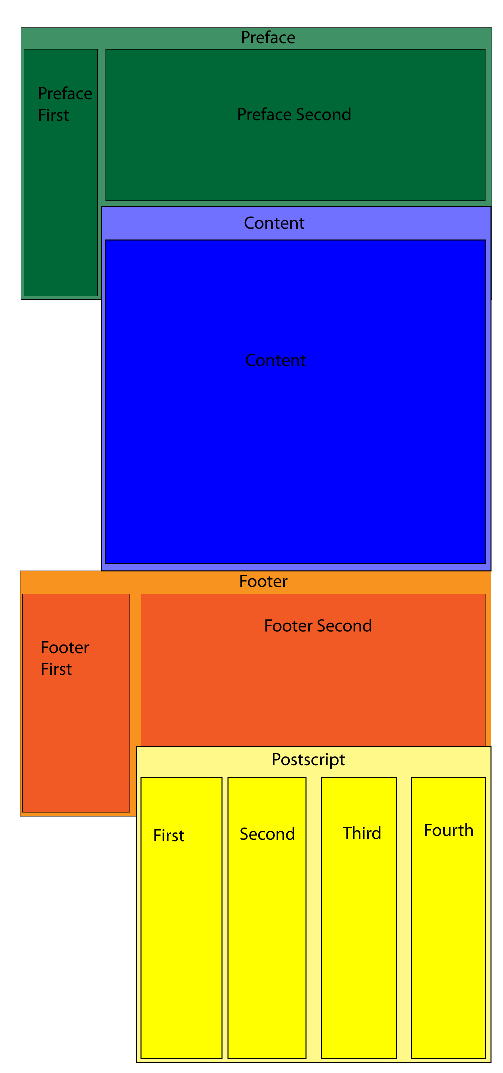
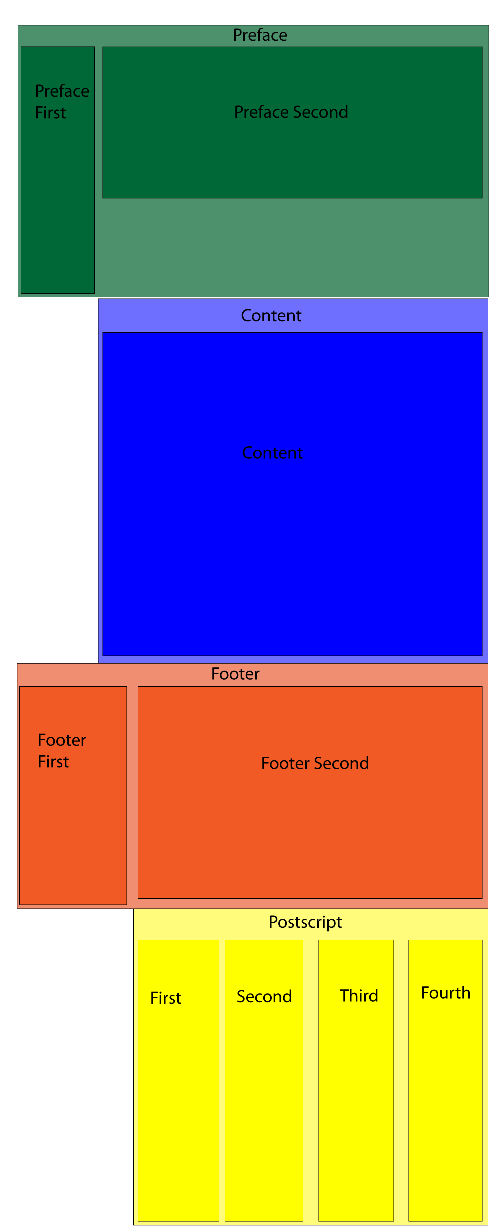
They say a picture is worth a thousand words, so please see the attached images. In short I am wondering whether it is possible to achieve the layout shown in desired-layout.png. Currently it would appear that Omega does not allow for vertically overlapping Zones (see current-layout.png). Is this correct or am I missing something due to my inexperience with Omega?
Does anyone have any suggestions on what might be the best way of achieving the desired result?
| Comment | File | Size | Author |
|---|---|---|---|
| desired-layout.png | 9.71 KB | begun | |
| current-layout.png | 10.06 KB | begun |

Comments
Comment #1
louloubug commentedBegun - did you ever resolve this? I'm researching this issue right now for a site I'm working on.
Comment #2
bigfatrat commentedI have similar requirements, and the following is my work-in-progress. Not sure if it is the correct / best solution because I am still working on the site.
In "yourtheme-alpha-default-normal.css"
section#section-content { position: relative }
/* "left: 0; right: 0" is a trick to center an absolutely positioned div */
#zone-content { position: absolute; left:0; right: 0; top: -200px; z-index: 9999 } /* or target one of the regions depending on your needs */