
 Support for Drupal 7 is ending on 5 January 2025—it’s time to migrate to Drupal 10! Learn about the many benefits of Drupal 10 and find migration tools in our resource center.
Add a vocabulary to a content type
Last updated on
22 August 2016
Drupal 7 will no longer be supported after January 5, 2025. Learn more and find resources for Drupal 7 sites
To use taxonomy terms to organize your content, the vocabulary must be associated with the content type. To add vocabulary, go to structure->taxonomy->add vocabulary. Here you can add a vocabulary list. Once created, you will see it appear in the list and can click to "view terms" and then will be able to add terms to the vocabulary list.
- In order to associate taxonomy terms to your content, you must add a field of type 'term reference' on the /Administration/Structure/Content types/[your-content-type]/Manage fields page.
- Add a new field by entering a label in the Add new field box, select Term reference from the dropdown box in Field Type, then select the relevant widget.
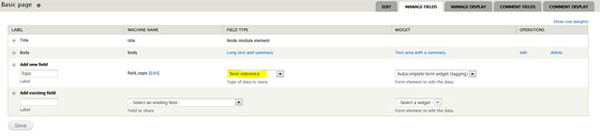
- Click Save. You are immediately taken to the Field Settings page.
- Select the vocabulary that you want to use with this term reference field, then click Save Field Settings.

- You are taken to a page to configure the newly added term reference field. Here you can change the term label, provide some help text and provide a default value.
Help improve this page
Page status: No known problems
You can:
You can:
- Log in, click Edit, and edit this page
- Log in, click Discuss, update the Page status value, and suggest an improvement
- Log in and create a Documentation issue with your suggestion











