

Closed (fixed)
Project:
Taxonomy Access Control
Version:
5.x-1.1
Component:
Miscellaneous
Priority:
Normal
Category:
Support request
Assigned:
Unassigned
Reporter:
Created:
3 Nov 2007 at 19:56 UTC
Updated:
15 May 2009 at 03:48 UTC
Jump to comment: Most recent file

Comments
Comment #1
klance commentedOn the TAC admin page, you can make TAC aware of categories by selecting a role, then adding the category to the role and setting its permissions for that role. The "Global" permission applies to all categories that belong to vocabularies that aren't on the list. The "default" permission for a vocabulary that is on the list, applies to all categories within that vocabulary that aren't on the list. In other words, TAC is only aware of what you need to control, and anything else is addressed by the "Global" permission for a particular role, which is usually "ignore" across the board. Making TAC "aware" of a vocabulary without specifying its permissions for at least anonymous users isn't really that useful IMHO.
Comment #2
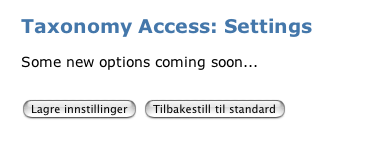
chrissearle commentedSee attached screenshot - am I looking in the wrong place ?
Comment #3
klance commentedUh... wow, you got me. Now I'm wondering if the options were still under Admin->Access Control in a tab called Category Permissions when I was running version 5.x-1-1. I didn't think so, but they could have been. That's the only other place I've ever seen the settings for TAC. The attached page looks very familiar for some reason, so at one time I had it on my site, too, but was still able to adjust the settings.
Comment #4
chrissearle commentedNope - nothing there. Wonder if the settings are only in 5.x-1.x or 5.x-2.x dev builds?
Comment #5
thomasmurphy commentedsubscribing
Comment #6
cpugeniusmv commentedThis sounds a lot like the new UI in the 5.x-2.x-dev branch. What do you all think?
Comment #7
cpugeniusmv commentedPlease reopen if this is still an issue. Thanks.