

Closed (works as designed)
Project:
filedepot
Version:
6.x-1.2
Component:
User interface
Priority:
Normal
Category:
Support request
Assigned:
Reporter:
Created:
22 Jan 2013 at 19:11 UTC
Updated:
20 May 2014 at 14:58 UTC
Jump to comment: Most recent, Most recent file

Comments
Comment #1
blainelang commentedYou can follow the directions in the README and when that doesn't work, review them again because if they are followed, the module will work. Review other issues posted in the issue queue for suggestions.
Comment #2
cordigital commentedThat is a great suggestion!
Seeing that is exactly what I have done, and it still does not work means somewhere somthing went awry.
I have followed them step by step and to no avail. I redid every step after uninstalling and reinstalling. So I am pretty sure I have done this.
EVERYTHING WORKS GREAT! Except the interface is not shown to me at siteurl/filedepot
Nothing. Nada. What is missing?
Comment #3
blainelang commentedWell you would be surprised how many do not notice the README. As per my suggestions review the issue queue and you will notice that we require more information to help you. It's also noted in the README - just saying it does not appear is not all that helpful.
Comment #4
cordigital commentedI am not surprised at how many people do not follow instructions. I can assure you of that. I do technical support and websites for a living and customers never stop amazing me.
However, I am new to Drupal and I am here because of filedepot. I need a folder repository that I can setup permissions and make work!
I updated my java on my pc. I have checked out the site on multiple PC's and no interface comes up. I promise I did the README 3 times minimum. Again, everything is awesome except for that interface and the fact that every user can see every folder - but I figured I would worry about that after I get the interface up!
If the screen is blank - the source code reads as this....
Comment #5
cordigital commentedAnyone that can help me with this would be greatly appreciated!
Comment #6
advernut commentedSame issue - White blank page. Wonder if anyone has found a solution yet. I too followed the readme file forwards and backwards to no avail. It occurred to me that maybe my library js files were saved wrong and sure enough, they were. Once I fixed that, I uninstalled and then reinstalled the module, but still doesn't work. I checked the page source and everything appears to be in place. What could cause the module to not render? I'm using OG ver1. Do I need to connect OG to Filedepot first? Can't wait to use this file management system once it's fixed!
Any help is much appreciated.
Comment #7
advernut commentedLooking into this further (page source), I see that the library js file jquery.blockui.js is not loading the page. Wondering if there's an error in this file's code. I downloaded the file directly from the author's Git repository at: https://github.com/malsup/blockui/
File name: jquery.blockUI.js (note uppercase UI)
Finally got it to work, while writing this!
The problem was the name AND folder must match and are CASE SENSITIVE. The UI must be lowercase! NOT: jquery.blockui/jquery.blockUI.js, but query.blockui/jquery.blockui.js. Also, just a little quibble, the README says: SAVE FILE as jquery.blockui/jquery.blockui.js. This is obviously incorrect. Should say SAVE FOLDER AND FILE as jquery.blockui/jquery.blockui.js
Thanks! Now I get to find out how great this module really is. Yeah!!
Comment #8
cordigital commentedMy code does not have uppercase. So I did not put uppercase?
What do you think that means that you had uppercase and I do not?
I will try to match everything up like you did and see where it goes.....
Comment #9
_randy commentedIf this has already been suggested elsewhere, then ignore, but here's what I would suggest:
Using Firefox, download the Firebug add-on. Using firebug, see if there are any 404s or errors that appear in the Console tab or the Net tab.
That should tell you exactly what your browser is requesting and what it can't find.
Comment #10
blainelang commented@advermut: I'm glad you got your installation of filedepot installed and working but the README does already have clear instructions on the need to create a separate folder for each library.
When we added support for Version 2.x of the libraries module, it required separate folders for each library. We added code to test that the folders exist and show an error message with directions to create the folders for the libraries to load. You now must have the separate folders even if your using the older 1.x version of the libraries module.
Were you not getting the large error message and directions to fix the installation when you accessed the filedepot main page?
Comment #11
advernut commented@blainelang - Yes you are correct! I guess I shouldn't have mentioned the SAVE FILE as jquery.blockui/jquery.blockui.js thing. All I was trying to point out is that SAVE FILE as jquery.blockui/jquery.blockui.js is NOT just a file but also a FOLDER indicated by the "/". That was the only part that was not clear. Maybe it should say SAVE FILE as jquery.blockui.js. The other thing I discovered was that the plugin author uses the file name "jquery.blockUI.js", which has uppercase UI in the name. So, one must change the file name to match your instructions before the js file will work. That ended up being the problem with my installation. Once I changed UI to ui, all was good with the world again.
Sorry if my comments caused confusion. I appreciate all your hard work on this module.
Thanks!
Comment #12
ikaros123 commentedYou have to use google CDN http://ajax.googleapis.com/ajax/libs/yui/2.7.0/build/ in the Filedepot preferences settings to get the module to work. I think that yahoo does not have yui 2.7.0 any more ...
Comment #13
blainelang commented@nasia1234: I still have sites installed and working that are using the default Yahoo CDN URL. It may depend on what country you are in.
Comment #14
cordigital commentedOk, the interface showed after making everything match case sensitive-wise!
HOORAY!
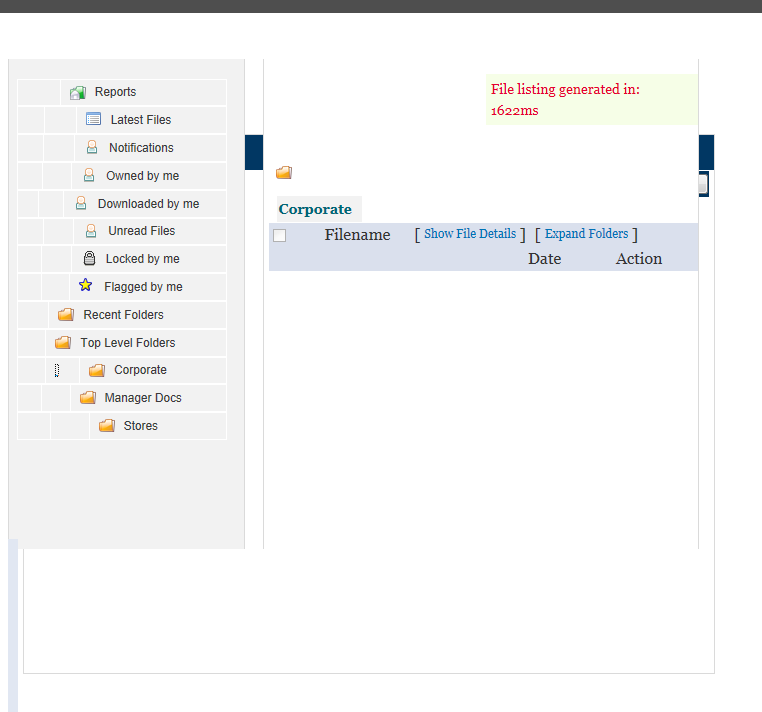
OK - now the interface is not pretty, it is clunky because something is missing. The first 2 columns are blank! They look like they could be clickable but they do nothing.
Second- how do I set permissions on these folders so that only the people in certain roles see certain folders?
I have attached a picture! What can I do next?
Comment #15
blainelang commented@cordigital: good to hear you now have it installed. This issue should now be closed and a new issue used for different questions.
Your attached image tells me that your theme is the source of your layout issue - try with one of the base themes to eliminate a theme issue.
Refer to this issue for some direction on setting folder permissions: http://drupal.org/node/1892466#comment-6955904
Comment #16
cordigital commentedOk cool!
I am using the regular base theme of...bartik.
I shall set it to the next base theme of seven.
I will see what that does. I will look at the other comment for folder permissions.
Thank you!
Comment #17
drupalite1411 commentedhey,
I have tried all the solution given above.I am new to drupal.
My file depot module and library module are inside sites/all/modules directory.I have followed the steps given in comment #7.
I have created two folders html_encoder and jquery.blockui in sites/all/modules/libraries directory and put html_encoder.js and jquery.blockui.js inside their respective folders bt it didnt work out.
I have tried two put html_encoder.js and jquery.blockui.js files inside sites/all/libraries directory also bt didnt work.
plz help.
thanks & regards
Comment #18
blainelang commentedWe have a video as well now on how to install filedepot - listed on the front page of the project.
Comment #19
drupalite1411 commentedhey Thanx for the reply.I am new to this site.Can you pls give me the link of vedio.
Comment #20
mhkc commentedWhen I saved the jquery file, it saved with 2 capital letters in it: jquery.blockUI.js
Case often matters in the Unix world.
Rename the file with all lowercase letters - jquery.blockui.js - and save. Resolved the issue for me.