

 Come together with the global Drupal community in Rotterdam, 28 Sept – 1 Oct 2026. Sessions, contribution, connection, and Early Bird savings until 8 June.
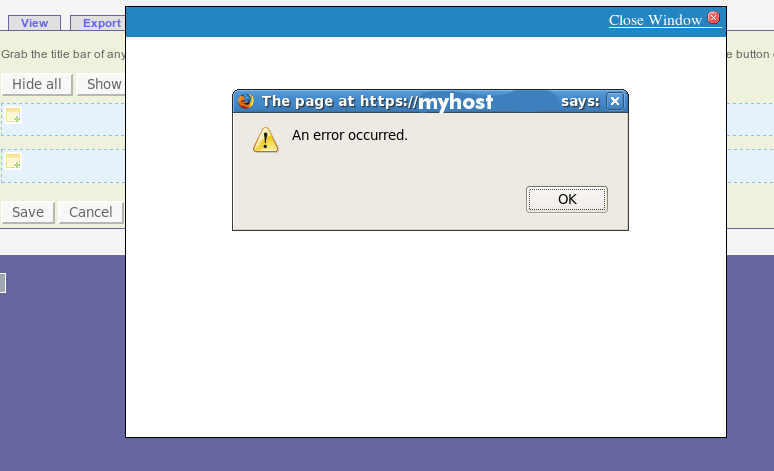
Observed this error when attempting to use the ajax interface to add content to a flexible panel: A javascript alert box pops up saying "An error occurred" then refuses to let me add anything to the panes. See attached "error.png"
The indispensable Firebug extension gives some more detail on what is happening:
uncaught exception: Security Error: Content at http://myhost/admin/panels/panel-page/home_panel/edit/content may not load data from http://myhost/panels/ajax/add-content/1/row_2_2.
This is apparently a conflict with Secure Pages, which I have configured to use https for everything under admin*.
Workaround: Added "panels/ajax*" to the list of paths that Secure Pages runs through SSL, et voila, I can add stuff to panes.
| Comment | File | Size | Author |
|---|---|---|---|
| error.png | 22.82 KB | buzzdecafe |

Comments
Comment #1
gordon commentedMake sure that in the setting page for secure pages the ignore pages contains "*/ajax/*"
This will make sure that the link is not redirected from http to https or vice versa.
Comment #2
(not verified) commentedAutomatically closed -- issue fixed for two weeks with no activity.
Comment #3
rickmanelius commentedIt would be nice to add this into secure pages by default. Is there a way to transfer this over to the secure pages queue without adding a new tickets?
Comment #4
Letharion commentedYes, by updating the "Project" settings. Passing it over there now.
Please stop abusing the tags, and read the relevant instructions.
Please also remember to update the issue settings for the issue to whatever is relevant for you.
Comment #5
rickmanelius commentedApologies for the abuse. I believe this is the first time I used the tags because it thought it might be more helpful to alert the secure pages folks.
Thanks for the help in accomplishing the goal.
Comment #6
rickmanelius commentedComment #7
grendzy commented*/ajax/* was removed from the defaults when #1258200: Ignore requests with X-Requested-With:XMLHttpRequest landed.
Comment #8
rickmanelius commentedSo is it a security risk to use */ajax/*?
I had to add this in as ubercart was not playing nice without it.
Comment #9
grendzy commentedNo, it's not a security risk, but I'd like to understand why the XMLHttpRequest check isn't catching it. Can you see if the header is either not sent, or not detected?
Comment #10
rickmanelius commentedSeems like this was fixed in the later versions of ubercart. No more issues on my production, dev, or local sites.
Comment #11
rickmanelius commentedNope. It's not working again with ubercart.
To recreate, simply go to checkout and then click the "My billing information is the same as my delivery information." You'll get a 503 error
An AJAX HTTP error occurred.
HTTP Result Code: 503
Debugging information follows.
Path: /system/ajax
StatusText: error
ResponseText:
Comment #12
grendzy commented503 errors generally leave an entry in your apache error_log, can you post the error message here? Thanks.
Comment #13
rickmanelius commentedHi @grendzy. With ubercart 7.x-2.4 and patch #85 in #1373236: Allow multiple modules to react on checkout Ajax events, I no longer get this error. I'm setting this to "cannot reproduce" for now because it appears something fixed this glitch.
Note, I'm not 100% sure that the patch is necessary, but I'm listing it for completeness just in case it has some impact/influence on this issue.
Comment #14
rickmanelius commentedOpening this thread up again as I discovered a new location where NOT having */ajax/* disables a feature. Basically with panels, I cannot add anything into a pane without this hack/tweak.
Off to debug...
Comment #15
astonvictor commentedI'm closing it because the issue was created a long time ago without any further steps.
if you still need it then raise a new one.
thanks