

Closed (fixed)
Project:
Panelizer (obsolete)
Version:
7.x-3.x-dev
Component:
Code
Priority:
Normal
Category:
Bug report
Assigned:
Unassigned
Reporter:
Created:
29 Jan 2013 at 16:00 UTC
Updated:
19 Mar 2015 at 12:24 UTC
Jump to comment: Most recent, Most recent file


Comments
Comment #1
merlinofchaos commentedGood catch! I introduced a bug in there yesterday. I pushed a fix just now.
Comment #3
fadgadget commentedhello forgive my ignornce but where would i find this fix? Ive had a look on the pending patches but nothing there. Thanks
Comment #4
merlinofchaos commentedI directly committed it to git. Any version published after the date I said I committed it will contain it.
Comment #5
andi-d commentedThe Bug still exist in Version 7.x-3.x-dev from May 25.
I have a Full Pager Override from a Taxonomy.
When I try to delete one of my default panels I get this error message.
[Wed Jun 19 15:49:00 2013] [error] [client 127.0.0.1] PHP Fatal error: __clone method called on non-object in /modules/panelizer/plugins/export_ui/panelizer_defaults_ui.class.php on line 104
This is the same bug as described in #1 and still applies to the current version.
Comment #6
dagomar commentedThis bug is still persistent. I saw the fix in the commit log, but the problem persists.
[Edit]
I have this bug, BUT it happens on a Vocabulary and User panels, NOT on a Content type.
Comment #7
gable commented@merlinofchaos
I've still got this error in Panelizer 7.x-3.1. Where did you fix it? Please write some details. Was the error correction here, in function delete_page or somewhere else? I've even tried to analyse your commits and find solution, but I couldn't.
Comment #8
dagomar commented@gable
I'd recommend trying a dev version first to see if the problem persists. If you are trying to work with taxonomy or user pages, the bug is still not fixed. As far as I know it is only fixed for nodes.
Comment #9
uzlov commentedfixed issue with clone, export, delete of panels templates for taxonomy terms
issue in not correct loading of page arguments
*can be fixed in the same for user entity
Comment #10
damienmckennaPlease check the latest dev release, I just ran through the process of cloning the default display for a vocabulary view mode and deleted it again, all without any problems.
Comment #11
damienmckennaPS, the patch is incorrect anyway, the admin path for modifying a vocabulary is "admin/structure/taxonomy/[vocabularyname]", not "admin/structure/taxonomy/manage/[vocabularyname]".
Comment #12
uzlov commentedremoved incorrect way (with changing of the admin path for modifying a vocabulary)
issue not only in clone of default display
issue with almost all ui_menu - export, clone, delete, disable of taxonomy (and I'm sure - the same issue for user entity)
fixed in bad way( overiden for taxonomy public function add_admin_links
fix of issue
+ if ($key == 'export' || $key == 'delete' || $key == 'clone' || $key == 'disable') {
+ // Change page argument only for taxonomy term.
+ $ui_items[$key]['page arguments'][2] = 6;
+ }
+fixed not correct redirect after adding new "default" template
one more patch :)
Comment #13
dagomar commentedI just fired up a simplytest.me to check it out and I found that it does seem to work as expected for Taxonomy. However, for users its still broken.
Comment #14
m.lebedev commentedOn dev version = "7.x-3.2-beta1+11-dev" from 2015-02-08
Fatal error: __clone method called on non-object in /sites/all/modules/panelizer/plugins/export_ui/panelizer_defaults_ui.class.php on line 122
patch not work.
Was performed a clean install of drupal. Panelizer turned on for node. I added panel choice . When I click delete panel choice, an error occurs.
Comment #15
m.lebedev commented$Item - variable contains a string.
Expected value - the object.
Comment #16
damienmckenna@m.lebedev: Just to confirm it - were you using Overlay? What URL was the browser showing? How many displays were there when you selected to delete one?
Comment #17
m.lebedev commentedHi DamienMcKenna,
Overlay off.
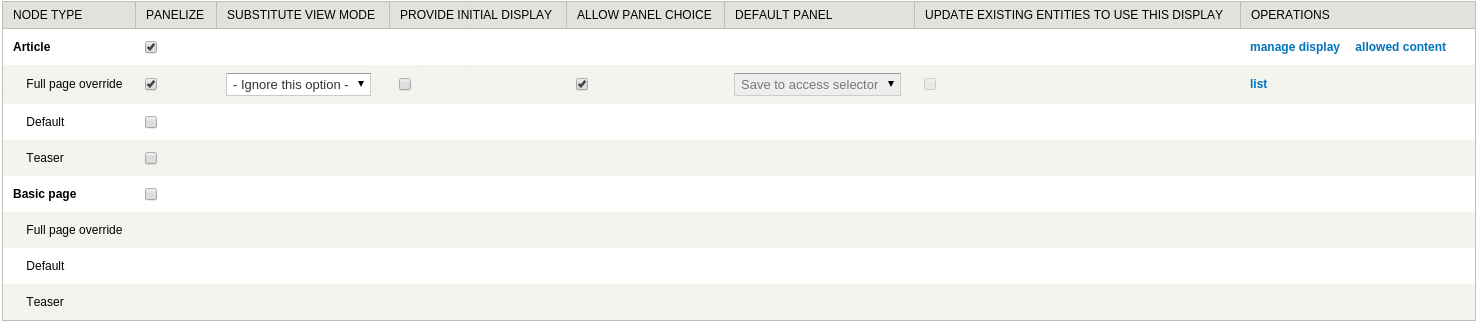
1. Panelizer settings

2. Panel choice
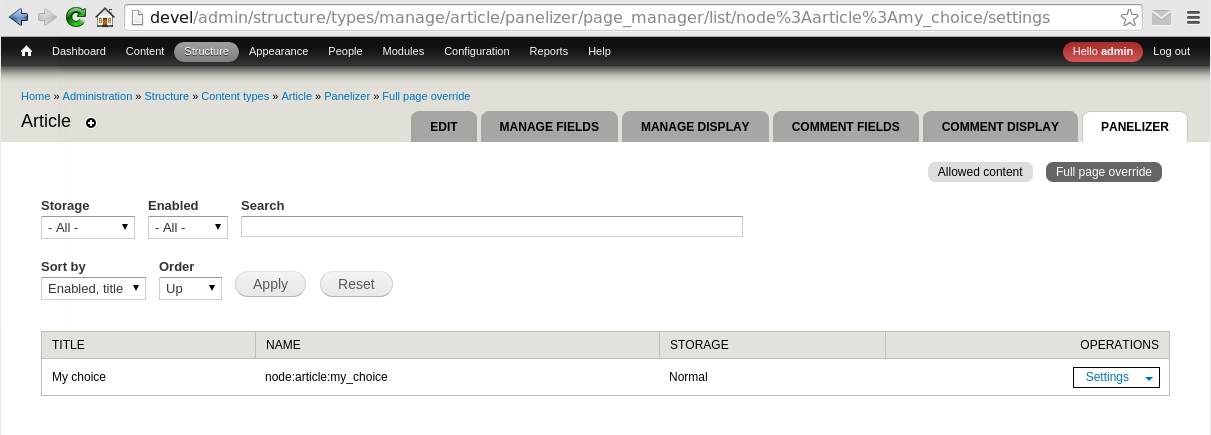
3. Delete choice

P.S.: Button to disable the panel choice too does not work.
Comment #18
damienmckenna@m.lebedev: Thanks for providing those details, I've been able to reproduce the issue and will take a look at it.
Comment #19
m.lebedev commentedThis is a big problem. I can not delete the configuration panel choice. I created a new version of the panel choice, and it does not work. As a result, I messed up the configuration of the view mode =(
Comment #20
damienmckennaCan you please test the latest -dev release, I believe #2445769: Unable to clone a display may have fixed this.
Comment #21
damienmckennaYep, I'm pretty certain #2445769: Unable to clone a display fixed this, but feel free to reopen if the problem persists.
Comment #22
m.lebedev commentedYes, the problem is solved. everything works
Comment #23
damienmckenna@m.lebedev: \o/