Closed (fixed)
Project:
Openlayers
Version:
7.x-2.x-dev
Component:
OL Layers
Priority:
Major
Category:
Bug report
Assigned:
Reporter:
Created:
31 Jan 2013 at 03:28 UTC
Updated:
9 Mar 2013 at 13:20 UTC


There are a number of related issues which I have reviewed related to this:
http://drupal.org/node/1360382 << committed
http://drupal.org/node/1817400 << committed
http://drupal.org/node/1801228 << committed
But I simply cannot get any KML files to display on any of the three installs I'm working with.
Simple case:
1. Source KML = http://geonetwork4.fao.org/data/kml/Australia_and_New_Zealand_24h.kml
(Extract xxx are all ticked on; have tried both 900913 and 4326 projections)
2. Place KML layer into Default map
(no changes to default config; have tried both projections, using the KML layeer as baselayer and overlay)
3. Base layers are rendered (eg, OSM, Google, Bing) but KML layer does not display in Preview
4. Place Default map onto Panels page: same result...base layers, but no KML
5. No messages in Watchdog
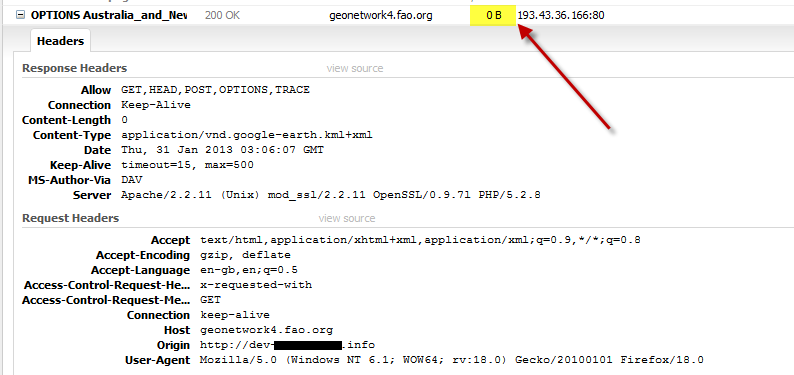
6. Looking at the transaction in FireBug, I can see the communication request and response, but 0 bytes are transferred (see attached)
I'm running the latest dev (7.x-2.0-beta3+63-dev)
Any clues or suggestions very much appreciated!
| Comment | File | Size | Author |
|---|---|---|---|
| mapping-kml.png | 35.77 KB | boabjohn |

Comments
Comment #1
polComment #2
polFixed, I rewrote the KML handling stuff, need testers.
Comment #3
boabjohn commentedHey fantastic...I put my hand up to test...is this committed to latest dev?
Thanks Pol!
Comment #4
polHello,
You can do your test and report, everything is committed ;-)
Thanks again !
Comment #5
boabjohn commentedSorry Pol, no joy.
I see the [KML Example Layer] provided out of the box, but this is produced by raw KML markup pasted into the UI.
Can you confirm that you can see my sample layer via the URL provided?
That way we can check against the same testcase?
http://geonetwork4.fao.org/data/kml/Australia_and_New_Zealand_24h.kml
Comment #6
polThis is your data displayed on a custom map ;-)
https://docs.google.com/file/d/0B7ugUjBv1lqHZjBFUWlxS0szQzg/edit
Comment #7
boabjohn commentedThat looks great Pol...the question is why you're seeing the layer and I'm not?
Could you very quickly dotpoint your settings for the layer and the map?
I have:
LAYER:
+ Add New (Hotspots: FAO)
+ Layer Type= KML
+ Provide= URL
+ Extract styles/Track/Attributes=On
+ Projection=900913
- Storage = Normal
MAP
+ Start with default
+ Base Layers: enable only OSM Mapnik
+ Overlay: enable KML Example and Hotspots: FAO ... set both layers to enabled, activated, in switcher
+ Map projection: 900913 / Display: 4326
-- No other changes to default
Save.
(a) Preview map does not show FAO layer
(b) Map placed in node does not show overlay
Confirming: 7.x-2.0-beta3+75-dev
What else can I try?
Resetting this to [Needs review] until I can actually reproduce your success!
Thanks,
JB
Comment #8
polLAYER:
+ Provide= URL => If the file is on the same server, you can use URL or you can upload the KML through the layer ui now.
+ Extract styles/Track/Attributes=On => Disable Tracks
+ Projection=900913 No, it's 4326.
Comment #9
boabjohn commentedHey Pol,
Thanks for taking the time to go through this. I still don't have the KML layer showing up:
- Extract tracks off
- Layer projection = 4326
Map: Projection changed between 900913 and 4326 / no change either way.
The upload KML looks exciting, but in this case the whole point is to leverage networked layers.
Can you suggest any other setting I might be missing?
Thanks in advance.
Comment #10
polBoabjohn,
OpenLayers is not able to retrieve data from another server.
Read: http://gis.stackexchange.com/questions/33336/parse-a-kml-for-openalyers
This is why I added an upload field, so people are able to add their own KML, on the same domain.
Comment #11
polComment #12
boabjohn commentedHey there Pol,
Thanks for the stackexchange link...just spent an hour prowling around there reviewing things.
Still, there is a fair bit of complexity in people's different situaitons.
Just to make sure I understand: up in #6 you showed a map with the data layer sample I sent in.
Can you confirm...
Did you download that KML file and re-upload locally in order to generate the display?
Thanks in advance,
JB
Comment #13
polYes exactly :-)
Comment #14
cameron prince commentedHey guys,
I'm working on a project where I need to highlight countries on a map and followed these steps with no luck. I tried numerous combinations of the settings, different KML files (all copied local/same server), both dev and release versions of openlayers, 900913/4326, and both in preview and in a map from a view display. No matter what I try, I have two outcomes... Either the overlay or the entire map doesn't display.
Pol, could you export what you're using so boabjohn and I can try it?
Thanks,
Cameron
Comment #15
boabjohn commentedG'Day Cameron,
Could you first follow the recipe at #7 and #8 above, and check that you can/can't see the demo kml map supplied with the module? I have always been able to display this, so it could give you a HelloWorld starting point, yes?
Cheers,
JB