Problem/Motivation
(why the issue was filed, steps to reproduce the problem, etc.)
In a task within the task console, we are not seeing the 'document/form' listed in the task header as expected. There is a field, but it is empty. The 'document/form' is available in the 'content' sub section. See image below.
What could cause this?

Proposed resolution
(description of the proposed solution, the rationale behind it, and workarounds for people who cannot use the patch)
Not known at this stage.
Remaining tasks
(reviews needed, tests to be written or run, documentation to be written, etc.)
Not known at this stage.
User interface changes
(new or changed features/functionality in the user interface, modules added or removed, changes to URL paths, changes to user interface text)
The version is the dev version.
API changes
(API changes/additions that would affect module, install profile, and theme developers, including examples of before/after code if appropriate)
The version is the dev version.
Original report by [username]
// Text of original report here.
(for legacy issues whose initial post was not the issue summary)
As per Problem/Motivation above


Comments
Comment #1
blainelang commentedHi,
Thanks for your detailed report but what type of task is this - provide us with the details of the task type and it's settings.
Comment #2
therobyouknow commentedComment #3
therobyouknow commentedAdded some more details as requested, blainelang, let me know if you need anything more. Four images:
Comment #4
blainelang commentedHi, none of that really helps me. What does the maestro workflow template look like - what maestro task type have you used and what the task properties.
Comment #5
therobyouknow commentedBlaine, thanks for following up, as requested, here is some more information:
There are 2 task types as below.

Task that completes a form and initiates workflow

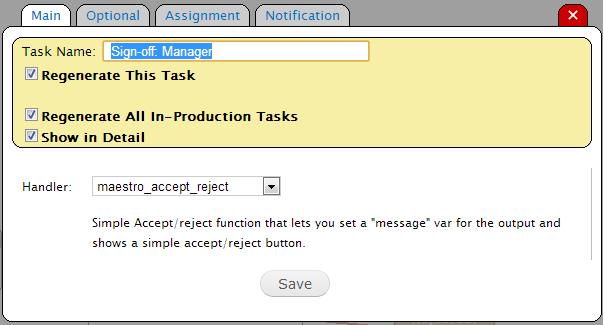
Second task, for review of the form data and sign-off, with accept/reject. All subsequent tasks are of this type and set up is the same (different users).
Comment #6
blainelang commentedThe 'maestro_accept_reject" interactive function is used to ask the user a question and set an accept/reject response that can be tested for with an IF task and branch the workflow. It's a simple (but useful) example of an interactive function that shows how to program your own custom interactive functions or to prototype a use-case workflow. You set up a task variable under the 'options' tab called 'message' which will be the text displayed in the task to the user - example: "Do you like Drupal?" and using an IF task after that to branch the workflow depending on the response TRUE/FALSE.
To have a content aware task for review/accept, enable the maestro_content_publish module (included in base module package) and use the interactive function 'maestro_reviewContentType'. The help text will then direct you to create a variable called 'content_type' and set it to the machine name of the content type you want the task to review. You can use a Process Variable which is set at the template properties level or a Task variable which is set under the task options tab. A process variable is available to all tasks and it's value can be set using code or the Set Process Variable Task.
Comment #7
therobyouknow commentedThanks Blaine your latest comment has provided some tips which have helped us move forward a bit more and we'll aim to provide more detail on this a bit later as we know this would help others using Maestro as well as yourselves understand how it is being used.
Comment #8
blainelang commentedVery good - thanks for your update!