

Closed (fixed)
Project:
Custom Search
Version:
7.x-1.x-dev
Component:
Code
Priority:
Normal
Category:
Feature request
Assigned:
Unassigned
Reporter:
Created:
1 Feb 2013 at 13:50 UTC
Updated:
18 May 2013 at 07:13 UTC
Jump to comment: Most recent file


Comments
Comment #1
jdanthinne commentedGreat idea! At the time I created the module, HTML5 wasn't born :-)
Now it's in, you can test the next DEV version, or use this patch : http://drupalcode.org/project/custom_search.git/patch/a9cbec4
Comment #2
naiara commentedHi, @jdanthinne,
Thanks for your quick update! I've installed it but had to do a minor change in custom_search_i18n.module by commenting line 64:
$form['default_text']['#default_value'] = i18n_string_translate('custom_search:common:1:' . $delta . 'text', variable_get('custom_search_' . $delta . 'text', ''));and changing line 63 like this:
$form[$form_id]['#attributes']['placeholder'] = i18n_string_translate('custom_search:common:1:' . $delta . 'text', variable_get('custom_search_' . $delta . 'text', ''));to make it work on my i18n environment.
However, I found that 'placeholder' value was being set through my base template by calling TEMPLATE_form_search_block_form_alter, so I had to comment that line to in order to show the correct text.
So, seems that 'placeholder' attribute was not a native D7 feature, but my base template's feature... I guess.
Eitherway, It works perfect now! Thanks again!
Comment #3
jdanthinne commentedYou're right!
I forgot about the i18n submodule… I've just pushed the changes to the dev version.
Comment #4
katrialesser commentedHey, sorry I don't understand everything about this issue - my search box has my default text "Search..." until you click in it, and then it has the title of my site until you start typing. I would like it blank - is that what you guys are talking about here - the value of the placeholder text?
If it's not the same thing you are talking about, I'll gladly make a different issue.
Thanks!
Comment #5
jdanthinne commentedPlaceholder text is the one in the input box, in gray, and should disappear when you start typing something, and comes back if nothing is entered (http://www.w3.org/wiki/HTML/Elements/input/text).
If this is not what you see on you site, please send me a link so I can check what's happening.
Comment #6
katrialesser commentedAlright, I'm not exactly sure. There is what I can specify under the module's configuration page (I specified two spaces for Search box default text so it looks empty). so the search box looks empty, until you click on it, and then it shows text until you start typing.
I'd like to change that text - so that is the placeholder text, correct? Sorry...
https://adjuncts.byu.edu
Comment #7
katrialesser commentedWell, now I updated to 7.x-1.12 and my Search box default text doesn't do anything anymore. so it's just always the second text - I'm going to go back to my 1.11 version..I still would like to get rid of that text, but if i go back a version then at least I'll only have that text show when they click into the box (and only for a second, because they'll start typing).
Comment #8
jdanthinne commentedThere's something really strange, it seems that another module or custom script is also trying to manage this text. Unfortunately, if your site is not running Custom Search 1.12, I can't check where this is coming from in the end. Can you reinstall 1.12, so I can try to see where it's coming from? A temp admin account would be helpful indeed…
Comment #9
katrialesser commentedI can put 1.12 back on but I can't give you an account sorry..university website.
I'll go ahead and put 1.12 on again
Comment #10
jdanthinne commentedI see you've enabled 1.12 again, and everything seems fine now.
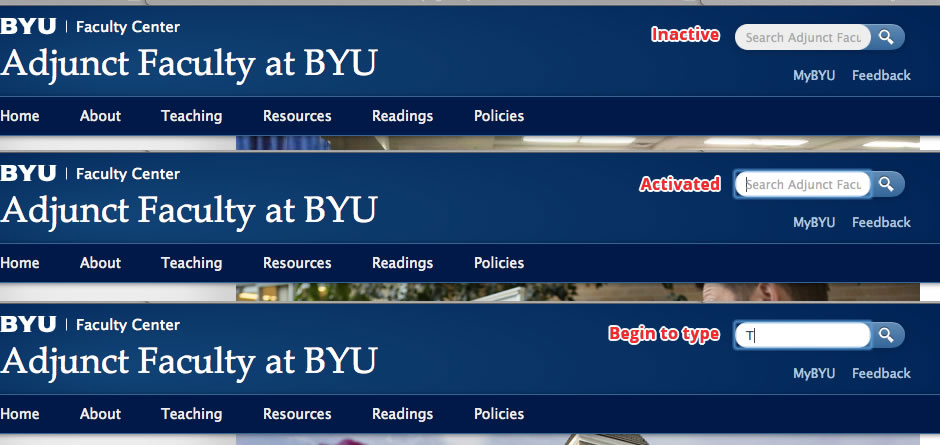
As you can see in my capture, placeholder behaves like it has to : grey text when inactive, still grey before typing anything, then disappears when you start typing…
Comment #11
katrialesser commentedThanks for looking at my site!
What I'm trying to do is change that gray text so that it is something shorter. Like just 'Search'.. 'Search Adjunct Faculty at BYU' is very long..and it's just putting the name of the site in there somewhere.
I thought maybe I could assign a different value to that placeholder text...
Comment #12
jdanthinne commentedJust go to /admin/config/search/custom_search and change the text in "Search box default text".