I have a sort of waymarking website. Users can create new waymarks or spots as I call them. When creating a spot they can either enter an address and click Map It, which will geocode the address and add the marker the map. Then when they submit the new "spot" the Address and the geocode info gets submitted to the database.
Is there a way to reverse this process. For example, if the user doesn't know the address, they can find it on the map and when they click on the map, the address is then found using the lat and lon info.
http://www.geonames.org/maps/reverse-geocoder.html Here is an example of a site that does this process. What would be the best way to do this. I have experience in PHP programming and am just starting out in drupal. I have been diving into the GMap module and if you could point me in the right direction I would be able to write this up myself.


Comments
Comment #1
Wouter Van den Bosch commentedSubscribing. Very interested in this as well.
Comment #2
pcoughlin commentedIt looks like the geonames.org site also will return the XML address information if given a Lat/Long:
http://ws.geonames.org/findNearestAddress?lat=39.542305&lng=-105.010866
This page describes the service:
http://www.geonames.org/export/
It looks like they will let you use 50,000 lookups per day.
This is a wonderful service ... glad you found it cday119 ... Thanks for putting it here.
Comment #3
j0rd commentedFrom my experience with Google Maps, it returns information which it believes accurately reflects said Location when you GeoCode. I've used this scheme to fill in City / Province / Country information for a Drupal website I've done which doesn't use the location module: http://memphismls.com/ . Users simply input Address and ZipCode and I get the City, State information from Google.
I think it would be a good idea to fill in this info when the user does not provide it. I believe you'll have it from the GeoCode request and you'll simply have to input it.
By default, GMaps module doesn't ask for City, State, Country information, so while I can display a map and lat/long, I'm not able to provide the City name to my users, which is lame.
For now I'm just going to force the people to enter it.
Comment #4
summit commentedSubscribing, interested in changing the user-input by reverse geocoding of lat/lon.
greetings,
Martijn
Comment #5
j0rd commentedAppears Googlemaps is now actually supporting this feature. They did it before, but you were not supposed to use Google Maps for reverse Geocoding even though, it was possible.
I noticed a "New" feature when I checked out Google Maps today to register a key. If anyone is interested, here's the documentation:
http://code.google.com/apis/maps/documentation/services.html#ReverseGeoc...
Comment #6
pkh commentedHere's a application interface to the Google Maps API referenced above, it allows for free bulk reverse geocoding:
http://www.batchgeocode.com/reverse/
Could be useful for folks who'd like to pre-cache the results to a database instead of reverse geocoding every time. Or those who can't create their own programs to access the Google Maps API.
Comment #7
introfini commentedSubscribing...
Comment #8
m@rtijn commentedSubscribing...
Reverse Geocoding seems to be an very important feature. From a users point of view it's a bit strange that he/she needs to fill in an address when he can point it out on a map.
Hopefully this feature will be added to the Gmap Module, so Street, City, State/Province and country get filled in when a user points something on a map.
Comment #9
hutch commentedReverse geocoding works by sending a Latitude and Longitude to google which returns the map. It does not return the address, nor does it provide a 'show all addresses nearby' feature. They do not provide this presumably for security reasons, I'm sure that if they did addresses would get grabbed by all sorts of dubious mailshot hustlers.
Comment #10
introfini commented@hutch you have an example here of how it works http://code.google.com/apis/maps/documentation/geocoding/#GeocodingAccuracy
Comment #11
held69 commentedSubscribing
Very interesting..
does somebody has this working yet?
Comment #12
hlopes commentedGot this working.
For now, it works the following way:
It's a single module, no patching required.
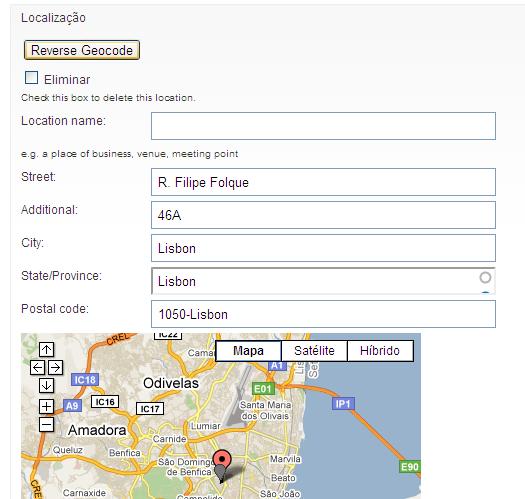
In the node edit form, above the fields of Location CCK, will appear a button labeled Reverse Geocode.
When clicked, it will fill the address fields in the same fieldset.
Comment #13
summit commentedHi, Could you attach the module in .zip may be?
Thanks a lot for your reply in advance!
greetings, Martijn
Comment #14
held69 commentedSounds great!
I'm very interested to try this module as well.
where can i download?
Comment #15
robotjox commentedanyone ever got this working? Tried to contact HLopes, but no luck :(
I got the reverse geocoding to work with a patch to the location module, but I'm not sure how to do the automatic address field fill-in on map click - anyone have an idea?
Comment #16
hlopes commentedSorry, been trying to test it up properly during the holidays, but no luck.
Anyway, here is a version that's working.
I've used it with Location CCK and Map Coordinate picker.
Please post feedback & changes you've made.
EDIT #1: Ooops, wrong file. Check file below.
Comment #17
robotjox commentedthanks a lot! I'll test it asap and get back :)
Comment #18
hlopes commentedThis is for Drupal 6.x !
Don't know if it'll work with 5.x.
Just unzip it to your modules folder and enable it in admin/modules.
Comment #19
hlopes commentedHere goes the relevant code:
reverse_geocode.module
reverse_geocode.js
I think it's pretty straight-forwarding, but if you need some explanations feel free to ask.
Comment #20
summit commentedHi Wouldn't it be great to make this or a Gmap submodule, or build your own reverse_geocode drupal project page? Than you can streamline possible issues or feature requests etc...
greetings, Martijn
Comment #21
robotjox commentedI've tested it a bit and it works great.
If you change the
$('.reverse-geocode').click(function(){class reference to the map class you can even have real time location tracking.This is really great and I agree that you should really release this in some way as it is sorely needed :)
Comment #22
hlopes commentedMy CVS account application got rejected, so i've created a website to host my modules.
You can access it at http://buseee.com
Comment #23
summit commentedHi, Why is your CVS account rejected. It should be possible to get your module on drupal.org, right?
Or are you using non-drupal libraries?
It would be nice to keep all modules integrated on drupal.org I think.
greetings,
Martijn
Comment #24
held69 commentedI agree.
It would be better to have all modules integrated on drupal.org
It would be nice to know, for users of this module, on what grounds the module got rejected,
and if the module does make use of non drupal libraries.
Ofcourse thanks for the hard work sofar :)
Comment #25
hlopes commentedMy CVS account is under consideration, so let's wait and hope for the best.
Meanwhile, do you guys know if is there any other module that needs this functionality?
Comment #26
held69 commentedGreat!
Comment #27
codecouleurs commentedHi,
Just in case somebody as the same issue...
When I installed the module, the button did not appear because in js file a css class which does not exist anymore is called.
In reverse_geocode.js I replace :
$('fieldset.location .fieldset-body').prepend(button);
by : $('fieldset.location').prepend(button);
module location 6.x-3.1
module Reverse Geocoding 6.x-1.x-dev
Comment #28
hlopes commentedYes, the referenced class i've used was theme dependent.
I've corrected it, just waiting for cvs account response before publishing anything else.
The selector stated above $('fieldset.location') is the one i've used in my latest version.
There was also an issue with anonymous reverse geocoding permissions, and unused values.
As long as the button is kept on the same DOM level, you can change the selector to place the button where you want/need it.
For example, if you wish to place the button under the map just replace
$('fieldset.location').prepend(button);
with
$(button).insertAfter('.gmap-gmap');
You can also use the methods .append() and .insertBefore()
Take a look at my site (http://buseee.com), as i've just published the latest version.
Feel free to open issues there, if you've added any kind of specific logic regarding your country, found a bug or have a suggestion.
#EDIT: Uploaded new version, that fixes an issue with State/Province autocomplete, when a country other than the default is picked. This was throwing an error on submission.
You can try it at http://buseee.com/drupal/modules/reverse-geocode/try
Comment #29
vlooivlerke commentedsubscribe
? must it be location cck, will normal location node not work?
I ask because the fetch address button does appear on the location node form but currently I cant get it to work.
Comment #30
hlopes commentedI've just tried with Node Location module and it does work.
Just make sure you've set the permissions right at admin/user/permissions, under reverse_geocode module
perform reverse geocode -> Tick all to allow anyone to perform reverse geocode.
Comment #31
EvanDonovan commentedI think this should be on the Location module, not GMap module.
I am tempted to mark this as duplicate of #316297: Add a reverse lookup of the coordinates to obtain country and city (plus more?) or #841506: Attached: Module to go geocoding, reverse geocoding as well as Create associated taxonomy terms. The former is a patch to Location; the latter is a separate module, which I have not tested yet.
Comment #32
EvanDonovan commentedOk, I'm just going to do it...
Comment #33
davycw commentedDoes anybody know if there's a way to alter HLopes's module so that when an user enters their zipcode, it'll populate all the CCK location fields associated with there account, and do it without the need to press a button?
Comment #34
kaizerking commented@davyvw, I have the same requirement did you get any module ?
Comment #35
nbchip commentedThis could be good example of how reverse geocode could be implemented on front end
https://github.com/poppycocker/GeoExplorer
Comment #36
hlopes commented@davycw, @kaizerking
For a quick solution, you could try to hide the button with css and add a jQuery .trigger() that fires a click on the button when zipcode field loses focus and is not empty.