

 Come together with the global Drupal community in Rotterdam, 28 Sept – 1 Oct 2026. Sessions, contribution, connection, and Early Bird savings until 8 June.
Hello, I have been working with panels for quite a while now, but all of a sudden, the basic style "Rounded Corners" I had selected for some panels, doesn't work anymore. All my other, custom styles still work like normal.
I have been toying around with some modules cornerning WYSIWYG editors and images (Media, CKEditor, Plupload, ...) and have changed some settings here and there. I cleared all caches, I created a new subdirectory for my images in sites/default/files, I disabled the Skinr module (I work with the Acquia Marina theme), ... but I can't seem to find out what is causing this problem.
I could still use a custom style with the "Rounded Shadow Box" als basic style, but that is just not the same (no borders at the top or the left). Or is there perhaps an easy way to redefine the "Rounded Shadow Box" style in /sites/all/modules/panels/plugins/style_bases/pane/pane_rounded_shadow so that it shows as the simple "Rounded Corners" style? I still seem to have all the necessary files in /domains/bibmaaseik.be/public_html/test/sites/all/modules/panels/plugins/styles/corners, or isn't that where the "ROunded Corners" style is defined?
Can someone help me please? I am really lost here but just want a way to show simple rounded corners... Thanks!
| Comment | File | Size | Author |
|---|---|---|---|
| #12 | panels.GIF | 33.73 KB | SuperStes |
| #8 | Styles.PNG | 304.75 KB | SuperStes |


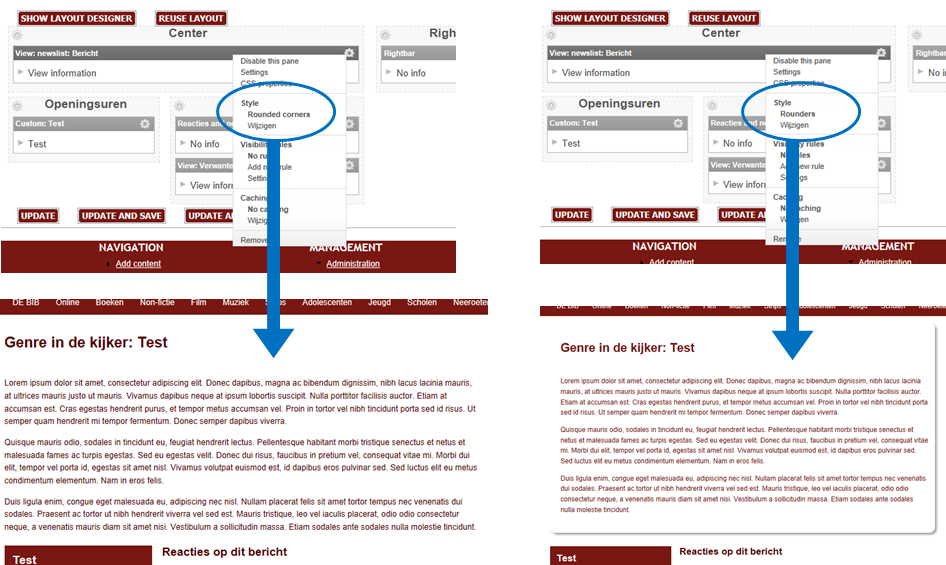
Comments
Comment #1
merlinofchaos commentedSome things to check.
On the panel you have the rounded corners style enabled, check the HTML output.
1) Is there an appropriate CSS file? (It will be temporary generated CSS file that looks like files/ctools/css/an-md5-string-here.css -- if there's more than oen, just check them all and see if it references the rounded corner classes.
2) Is the rounded corners HTML being rendered?
3) Is this on a pane or a region?
Comment #2
SuperStes commentedThe problem was with the style selected for one pane only. I tried to set the region style to rounded corners now (there is only one pane in that region anyhow), but still the rounded corners do not appear.
When I look at the source of the webpage, I see div classes of the rounder corner style are being refered to:
So I guess the html is there, but the problem is located in the CSS-file then I guess. I found no md-string type of css-file in sites/default/files/ctools/css, but i found some in sites/default/files/afbeeldingen/ctools/css (afbeeldingen is the subdirectory i created to store the images of my users). One of them indeed contained the definitions of the .rounded-corners div elements.
I copied this one back to sites/default/files/ctools/css, but still the rounded corners do not appear on the pane on the site...
Any idea what to do next?
Comment #3
merlinofchaos commentedDoes that CSS file actually appear in the CSS used on the page? It'd either be in the HEAD tag, or if using aggreggation, it'd appear in one of the aggregated CSS files.
Comment #4
SuperStes commentedWhen looking at the source of the webpage, I think I see it in the header tag.
I find it somewhere in a long list of css-files. It looks like this:
And it is included in a list that looks like this:
Comment #5
merlinofchaos commentedWould it be possible for me to visit a page exhibiting this behavior? At this point I'm out of suggestions and need to explore the DOM tree and the CSS and see what might be going on.
Comment #6
SuperStes commentedYou can visit an example page at http://test.bibmaaseik.be/boeken/bericht/23
It is the white text area in the middle, the actual article, that needs the rounded corners style. As you can see, the custom made style with the red box header is still working in the sidebars.
Is this enough for you to see what's going on? Or would you like to get inside the site?
Comment #7
merlinofchaos commentedThe markup for that pane does not contain the rounded corners markup. Can you doublecheck that the pane has the rounded corners style enabled? If it is, can you try switching it to a different style (and then back) to see if there is any change?
Comment #8
SuperStes commentedI can asure you the style is enabled. I tried to switch to a different style to try it, and that one works.
Comment #9
merlinofchaos commentedSince you have only one pane in the region, can you try putting the style on the region instead of the pane? Possibly something is broken in the pane version of the style, but might work in the region version?
Comment #10
SuperStes commentedNo sorry, the region style isn't working neither.
Is there perhaps any way I can re-install the panels module? Without losing my own defined styles or all of the many panels I created? I am still frustated by this problem, but I don't want to waste too much time on it.
Comment #11
merlinofchaos commentedI don't think reinstalling will help.
Question: Are you really using 7.x-3.0-alpha3? Though I don't see any changes in 7.x-3.0 that would make a difference here. I admit to being very confused. At this point, I woudl want to put some debugging in the style (and maybe the renderer) to see what's going on. The style works fine on my test sites, though.
You don't happen to have a panels-rounded-corners-box.tpl.php in your theme anywhere, do you?
For that matter, can you test in another theme to see if somehow the theme is involved? (It seems probably not, but who knows).
Comment #12
SuperStes commentedYes I have Panels 7.x-3.0-alpha3; see the image attached.
I do not have a panels-rounded-corners-box.tpl.php in my theme anywhere
It still doesn't show up when I set the Bartik theme as default, whereas the other styles do. (Normally, I use Acquia Marina 7.x-1.0-rc3.)
Comment #13
merlinofchaos commentedAt this point without being able to do some direct debugging, I'm out of ideas. :(
Comment #14
dbrouwer commentedHello,
It is not just Jan having this problem. I just started using panels & minipanels and seem to have
hit upon the same. My theme is AM 7.x-2.0-beta1. (It looks as though updating the theme is
not ging to help much..).
Diederik
Comment #15
dbrouwer commentedSolved!
I was using an old panels-module (7x3.0). Silly me.
Comment #16
lsolesen commented