Closed (fixed)
Project:
Live CSS
Version:
7.x-2.9
Component:
Code
Priority:
Normal
Category:
Bug report
Assigned:
Reporter:
Created:
2 Feb 2013 at 22:15 UTC
Updated:
26 Oct 2018 at 13:38 UTC
Jump to comment: Most recent, Most recent file


When I go to use Live CSS and I select a CSS file to edit, I cannot scroll through the file. Before a scroll tab would appear on the side, now there is nothing.
| Comment | File | Size | Author |
|---|---|---|---|
| #18 | scroll_ace.png | 66.44 KB | sethu_sk |
| #11 | live_css-ace_to_library-1906370-11.patch | 6.59 MB | tomtech |
| #8 | css js errors.png | 50.14 KB | brianlp |


Comments
Comment #1
guybedford commentedThanks for reporting.
- Have you disabled js and css minification on the site?
- Have you waited until the page is finished loading before opening the tab?
If so, is there an error in the JavaScript console at all?
Would be much appreciated to track this down.
Comment #2
Seph commentedI went through the steps you outlined above. js and css minification were both disabled and I waited until the page finished loading. It still didn't work. Then I decided to try using Chrome instead of Safari and it worked. For some reason it isn't appearing or working correctly in Safari.
Comment #3
guybedford commentedHmm, this is odd as it is working fine for me in safari. Which version of Safari are you using? If you open up the console, can you see any JavaScript errors on the page?
Any info to help reproduce would be great.
Comment #4
hallsy commentedI am having the same problem i am afraid i cant scroll down.
Comment #5
guybedford commentedCan you confirm which browser you are using?
Also ensure you have css and js minification turned off.
If you check the JavaScript console do you see any errors?
Comment #6
hallsy commentedsorry guy i am new to this.
I am using the latest version of safari on my macbook.
I dont know how to turn css and js minification off...
Comment #7
guybedford commentedIt sounds like this is some sort of Safari issue... strangely I'm not seeing it in my Safari though. Have you tried using Chrome instead?
Comment #8
brianlp commentedIt doesn't work in Safari but in Firefox. Chrome I don't know.
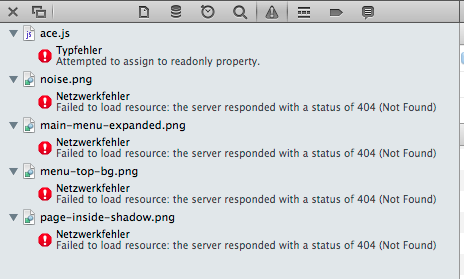
Attached the errors I get in Safari on a page where noting is going on exept a dropdown menu and an image enabled for colorbox. No errors until I click to open the live css drawer.
also:
(242) 42event.layerX and event.layerY are broken and deprecated in WebKit. They will be removed from the engine in the near future.
Comment #9
guybedford commentedIt looks like the issue is in the Ace code editor itself.
An update of the Ace editor may well fix the issue in this case.
Patches welcome.
Comment #10
guybedford commentedClosing as a duplicate of #1933222. If not feel free to reopen.
Comment #11
tomtech commentedI also cannot scroll when using safari.
Here is a patch against the latest dev.
Using the latest ACE editor does not exhibit this problem.
Attached is a patch that:
1) Removes the older ACE editor from the project
2) Implements the libraries API (dependency to Libraries added)
3) Adds a drush command to download the latest ACE editor
4) Adds a drush event that automatically downloads the editor when the module is enabled(through drush)
Comment #12
deryck.henson commentedUnless Guy beats me to it, I'll investigate this soon. Thank you very much for the patch!
Comment #13
deryck.henson commentedComment #14
deryck.henson commentedI like this and I am going to merge it. It works well and makes sense. I'm going to add a dependency in the .info file for libraries as well.
Thank you.
I have other unrelated updates that will be coming as well (mainly performance enhancements).
Comment #15
deryck.henson commentedThis was a great idea and I have it committed to the dev releases for testing in the community. I'm marking as closed until errors present that require the ticket be re-opened.
You will need to download ACE (http://ace.c9.io) for free and place it in your sites/***/libraries/ace folder.
Utilize latest git commit / dev release on project page to test and report bugs back here please.
Thanks
Comment #16
guybedford commentedThis sounds sensible - we should just ensure we document the process properly in the README so users can't get lost during the install process.
Comment #17
deryck.henson commentedMost certainly. I'll probably look into putting a notification when the module is enabled without the library to go download it (same way modules like colorbox do it).
Comment #18
sethu_sk commentedHi Team,
I have installed Live_css module in drupal 7. I am having ace.js file issue when scroll the ace editor.
When i scroll the editor, it display "Uncaught TypeError: Cannot create property 'type' on number '120'" in console.
Kindly refer the attachment.
Please let us know if found any possible way to fix the issue.
Thanks,
Sethu K