

Closed (works as designed)
Project:
Colorbox Node
Version:
7.x-2.x-dev
Component:
User interface
Priority:
Normal
Category:
Bug report
Assigned:
Unassigned
Reporter:
Created:
7 Feb 2013 at 21:16 UTC
Updated:
4 Apr 2013 at 17:27 UTC
Jump to comment: Most recent file


Comments
Comment #1
frjo commentedI believe this is an issue for the colorbox_node module.
Comment #2
iLLin commentedAll this module does is display w/e content is rendered into a colorbox modal. It uses the built in AJAX framework to return and render that content. You will need to provide more information on what the problem is. Does it work in IE9? If it works in IE9 but not IE8/IE10 then it is most likely a styling issue. You will need to figure that out.
I would of said it could be a JS issue (which it still could be) are you getting any JS error? If not then its a styling problem. Start adding some zooms and relatives until it works lol.
Comment #3
aaronbaumanAfter updating to latest versions of all modules and libraries, IE10 htabs are working. woohoo!
IE9 is also working.
IE8 htabs are still broken.
htabs work OK on the node, but not in the colorbox.
There are no javascript errors (yes script debugging is enabled).
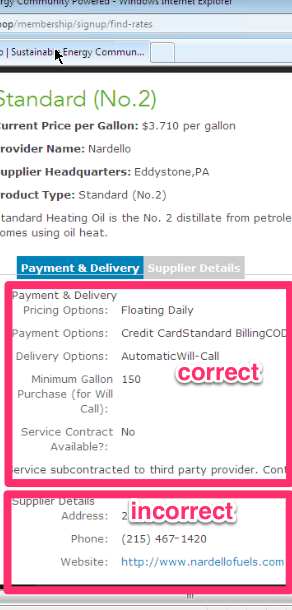
The tabs are rendered, and the "active" and "inactive" classes are assigned properly on clicking, but all tab content is displayed at once:
the content labeled "incorrect" is supposed to be part of the "supplier details" tab.
My instinct is that something in this CSS declaration doesn't work, but only within the colorbox modal:
Any ideas?
Comment #4
iLLin commentedI wonder why they don't use a display none when hiding tabs? Try adding a display none to the hidden class and see if that works with all browsers. Positioning it absolute to the top with a negative seems a little strange to me. Anyway give that a shot.
Comment #5
iLLin commented