

Closed (fixed)
Project:
Video
Version:
7.x-2.x-dev
Component:
General
Priority:
Normal
Category:
Support request
Assigned:
Unassigned
Reporter:
Created:
10 Feb 2013 at 17:59 UTC
Updated:
3 Jun 2013 at 15:20 UTC
Jump to comment: Most recent file




Comments
Comment #1
Jorrit commentedThat is strange. Does the file exist? Are there any other lines in your Drupal error log or the webserver error log?
Comment #2
Chipie commentedi have attached the screenshot of the recent log entries.
BTW: The transcoding of the video woks fine.
Update: I have attached the worn Screenshot
Comment #3
Chipie commentedHere is the correct screenshot.
Comment #4
Jorrit commentedIt is a very generic error, unfortunately. Can you access your webserver (ie: apache) error logs?
Comment #5
gaiello commentedSame problem here except we're using AmazonS3 rather than public files. Running: core 7.19, AmazonS3 7.x-1.0-beta7, and Video 7.x-2.9.
The warning appears upon running cron. The files get moved to and processed successfully by Zencoder.com then loaded to the S3 bucket. Zencoder reports that their notifications were sent (usually about 7 minutes later on these test runs).
On the next run of cron we get a conversion failed error due to timeout:
The node view on the site goes from waiting for processing to this message:
The file_managed table shows the transcoded files but with a zero size.
-George Aiello
Comment #6
magicmirror commentedSame issue here using Amazon S3.
Comment #7
selfsimilar commentedDitto. Using Zencoder + S3 here as well. I'll convert on save to 4 different formats and on node save I'll get 4 warnings like:
Warning: filesize(): stat failed for public://videos/converted/1504/example.webm in file_save() (line 570 of //public_html/includes/file.inc).
Comment #8
Jorrit commentedI understand the source of this issue, I don't understand why I don get this warning. It may be because of the PHP version you're using. Which version do you use? Is the module working fine apart from these errors?
Comment #9
Gyver06 commentedI am having the same issue using video latest dev version with Zencoder, Amazon S3 and AWS SDK.
Here is the exact message I have got if that can be of any help.
Video conversion is not done at all, it generates an error message on Zencoder transcoding.
Comment #10
Jorrit commentedGyver: the code should normally just continue after the warning, so Zencoder not working should be because of a different issue. And by the way, how are you getting those backtraces in your error messages?
Comment #11
Gyver06 commentedThe message returned by Zencoder is : "The server returned a 997 code"
On Zencoder site thid is the explanation of 997 code error :
Download Failure (DownloadFailureError)
This error occurs when we are unable to download a file for a reason other than Access Denied or File Not Found. If the server returns a response code, we will display it in the error message so that you can determine what happened and make any necessary updates to the file.
The reason "other than Access Denied" or "File Not Found" let me think this is not a permissions issue or path related. Instead, I cannot point out where this is coming from.
I can not make Zencoder and Amazon S3 working and this is very annoying to me. Nothing save on Zencoder and Amazon S3 in my buccket. If I transfer files manually it works.
By the way it seems not possible to reset "Click Reset to default button to add new account." no button to click on.
I really need some help since my site will use video intensely.
If you need to have a look to my site, just ask me.
Concerning the backtrace, as I can remember, this is coming from a code modification found on Drupal site that allow this. But I cannot remember the source. As soon as I find it, I'll let you know.
Comment #12
Jorrit commentedGyver: where do you store the original video files?
Comment #13
Gyver06 commentedMy video files are stored in the following "tokenized" path :
"Users_Files/[site:current-user:mail]_ID-[site:current-user:uid]_[site:current-user:name]/videos/original"
without the quotes.
And all the videofiles tested are actually being copied in the "original" folder.
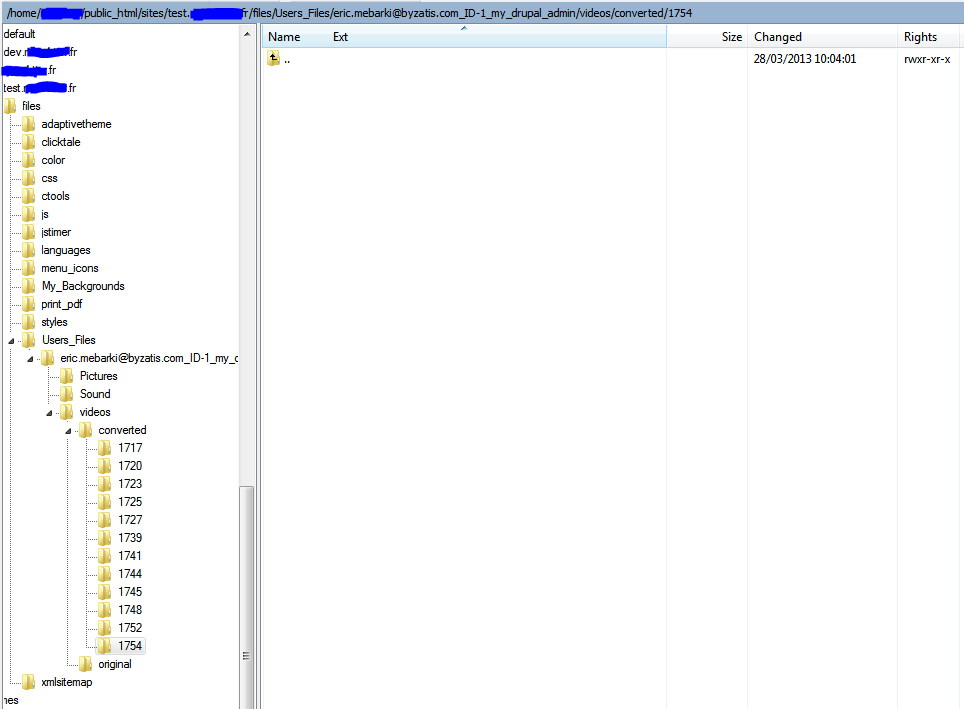
Here enclosed is a screen capture of the directory structure on my test site.
I can see the "converted" folder with its newly created sub-folders corresponding each to a failed video conversion test. They are all empty.
Comment #14
Jorrit commentedI think I have fixed the warning, please check the next -dev release if the warning is really gone.
Comment #15
magicmirror commentedJust tried it, issue remains.
Comment #16
Jorrit commentedWhat issue remains? The 'filesize(): stat failed for ...' warning? Or something else?
Comment #17
magicmirror commentedYes, sorry for not being a bit more specific. I'm using Video with Zencoder and S3 Module, but have yet to get it to work due to the error. I updated to the latest dev version you just pushed and tried again, but still getting -
While processing Zencoder postback, failed to copy https://zencoder-temp-storage-us-east-1.s3.amazonaws.com/.....The video is not in the bucket. I've put some time looking into this, but I just don't get what's happening. Appreciate any insights!
Comment #18
Gyver06 commentedI wasn't available these last days, to answer your #14 question, Jorrit. The warning as described earlier disappeared but the issue is still the same. I cannot see any converted video files in "converted" directories.
Zencoder error returned code is 997 as in the enclosed screen capture. There is no explanation that can lead me to any resolution for this behaviour. Do you have any clue for this error code 997 ? (second screen capture)
Could you please confirm which version of zencoder libray is to be installed with video module version 7.x-2.9 ?
Where can I find an updated tutorial about video module configuration with zencoder ?
I am running amazon S3 fine with "backup & Migrate" module.
I really need to find a way to use this nice video module but unfortunately, I cannot make it work with zencoder yet.
Any help is very appreciated.
Thank you.
Comment #19
Jorrit commentedGyver: Can you fetch the file properly from your browser? Are there no IP filters in place? Could you send the complete link to the file to me via a private message, maybe I can find something that could be wrong with it.
I use libary version 2.1.1.
Comment #20
Gyver06 commentedJorrit,
Thank you for pointing me to IP filters, in fact I had some security stuff in my ".htaccess" and my "index.php" files.
For testing purposes, I put back original unmodified files and things have evolved drastically but there is still an issue.
Movie files are now converted correctly whith Zencoder as you can see in the enclosed "screen capture 1 zencoder.png".
The new error message I have got is the one in "screen capture 2 zencoder.png"
with the the following ones "screen capture 3 zencoder.png" and "screen capture 4 zencoder.png".
I do not understang why there is a reference to youtube in "screen capture 3 zencoder.png"
Nothing yet in "Converted" folder apart from an empty numbered directory.
I think we are close from the resolution.
Thank you for your very appreciated help.
I am using library version 2.1.2
regards
Comment #21
Jorrit commentedThe YouTube prefix in screenshot #3 is odd, I am almost certain it causes problems. Do you have any media/YouTube related modules in your Drupal installation.
Regarding the errors on screenshot #2: the cause was a variable mixup in the code, I have corrected this error and you can download a new 7.x-2.x-dev version within 12 hours. It should, however, make no change for #3.
What are the Video field settings with respect to the output destinations?
Comment #22
Jorrit commentedI think I know why this is caused, I will look into a solution. I think you have installed the Media and Media: YouTube modules. Could you let me know which versions of those modules you're using?
[edit]
I have found the cause. The next release should work better for you.
Comment #23
Gyver06 commentedHi, Jorrit,
I effectively have Media and Media youtube modules installed.
Media version is : 7.x-2.0-unstable7+36-dev.
Media Youtube version is : 7.x-2.0-rc2.
I've got also Media Vimeo version 7.x-2.x-dev, Media Field module version 7.x-2.0-unstable7+36-dev.
Media Internet Sources module version 7.x-2.0-unstable7+36-dev
"Screen capture 5 zencoder.png" shows you the video field settings you requested.
Hope this can help you.
Many thanks for your help.
Comment #24
Jorrit commentedHave you tried the new 7.x-2.x-dev version ?
Comment #25
Gyver06 commentedI have just tested it and here is what I get in the following screen captures.
Big improvement in this dev release.
No more errors displayed in front end.
Now converted video files are appearing in the "converted" directory but size is 0. (screen capture zencoder_04.png)
Corresponding Error messages in drupal logs (screen capture zencoder_00.png to screen capture zencoder_03.png)
Hope this will help you finalize this wonderfull work.
Best regards.
Comment #26
Tsubo commentedJust to chip in on this.
As far as I can see - the original issue is caused during filesave (when the video job is first sent to zencoder). At this point file managed is updated with both the source and destination files - and the filesize of the 'converted' file is not known because it does not exist yet.
Comment #27
IWasBornToWin commentedI'm having similar issues and I do not have this module installed. I think it's more of something like comment #26 just explained. Several days ago I updated media module from 7.1 to 7.2 and nothing has worked properly since. I uninstalled, reinstalled, etc. But I can't get any of my files to upload.
For some reason, Drupal is not seeing the file size when attempting an upload.
Comment #28
Jorrit commentedThe fix for this bug resulted in bug #1991534: Error says "The video conversion process has failed", but it hasn't . Try the next 7.x-2.x-dev release for a fix that hopefully doesn't introduce more bugs.