

 The 2026 Drupal Business Survey is open. Your response will help shape the future of the Drupal business ecosystem.
I'm having trouble with the toolbar not showing up as I've configured it. On site I created for my niece the toolbar appears totally different than the one I've chosen.
Does anyone have a clue why my toolbar looks like this:
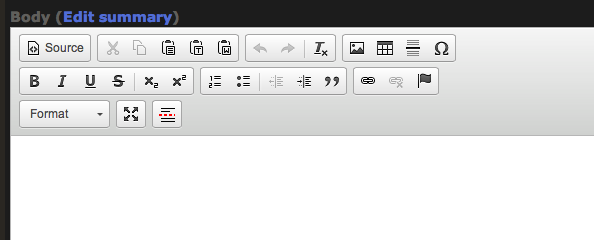
...rather than the "full" toolbar I've selected?
This happened when I did an upgrade a couple weeks ago and I haven't been able to find a solution.
Thanks so much.
-ken
| Comment | File | Size | Author |
|---|---|---|---|
| #1 | editor_bizare.png | 42.56 KB | sathish_js |
| Screen Shot.png | 25.8 KB | modhran |


Comments
Comment #1
sathish_js commentedI too have the similar issue, when changing the configuration as specified here http://nightly.ckeditor.com/13-02-14-08-51/standard/samples/plugins/tool... does not show toolbar as expected or all. Very odd behavior.
Comment #2
Ian Griffith commentedGood Evening from Eudlo. There are several threads I am following at present with the same problem. I have had it to when upgrading to CKEditor 4.01.
Have look at
http://drupal.org/node/1899652
http://drupal.org/node/1908736
http://drupal.org/node/1909696
There appears to be may theories but from what I have read from above there is an issue with CKEditor 4.01 in either not downloading the full version or having to download a version built in CKBuilder.
As I am only a virutal amauteur, I am having a friend who maintains the server for my website look into.
Cheers
Griffo
Comment #3
Anna_CKSource commentedMost of the problems stem from the fact that your CKEditor package does not contain the plugins that are responsible for some of the toolbar buttons and as a result, these toolbar buttons will not appear even if you try to add them in the Drupal admin panel.
A popular example is the Text Color and Background Color button -- these features are only available in the Full installation package and not the Standard one.
In any case, please go to http://ckeditor.com/download, choose the "Full Package", install it, clear the browser cache, and setup the toolbar again.
If this does not help, can you list editor buttons that are still missing?
Comment #4
modhran commentedThanks for all your help.
I replaced the CKEditor a few times with the Full version a few times, but it never worked until I put a copy of the CKEditor folder into the library folder as well.
as in:
...\sites\all\libraries\ckeditor
...From this thread linked by Ian Griffith:
http://drupal.org/node/1899652
I'd never seen this requirement on the install information, and I don't know if this is why it worked, but if for some arcane reason it happened to work after I followed these instructions, I'm not going to complain.
thanks again
-K