

Closed (works as designed)
Project:
Simple hierarchical select
Version:
7.x-1.6
Component:
User interface
Priority:
Normal
Category:
Support request
Assigned:
Unassigned
Reporter:
Created:
15 Feb 2013 at 19:16 UTC
Updated:
16 Oct 2017 at 15:11 UTC
Jump to comment: Most recent, Most recent file



Comments
Comment #1
manasiv commentedMake sure you have the depth selected to greater than 0. A higher depth value ensures the following :
If you have Fruit > Apple in your taxonomy, selecting Fruit will show all nodes with Apple and other child terms too.
Comment #2
stborchertOh, sorry. Didn't see this issue.
Which filter did you use? You may either use the normal field-based filter which will only display items directly assigned to the selected term or the taxonomy filter (with depth) which will display results in sub-terms, too (depending on the configuration manasiv mentioned).
Comment #3
devprocess commentedIm using the term reference with depth (simple hierarchical select) exposed on a view. I tried playing around with the depths but it still doesn't filter correctly.
Comment #4
stborchertHi.
Sorry for not responding for such a long time but I'm quite busy at the moment.
@Michael (devprocess): could you please post some more details about your configuration (for example screenshots of the term hierarchy and the views configuration)?
Comment #5
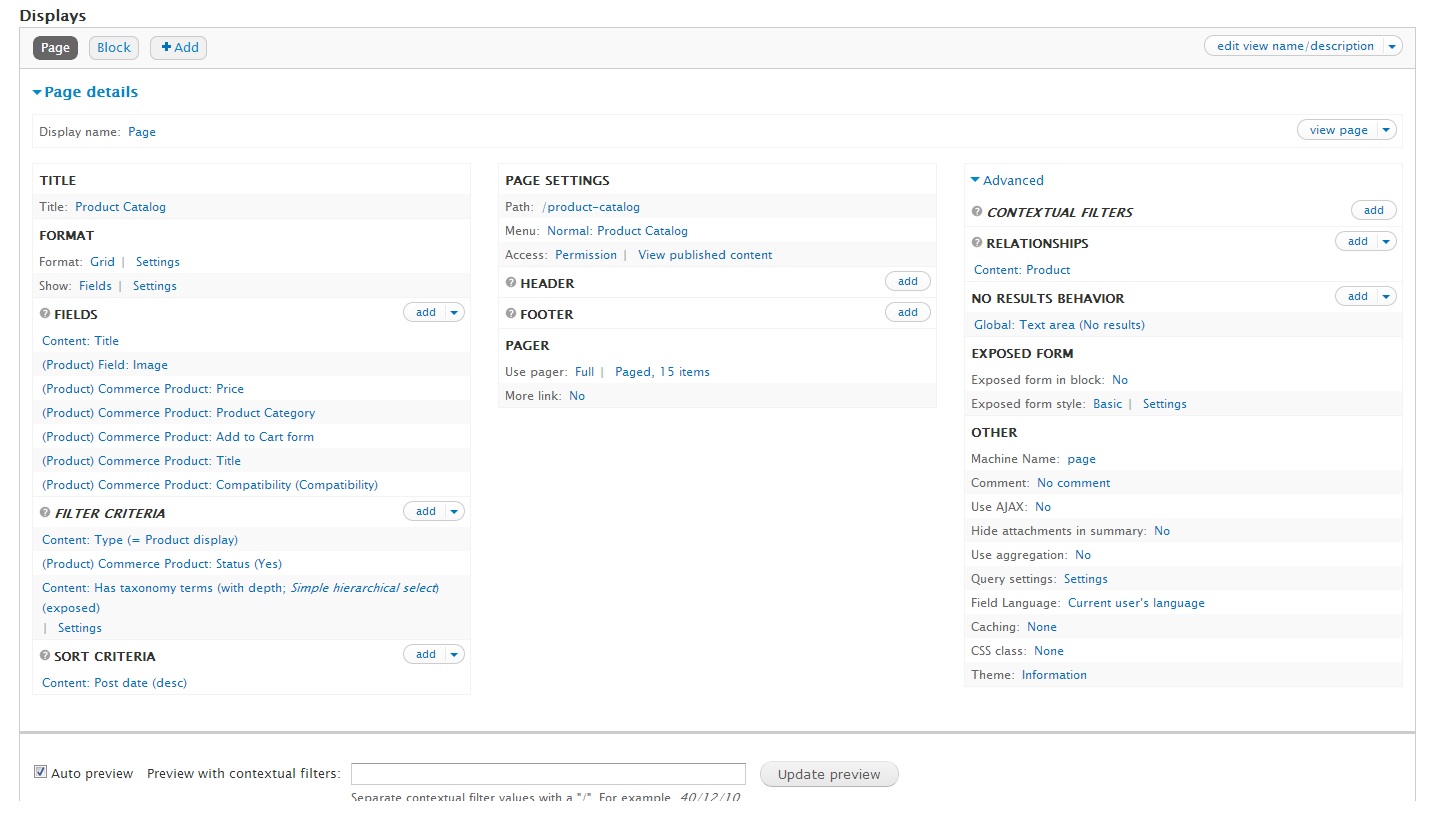
devprocess commentedHere are some screenshots of my term hierarchy and views config
Comment #6
stborchertDoes the filter work correctly when you're using the default "term ID with depth" filter?
Comment #7
devprocess commentedDoesnt seem to work with that setting either. Hmm starting to think this problem may go deeper.
Comment #8
playfulwolf commentedSHS works in the same situation for me. Done only initial testing - so cannot 100% confirm
Comment #9
stborchert@devprocess: if even the default filter provided by views is not working I guess this isn't a problem with Simple hierarchical select.
Setting to "cannot reproduce" for now.
Did you recently upgraded Views to version 7.x-3.6? There is a problem introduced with this version (#1949178: Notice: Undefined property: stdClass::$machine_name in views_plugin_argument_validate_taxonomy_term->validate_argument() (line 1) which brakes taxonomy filters. Maybe you ran into this?
Comment #10
nicolas bouteille commentedHi,
I am facing the same problem.
I understand this might be an issue related to Views and not SHS. However, this functionality is most needed in SHS so I figured you would be inclined to help solving it.
I posted an issue in the Views issue queue http://drupal.org/node/1961368 but the maintainers of Views have a lot to do so I don't expect a quick answer.
The reason why I call to your help also is because it seems you cannot reproduce the bug which means the functionality is working for you.
So maybe you could help me find what's wrong with my config...
Can you confirm that the Content : has taxonomy with depth filter is working for you?
What version of Views are you using?
Are you using References or Entity Reference?
Can you look at the testing workflow I described in my issue above to tell me if I am using the functionality as I should?
Any other help or idea will be much appreciated.
Thanks!
Comment #11
nicolas bouteille commentedI still can't make it work and I am stuck here. Are you able to use the SHS exposed filter Content : has taxonomy with depth ?
Comment #12
shania1618 commentedSame here, although I'm working with Drupal 6. I've got a view with some content exposed filters and Taxonomy: Term ID (with depth) exposed (Depth is set to 1).
I've got a published block with all these filters. All are working and showing filtered content except for Taxonomy. This one is displaying all hierarchical tree, but not filtering results.
As far as I can see, when I edit an exposed filter with views, exposed filter displays at the bottom of views page. All filters are working except of this one. The same when saved and displayed as a block.
This is a views problem with taxonomy.
Have you found a solution?
Comment #13
nicolas bouteille commentedJust tried on a clean Drupal 7.22 + Views 3.7 + SHS 1.6 install. Exposed Filter Content : has taxonomy terms (with depth) works perfectly. With and without SHS.
So something is definitely wrong with my several Drupal installs. I have not found out what yet.
Comment #14
nicolas bouteille commentedOk, what was causing this supposedly working behavior to break down for me was an additional filter of type Content : Published (No).
I was really lucky to finally find this! I could have been looking for it for a long time...
I wanted to try out this functionality on a live site using unpublished nodes which is why I add the filter to display only unpublished nodes. Unfortunately this is what was causing the behavior to break down. If I had tested this with published nodes it would have worked...
Comment #15
shania1618 commentedI had an additional filter of type Content: Published (Yes). I've deleted but it's not working for me. Can you send some pictures or explain me how have you configured shs and views?
Comment #16
shania1618 commentedSolved! So silly... I was using a story content type with a personalized taxonomy field. Default's was not displaying taxonomy's hierarchy as a tree (insted it displays in order ascending), so this is why I created a new taxonomy field. I've just deleted mine and now exposed filter is displaying results, not the way I wanted, but is working.
Comment #17
nicolas bouteille commentedGlad you also found the key to your problem :)
Comment #18
scotwith1tI am using this with Scald, so a custom entity type. Can this be extended to work with other entity types? If so, if you can provide some info, I'll take a shot at patching...or can you fix? Never made a views handler before...
Comment #19
scotwith1tComment #20
rgnyldz commentedThe problem is that the Content:Has Taxonomy Terms field is for the Content Type (Node based).
If your taxonomy field is in the Product variation field, than the filter in views can't find any products because the content type (node) doesn't actualy have any terms.
So it makes sense that it returns no products.
And right there I'm stuck too ;)
Maby transfering the taxonomy fields to content type can solve it, but that is just a lot of work for me. Too much products.
Comment #21
stborchertClosing this once again ...
Comment #22
scotwith1tI'll take that as a no.