

Closed (fixed)
Project:
Gallery
Version:
4.7.x-1.0
Component:
Code / API
Priority:
Normal
Category:
Bug report
Assigned:
Unassigned
Reporter:
Created:
14 Nov 2007 at 16:22 UTC
Updated:
18 Nov 2008 at 23:19 UTC
Jump to comment: Most recent file

Comments
Comment #1
profix898 commentedYour cart (on http://www.thechaffinfamily.net/?q=gallery) seems to work for me both using FF2 and IE7 (WinXP/Vista) ...
Comment #2
chaffinmichael commentedNow I am really confused; To date I have used multiple different photo's and albums but 90% of my tests recently (13 Nov to 14 Nov) have been 1) using the Add Album to Cart for 'The Proposal; Snowmass Colorado' album, 2) choosing View Cart and then 3) downloading the cart as a ZIP file.
What photo's have you tried? Did you try embedded Gallery2 or stand alone Gallery2?
Thank you for the help.
Comment #3
profix898 commentedI have only tried embedded gallery (you mentioned stand alone to be working) with 'The Proposal; Snowmass Colorado' and 'Monthly Photo with Stuffed Bear' albums and/or individual photos from these albums.
Comment #4
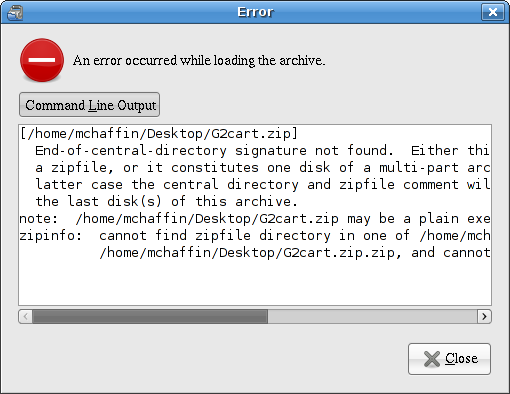
chaffinmichael commentedI just tried embedded again on my older (PIII Sony Viao) notebook with Internet Explorer (Version 6.0 Sp2) and it didn't work for 'The Proposal; Snowmass Colorado'. I copied the damaged zip file to my Linux box and received the following error message when I tried to open it,
Is there a way to relax the drupal.org web site attachment's requirements to include *.zip as well as *.tgz?
Is there someway to add extra logging to Drupal?
Comment #5
profix898 commentedYou can simply append
.txtto the the archive, e.g.archive.zip.txt, to attach the file to issues (Drupal only checks the file extension not the actual content).Hardly. You can check the server logs (php/apache) or add debug prints yourself.
Comment #6
alexandreracine commentedHope it work for you.
------------
Please look at the latest version first!
Feel free to reopen and put the 6.x version if so.
http://drupal.org/project/gallery
Closing (cleanup)