Closed (fixed)
Project:
Bibliography Module
Version:
7.x-1.x-dev
Component:
Code
Priority:
Critical
Category:
Support request
Assigned:
Issue tags:
Reporter:
Created:
22 Feb 2013 at 03:17 UTC
Updated:
24 Apr 2013 at 20:02 UTC


Dear all,
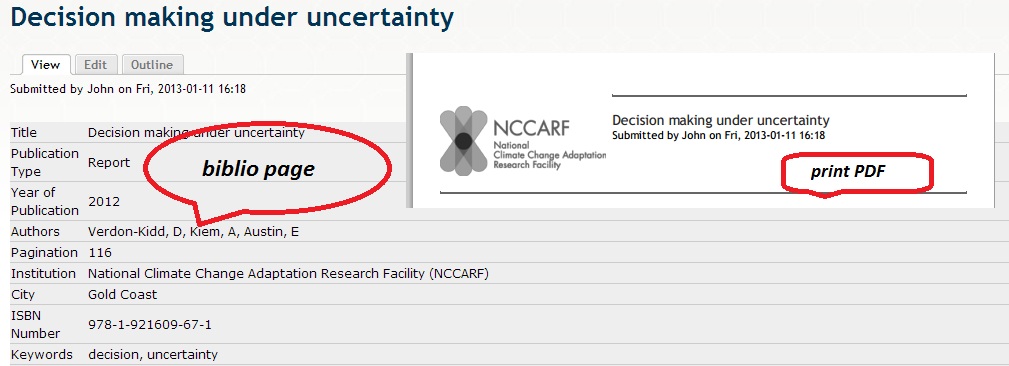
I installed the printer module to print a node/content generated from D7 Biblio module. it didn't print out the content on the page instead of just two areas: title and the editor but missed other areas. The layout of the page is briefly show as follows:
div id="content" class="column"
div class="section"
div class="region region-content"
div id="block-system-main" class="block block-system first last odd" .....
div class="content"
div id="node-1015" …
I am really new on the area and Does anyone could point out how to modify the print.tpl.php file to show all the area of the content or give me some suggestions?
Thanks in advance!
Regards,
John
| Comment | File | Size | Author |
|---|---|---|---|
| printer.jpg | 98.18 KB | drupal@nccarf |

Comments
Comment #1
SandPond commentedSame problem. Contents of page for full Biblio reference not shown in print window or contained in PDF. Also, deselecting the options to show or hide the Print and PDF links for the biblio content type has no effect either. They show all the time. If I knew how to hide them, I would do so. I am not certain if these issues relate to the "print-7.x-2.x-dev" module?
Comment #2
drupal@nccarf commentedHi SandPond,
I have solved my problem by re-coding the "print.tpl.php". Since the module might not cooperate with the format of the Biblio node. I print_r the 'node' object to see the elements in my biblio node. And then print the element I need in the node object, e.g. the biblio title is:
print $print['node']->title;There might be a smart way to do it, it works on my case.
Good Luck!
John
Comment #3
drupal@nccarf commentedHi SandPond,
I have solved my problem by re-coding the "print.tpl.php". Since the module might not cooperate with the format of the Biblio node. I print_r the 'node' object to see the elements in my biblio node. And then print the element I need in the node object, e.g. the biblio title is:
print $print['node']->title;There might be a smart way to do it, it works on my case.
Good Luck!
John
Comment #4
SandPond commentedThanks for posting a "solution", but I would ask that you be a bit more specific as to exactly what code needs to be changed, and which need to remain. I think all I want is the Title, Content (body), and URL.
Comment #6
rjerome commentedThis was actually an issue with Biblio not having a "print" build mode in the "view" hook.
It's fixed now...
http://drupalcode.org/project/biblio.git/commit/51f24a5
Comment #8
SandPond commentedHi R. Jerome:
QUESTION 1: Is this issue "fixed" in 7.x-1.x-dev ???
QUESTION 2: Is 7.x-1.x-dev the version recommended to address recent issues ???
Release notes state that 7.x-2.x-dev "is not usable at this time".
Thanks for your assistance!
Comment #9
rjerome commentedYes to questions 1 & 2. When a new release comes out, you can always switch back if you wish.