Closed (fixed)
Project:
Denver
Version:
5.x-1.x-dev
Component:
Code
Priority:
Normal
Category:
Bug report
Assigned:
Reporter:
Created:
15 Nov 2007 at 16:18 UTC
Updated:
30 Nov 2007 at 22:31 UTC


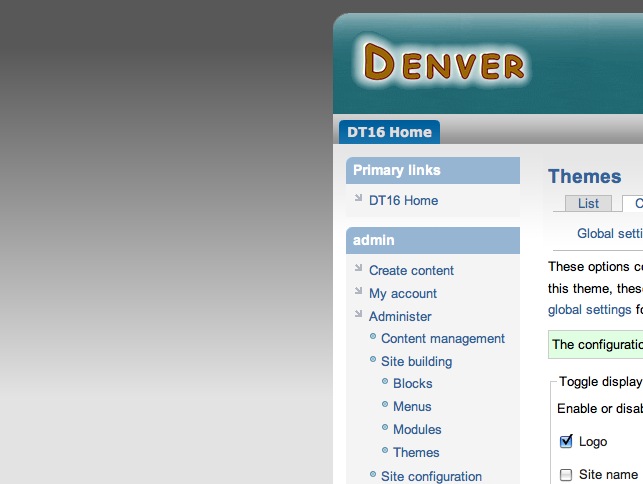
I think this problem showed up with the modifications made on Nov 11. In a nutshell, if I specify a custom page width in px I end up with a huge border around the body as shown in the attached screenshot. It even happens when I specify a custom width that is the same as one of those in the dropdowns (eg 850 px). Now all the dropdown values work as expected including those that are specified in px. If I specify a value in % that also works as expected. I have tested this on a fresh install.
It's a wonderful theme by the way!
| Comment | File | Size | Author |
|---|---|---|---|
| custom_width.jpg | 58.08 KB | grahamba |

Comments
Comment #1
colorado commentedThank you grahamba, I have fixed and committed. Please test and let me know...
Comment #2
grahamba commentedYep. That fixed it. Thanks bunches.
Comment #3
grahamba commentedSpoke too soon. Doh. I just checked my site in IE6 and the problem persists. It's solved in IE7, Firefox and Safari though. I also noticed that IE6 isn't honouring my custom header height. I don't know if this helps but if I turn off css aggregation/compression my width problem goes away but of course the rest of the css turns to garbage.
Comment #4
ryo commentedYes, still active in IE6. Works fine in FireFox.
But IE6 is honouring my custom header height.
Plus, if I turn off css aggregation/compression almost all the things turn to garbage in IE6...
Comment #5
colorado commentedYes, as said, CSS Aggregation needs to be turned on to prevent rendering errors in IE.
Comment #6
colorado commentedgrahamba and ryo,
Please provide links to live web pages that are still displaying the problem - I can't seem to replicated the problem on the demo site...
Thank you
Comment #7
ryo commentedYes, as always,
http://explus.s5.coreserver.jp/
and you can login, colorado.
Comment #8
grahamba commentedI would love to provide a live site but my site(s) are behind a corporate firewall. The problem does go away for me in IE6 if I revert back to a pre-Nov 11 Denver which I had lying around.
Comment #9
colorado commentedFixed and committed - please test and let me know...
Thanks!
Comment #10
ryo commentedConfirmed the fix! Bravo!
Thanks a lot!
By the way, I would like to go to bed...
It's already 2:41AM here.
Sorry.
Comment #11
grahamba commentedIt appears to be fixed in every browser I could get my hands on, IE6, IE7, Firefox2 (Mac and Win), Safari3 (Mac and Win).
Yay! Thanks again for fixing this so quickly.
Comment #12
colorado commentedComment #13
(not verified) commentedAutomatically closed -- issue fixed for two weeks with no activity.