I am using Drupal 7
i have add this a class="colorbox-node" href='.$base_path.'show/form?width=600&height=600>Test"; in my page _preprocess (template.php)
On web page it looks like this
a href="/drupal-7.15/show/form?width=600&height=600" class="colorbox-node init-colorbox-node-processed-processed">Test"
but when ever i clicked on this link, popup is not opening either it is normally opening new page(as normal http req) .
i am using firefox 13 as browser and i have tested in all browsers.
using bartik theme
While doing more testing got one more java script error ($.colorbox is not a function) please go through


Comments
Comment #0.0
harshil.maradiya commentedmaking changes in description
Comment #0.1
harshil.maradiya commentedmaking description more understandble
Comment #1
Vendramini commentedTo use the function coloxbox_node version colorbox-7.x-2.0 (http://drupal.org/node/1704592)
and version of Plugin Version 1.3.20 - The current version of the module and its plugin colorbox are incompatible with
the colorbor_node.
By
drupalbrasil.com.br
Comment #2
franckdg commentedSorry but it doesn't work with these versions too.
Comment #3
iLLin commentedI'll work on a new release soon to address this.
Comment #4
iLLin commentedI just downloaded the latest drupal, installed the latest colorbox-dev version and installed the lastest colorbox.js version. Everything for me works fine. Can you please post up how you can duplicate this?
Comment #5
deanflory commentedI too am finding that this module is not working at all but switching out "colorbox-node" for "colorbox-load" works fine except for having all the other block regions visible:
<a class="colorbox-node" href="@terms?width=500&height=500&iframe=true">Terms & Conditions</a>Comment #6
iLLin commentedWhat happens? Any error messages? does the popup display? what versions are you using?
Comment #7
iLLin commentedDo you have a link that I can see this reproduced?
Comment #8
deanflory commentedThe link does not pop up a colorbox, it just takes the browser to the linked page in the same window.
No error messages.
Colorbox Node 7.x-2.6
Colorbox 7.x-2.3
Of note, I am trying this with the Legal module that automatically creates a node at /legal. Basically Legal presents checkboxes for agreeing to Terms & Conditions that can be shown in a css box with scroll, as just HTML unrestricted visually, or as a separate page that creates a link on the word "Terms & Conditions", which is where I'm attempting to get a colorbox-node link to work. So it may be that it's not a normal node-type, user-created node but instead is a hardcoded module-created node and may be what is causing it not to work.
Again, using the regular colorbox method without Colorbox Node works perfectly. I have not tried this on another regular node to another regular node.
Comment #9
redijedi commentedI am also experiencing this issue however no workaround appears to work.
Drupal 7.21
Colorbox Node 7.x-2.6
Colorbox 7.x-2.3
Colorbox JS 1.4.10
Relevant HTML from view:
Comment #10
iLLin commentedWut URL comes up? What happens? Any JS errors?
Comment #11
robert.labrie commentedSo I'm getting $.colorbox is not a function on line 66 of colorbox_node.js
I do have the colorbox library in sites/all/libraries/colorbox. I'm not seeing any 404's in the net section of firebug when the page loads, so as far as I can tell everything is there. I don't see jquery.colorbox-min.js in the net window either though, so I don't know. If I've posted something useless, please disregard.
Comment #12
robert.labrie commentedInstalled dev version per other bug report. Sorry. All is well.
Comment #13
arosboro commented@iLLin
Happens after clicking a link before the link loads in the current page. Using dev version of colorbox, colorbox_node 2.x, and latest colorbox library downloaded today.
colorbox.js is being included in the header after colorbox_node. To fix this, we need to include colorbox_node.js with drupal_add_js and add a weight so that it gets included last.
Comment #14
iLLin commentedHmm, I thought the behaviors were fired last no matter what? Have you set a weight to it and verified it fixes your issue?
Comment #15
cmgdesign commentedSame issue here - no errors, just takes me to the linked page instead of opening a overlay.
I'm noticing when I run cron though that it's not recognizing the .js in the libraries. I've gone through all the documentation and I have it in the right spot, I've downloaded and installed the newest modules and libraries but it still won't recognize the library. I re-named the colourbox folder from colorbox-master to colorbox with no effect.
Comment #16
iLLin commentedYuh, I have had issues with Drupal caching when recognizing new libraries or not picking up new ones. To be honest, I just keep clearing cache and uninstalling and reinstalling till it works lol.
Comment #17
arosboro commented@#14 iLLin,
Yes, I added the following to colorbox_node.module and removed colorbox_node.js from colorbox_node.info.
Comment #18
iLLin commentedCan you add it to the preprocess_html() instead and see if that works? Don't really want to use hook_init().
Comment #19
arosboro commentedIt works in hook_preprocess_html() too. I'd make a patch but I see someone's already been testing it out on the master branch (without setting weight).
Comment #20
mareks commentedI have a fresh D7 install with only minimal number of core modules enabled.
I also have these contrib modules:
* Webform (7.x-4.0-alpha6)
* Webform AJAX (7.x-1.1)
* Colorbox (7.x-2.4)
* Colorbox Node (7.x-2.6)
+ the ones that are required like ctools, libraries etc...
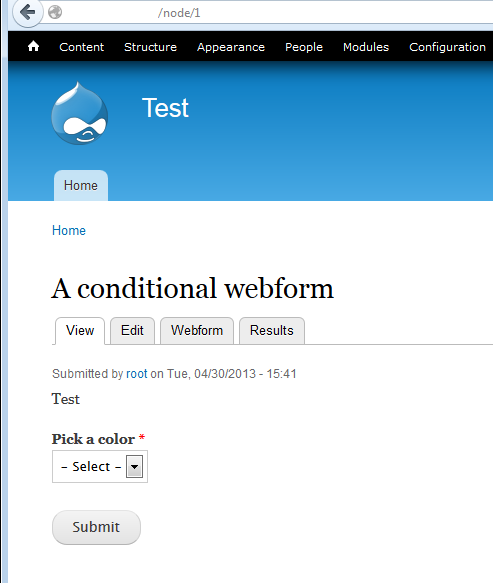
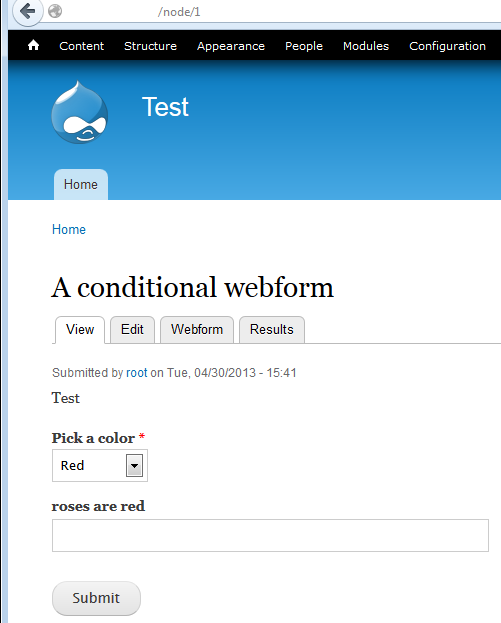
I created a webform with a conditional field. Works fine on a normal page.
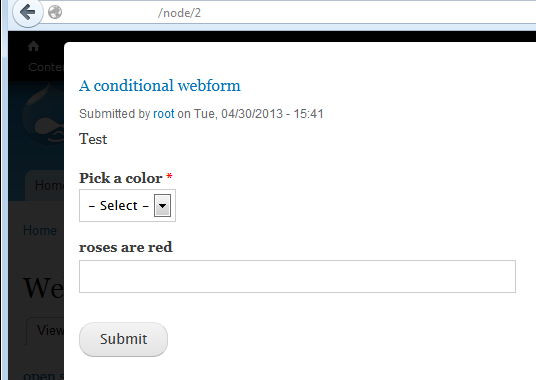
But, when I open that webform in a colorbox window then the conditional field is always shown. As if tho the JS is not included?
Any ideas? Thanks,
Comment #21
iLLin commentedInstall the latest DEV version of colorbox 3.x-dev instead of 2.6. You may have a conflict or something with the webform AJAX module.
Comment #22
ajaygupta1139 commentedIF you are facing the issue in admin panel then you have to exclude the admin page from the colorbox advance settings "Show Colorbox on specific pages". After that colorbox.js will be loaded in your admin pages.
Please remove the "admin*" from the "Show Colorbox on specific pages" box
Comment #23
iLLin commentedThanks arosboro: Committed to 3.x-dev https://drupal.org/commitlog/commit/38370/444573d8296e81bcd3e949c4f46a2b...
Comment #25
nuncius commentedwith me, it loads loading.gif, but it doesn't load the node, like it can't find it.
<a class="colorbox-node" href="statement?width=500&height=500">statement </a>mysite.com/statement does exist and colorbox works perfectly with images.
Does anyone know why?
I am using Colorbox Node 7.x-3.0 Colorbox 7.x-2.4 and drupal 7.22
thanks
Comment #26
deanflory commentednuncius, change to:
<a class="colorbox-node" href="statement?width=500&height=500">statement</a>Remove the amp;
Comment #27
nuncius commentedUpdate:
After installing 7.x-3.x-dev, everything works fine.
Comment #27.0
nuncius commentedadding java script error message
Comment #28
tusik commentedAlso not working for me. I tried all possible combinations of stable and dev releases of colorbox and colorbox node, and it just does not work. No error. Simply loads the page in the href in the browser window.
I can link developer to the test site if wanted.
Comment #29
iLLin commentedCheck to see if you have any javascript errors in the console.
Comment #30
tusik commentedHello @iLLin. First of all thank you very much because you are very active and responsive in all threads where issues with this node are mentioned. And I have been all day browsing to solve this issue.
Second, I managed to have the colorbox pop-up open (after disabling and uninstalling both colorbox and colorbox_node and re-insalling for a second time and clearing caches).
Now colorbox loads the node, but not in all browsers. I'm testing at the moment. For example, it does load in Firefox 10.2 in mac, but does not show in Safari 5.0.6 mac. However in Firefox Ubuntu it does not show, but does show in Chrome, in the latest vesions...
Thank you.
Comment #31
tusik commentedConsole errors:
Use of getAttributeNode() is deprecated. Use getAttribute() instead. js_zzcIWOou_jnX0ZWAIA4sb6Xy_p5a8FZNA0GySvuWjPU.js:16
21:15:07.717 Use of attributes' specified attribute is deprecated. It always returns true. js_zzcIWOou_jnX0ZWAIA4sb6Xy_p5a8FZNA0GySvuWjPU.js:16
21:15:07.756 Use of getPreventDefault() is deprecated. Use defaultPrevented instead. js_zzcIWOou_jnX0ZWAIA4sb6Xy_p5a8FZNA0GySvuWjPU.js:16
21:24:30.835 TypeError: $(...).editable is not a function <---This is for jeditable I think
Comment #32
tusik commentedComment #33
iLLin commentedWhat version of Jquery are you using?
Comment #34
tusik commentedjQuery 1.5.2 / jQuery UI 1.8.11
Comment #35
iLLin commentedLet me update my versions to that and see what happens. Give me a few.
Comment #36
iLLin commentedCan you turn off javascript aggregation so we can see what file these errors are occurring on. And update this thread. I just downloaded jquery_update to get version 1.5 and the colorbox still works for me.
Comment #37
tusik commentedOk, I disabled JS aggregation and could see the problem was NOT colorbox_node but jeditable, entirely.
colorbox_node works as designed. However for reference, fields set to display a jeditable format in the colorbox view, will prevent the node from loading. I am updating thread.
Thank you for yout ime.
Comment #38
tusik commentedComment #39
s_chandela commented?>
//Only node in popup
<a class="btn btn-primary colorbox-node" href="<?php echo $base_url; ?>/add/page?width=800&height=500&destination=node/10" role="button">Add Page</a>//whole page in popup
<a class="btn btn-primary colorbox-load" href="<?php echo $base_url; ?>/add/page?width=800&height=500&destination=node/10" role="button">Add Page</a>