
Views FractionSlider
Last updated on
8 February 2018
This is documentation for Drupal 7, which is no longer supported. Learn more and find resources for Drupal 7 sites
FractionSlider is a jQuery plugin which adds a fully customization element slider to your website. FractionSlider is HTML5 multi-layer and parallax slideshow. Works fine with views fields.
Features
- Multi-Layer slider
- Parallax Support
- Similar to Layerslide
Removed manual installation (7.x-2.7). install and use.
Installation for 7.x-2.6 or old version.
- Install Views FractionSlider.
- Install jQuery Update module. dont enable it yet.
- Go to "
/sites/all/libraries" create a folder here named, "fractionslider".
So the library path will be,
/sites/all/libraries/fractionslider - Go to directory,
/sites/all/modules/views_fractionslider/js,
copy "jquery.fractionslider.js" and paste it under/sites/all/libraries/fractionslider. - Now Go to /admin/build/modules, enable module,
"Views FractionSlider". - Views FractionSlider is ready to use. Check ready-made Slider block named
"FractionSlider" Under /admin/structure/block and its settings can be change from
here at /admin/config/user-interface/fractionslider
Using with Views


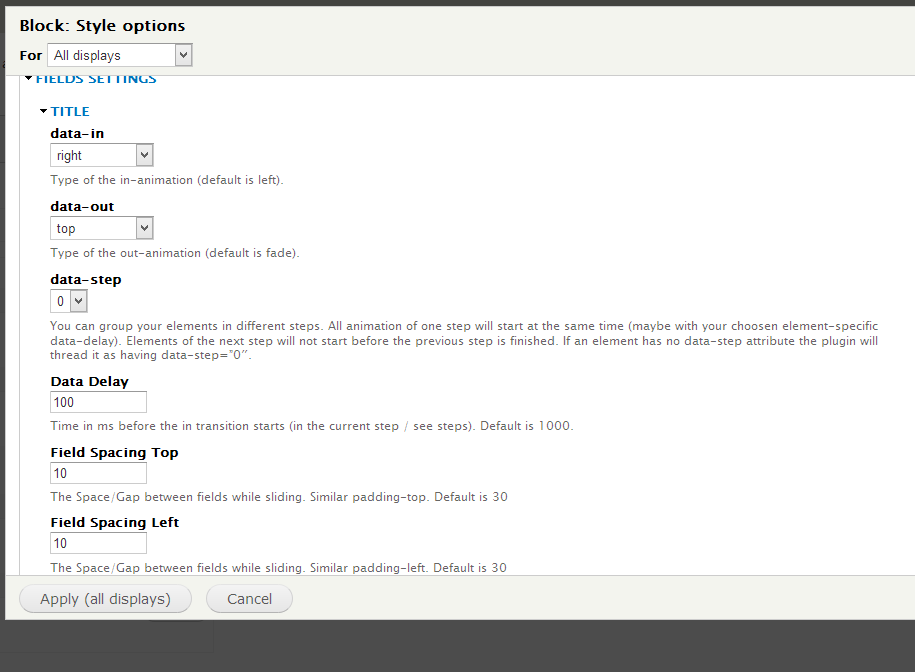
- Select Format as Views Fractionslider.
- Under Format Style options, check Fields settings at bottom.
- Change settings for each field and save.
For Advanced/Custom Solution
if you are a developer, you can customize slider in any block/page or anywhere.
make structure in given way,
<div class="slider-wrapper">
  <div class="responisve-container">
    <div class="slider">
      <div class="fs_loader"></div>

      <div class="slide"><!-- all elements for the first slide --></div>
      <div class="slide"><!-- all elements for the second slide --></div>
      <!-- and so on -->

    </div>
  </div>
</div>
add following code to Theme's/Module's js file.
$('.slider-wrapper .slider').fractionSlider({
  'fullWidth': true,
  'controls': true,
  'pager': true,
  'responsive': true,
  'dimensions': "900,400",
  'increase': false,
  'pauseOnHover': true,
  'slideEndAnimation': true
});
Help improve this page
Page status: No known problems
You can:
You can:
- Log in, click Edit, and edit this page
- Log in, click Discuss, update the Page status value, and suggest an improvement
- Log in and create a Documentation issue with your suggestion
