

Closed (fixed)
Project:
Administration Views
Version:
7.x-1.1
Component:
User interface
Priority:
Normal
Category:
Support request
Assigned:
Unassigned
Reporter:
Created:
3 Mar 2013 at 02:36 UTC
Updated:
13 Jul 2013 at 07:31 UTC
Jump to comment: Most recent file


Comments
Comment #1
damiankloip commentedHmmm, I would say this looks like a bug in that case. If the theme information is saying your new template is being used but it's not....
Comment #2
colin_young commentedI do have templates for other views working just fine, so it's not my overall Views/Drupal setup. That said, it could still be me, but I don't think I've really done much to the default view, other than adding some grouping and columns. Exported view attached.
Comment #3
damiankloip commentedThat's what I'm saying, templates for other will will work ok, hence me changing this to a bug.
I don't think the export will help here, and it takes up lots of space on the thread, so can you either just remove it, or attach it as a file instead? thanks!
Comment #4
colin_young commentedI attached it. I added it in case the problem is in my view and not an actual bug (it wouldn't be the first time).
Comment #5
scalp commentedConfirming that this is a bug. Same problem, template appears to be recognized in "theme information", but no changes added to the template take affect. Have changed it to an unformatted list to see if maybe it had to do with the style, but it does it on any style I use. I've tried out a couple of other things to no avail, but will list them here in case anyone get's any ideas from them as to how to fix this:
1) Tried adding a views-view.tpl.php to the admin_views directory thinking that I remember reading that a plugin needs to have an tpl file for the theme it declares in its hook_views_plugins.
2) Added $this->view->pre_execute(); just before rendering in function execute() in views_plugin_display_system.inc thinking that the templates from the theming layer might get inserted during the pre_execute.
Sorry I can't be of more help. Please let me know if there's anything I can do to help troubleshoot.
Comment #6
jinraynor1 commentedReconfirming this is a bug, i can't theme an admin view ,but i cant theme a non-admin view , if someone wants a dummy solution... If you change The "View Path " then it will take your non-admin template view....
I will search a solution...
Comment #7
jinraynor1 commentedHey it's not a bug ..... Sorry hehehe i found the solution for me....
I was theming a view admin and my admin theme was seven (Check on appearence menu). then your template has to be in the correct folder, in my case i was using seven theme ,but my view says other thing :
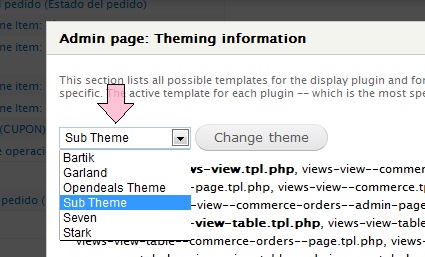
It says i am using my own theme "Sub-theme" but thats not correct i am using "Seven theme", so you just have to put the template file in the correct location. That's all
Comment #8
dwightaspinwall commentedI also have a case of an theme function not being called. I've added a nid field and added the file "views-view-field--admin-views-node--nid.tpl.php" to the proper theme folder and the tpl.php is not getting executed. See attached showing that Views has picked up the theme file. I've cleared all caches, more than once, and still no execution.
Happy to try to debug this myself if I knew where to start.
Comment #9
damiankloip commented#8, did you see #7? Unless you are running you site in the seven theme or something? Remember admin views will use your admin theme - not your normal theme.
Comment #10
dwightaspinwall commentedAh - thanks damian - my bad. And since I'm a theming novice, https://drupal.org/node/627378#comment-6444570 helped me understand how to override the output from my module.
Thanks very much for the module.
Comment #11
damiankloip commentedComment #12
damiankloip commented